How to Turn a $5 Microcontroller into a Bluetooth Speaker or Wireless Player
If you've ever opened the official Espressif examples for Bluetooth audio, you probably remember that slight feeling of horror. Dozens of lines of low-level magic, a bunch of Bluedroid callbacks, FreeRTOS queue configuration, and a constant feeling that a pointer is about to drift off somewhere.
Swiss developer Phil Schatzmann ran into exactly this frustration and wrote the ESP32-A2DP library. It hides all the complex boilerplate under the hood and provides a clean C++ interface for audio streaming.
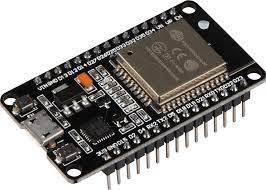
What's under the hood and how it works
The library handles two main tasks:
- A2DP Sink (receiver): ESP32 pretends to be a wireless speaker or headphones, receives the stream from your phone, and outputs it to an external DAC, the board's internal DAC, or a raw memory buffer.
- A2DP Source (transmitter): the microcontroller itself broadcasts audio (generated algorithmically, read from an SD card, or from a microphone) to external Bluetooth speakers.
The project relies on the standard A2DP profile and supports control signal transmission via AVRCP. This means the microcontroller can switch tracks on your phone, pause playback, or read metadata (track title, artist name, duration).
As for audio output, the library works over the I2S bus. In ESP-IDF v5 and Arduino ESP32 v3, the I2S API was significantly rewritten. To avoid breaking compatibility when updating the framework, the author recommends linking the library directly to your own project arduino-audio-tools, though you can get by with the standard class I2SClass or just grab raw PCM samples.
How to build a wireless receiver in five lines
Here's a minimal example to get the audio receiver up and running:
#include "AudioTools.h"
#include "BluetoothA2DPSink.h"

I2SStream i2s;
BluetoothA2DPSink a2dp_sink(i2s);

void setup() {
    Serial.begin(115200);
    a2dp_sink.start("MyMusic");
}

void loop() {
}
After flashing, the board shows up in the Bluetooth device list as "MyMusic". By default, the audio stream (16-bit, 44.1 kHz stereo) goes to I2S pins GPIO14 (BCK), GPIO15 (WS), and GPIO22 (Data Out). If your wiring is different, the pins are set in two lines via the config i2s.defaultConfig().
If you don't have an external DAC chip (like the popular PCM5102A or MAX98357A) on hand, you can use the built-in 8-bit DAC on GPIO25 and GPIO26:
#include "AudioTools.h"
#include "BluetoothA2DPSink.h"

AnalogAudioStream out;
BluetoothA2DPSink a2dp_sink(out);

void setup() {
    Serial.begin(115200);
    a2dp_sink.start("MyMusic");
}

void loop() {}
Sound through the built-in DAC will be a bit noisy for audiophiles, but it's perfectly fine for voice notifications or radio in the kitchen.
Reading metadata and controlling tracks
A useful detail: the library lets you pull track info via AVRCP. If you connect a small display, you can easily make an info screen for a media center:
void avrc_metadata_callback(uint8_t data1, const uint8_t *data2) {
    Serial.printf("Метаданные: id 0x%x, текст: %s\n", data1, data2);
}

void setup() {
    Serial.begin(115200);
    a2dp_sink.set_avrc_metadata_callback(avrc_metadata_callback);
    a2dp_sink.start("ESP32_Receiver");
}

void loop() {}
To control the player on your phone from physical buttons, the methods play(), pause(), next(), previous(), fast_forward(), and rewind() are available.
Transmitter mode: when ESP32 generates the sound
If you need to send audio to Bluetooth headphones or a soundbar, switch to BluetoothA2DPSource. The stream is fed to the library via a callback:
#include "BluetoothA2DPSource.h"

BluetoothA2DPSource a2dp_source;

int32_t get_sound_data(uint8_t *data, int32_t byteCount) {
    // Здесь заполняем буфер PCM данными
    return byteCount;
}

void setup() {
    a2dp_source.set_data_callback(get_sound_data);
    a2dp_source.start("Target_Speaker");
}

void loop() {}
By the way, you can pass a list of device names to the start() method (via std::vector<const char*>). The board will automatically connect to the first one it finds from the list.
Accessing raw audio stream and codecs
If you don't need I2S and need to process audio algorithmically right on the microcontroller (for example, create a light show via FFT or record a fragment to memory), you can intercept PCM packets via set_stream_reader():
void read_data_stream(const uint8_t *data, uint32_t length) {
    int16_t *samples = (int16_t*) data;
    uint32_t sample_count = length / 2;
    // Обработка семплов
}

void setup() {
    a2dp_sink.set_stream_reader(read_data_stream, false); // false отключает вывод на I2S
    a2dp_sink.start("DSP_Node");
}
The default codec is standard SBC. In recent versions, the author added experimental support for connecting external decoders via add_decoder(), including AAC (though for full functionality on the IDF side, ESP-IDF version 6.1 or higher will be required).
Limitations you should know about
- HFP and HSP profiles (hands-free calling, calls with microphone) are not supported. The project is strictly about media stream transmission.
- The library is demanding on Bluetooth stack resources. Combining heavy Wi-Fi traffic and stable A2DP streaming on a basic ESP32 can be tricky, and audio stuttering is possible.
- The documentation in the repository is detailed, but the author is strict about bug report formatting: before opening an issue on GitHub, make sure to check the versions of the libraries and ESP32 core.
Who will find this useful
The project will come in handy if you want to breathe new life into an old tape deck, integrate a wireless receiver into a vintage amplifier, or build a custom synthesizer that streams audio directly to wireless headphones.
The library is compatible with Arduino IDE, PlatformIO, and pure Espressif IDF as a component. To get started, you just need an ESP32 WROOM board and a PCM5102A-based DAC board for a few dollars.
Projets similaires