How to Keep Your Local Network Devices Under Control with WatchYourLAN
Familiar scenario: you set up a new single-board computer or connected a smart plug, and then you open your router's web interface and try to guess which IP address was assigned to the device. Most home router admin panels update their connection lists reluctantly, and there's usually no history at all.
In search of a simple solution, I came across WatchYourLAN. It's a small network scanner with a web interface, written in Go. It runs in the background, scans the local network using ARP, and immediately alerts you when an unknown host appears.
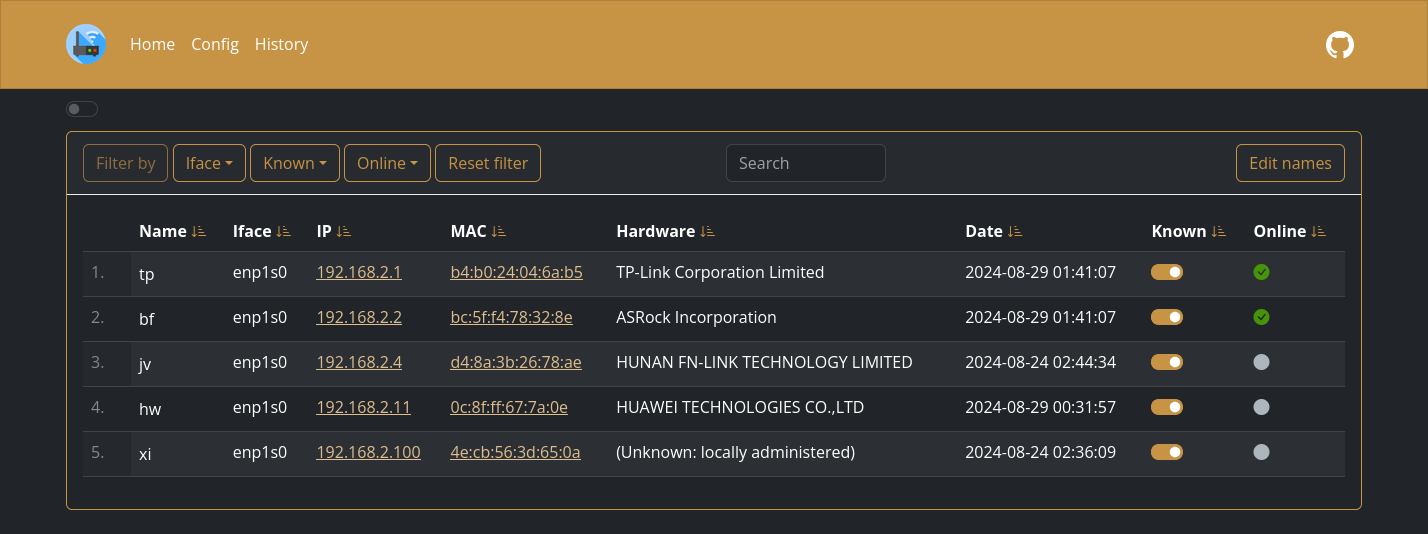
What the utility can do
WatchYourLAN solves a basic but annoying task: keeps an up-to-date map of your local network in front of your eyes.
Here's what's inside:
- Notifications via Shoutrrr. The utility supports Telegram, Discord, Gotify, Slack, Matrix, email, and regular webhooks.
- Activity history. The scanner remembers when a device appeared on the network and when it went offline.
- Metrics export. Data can be sent to Prometheus via
/metricsor streamed directly to InfluxDB2 for building dashboards in Grafana. - Database selection. SQLite is used by default, but if desired, data can be migrated to PostgreSQL.
The project runs fast since it's written in Go, and the container image is very lightweight.
Launch and configuration nuances
The service is deployed with a single Docker command. The main requirement is to run the container with network mode host, otherwise arp-scan won't see the host system's interfaces.
docker run --name wyl \
	-e "IFACES=eth0" \
	-e "TZ=Europe/Moscow" \
	--network="host" \
	-v /var/lib/wyl:/data/WatchYourLAN \
    aceberg/watchyourlan
After launch, the web interface is available at http://localhost:8840.
There are two things to keep in mind when configuring. First, WatchYourLAN has no built-in login form. If you plan to expose the dashboard externally, close it off with a reverse proxy with authentication like Authelia or Nginx. Second, the application pulls themes and fonts from CDN by default. For completely isolated networks, the author prepared a separate container node-bootstrap, where the interface works without internet access.
Who will find it useful
The tool fits perfectly in a home lab or small office network. If you frequently connect new hardware, debug microcontrollers, or want to know when home devices connect to Wi-Fi, WatchYourLAN will cover this need without unnecessary complexity.
Projets similaires