Generating meaningful commit messages from diffs with OpenCommit

We've all been there: end of the workday, a dozen changes across five different files, fatigue sets in, and yet another masterpiece like git commit -m "fix", wip 2 or refactor flies into the repository history. Then a couple months later you open git log trying to figure out why authorization broke, only to see a wall of one-liners.
The author of OpenCommit decided to automate this routine. The project takes your staged changes (staged changes), analyzes the code diff using a language model, and produces a proper, clear description following the Conventional Commits standard.
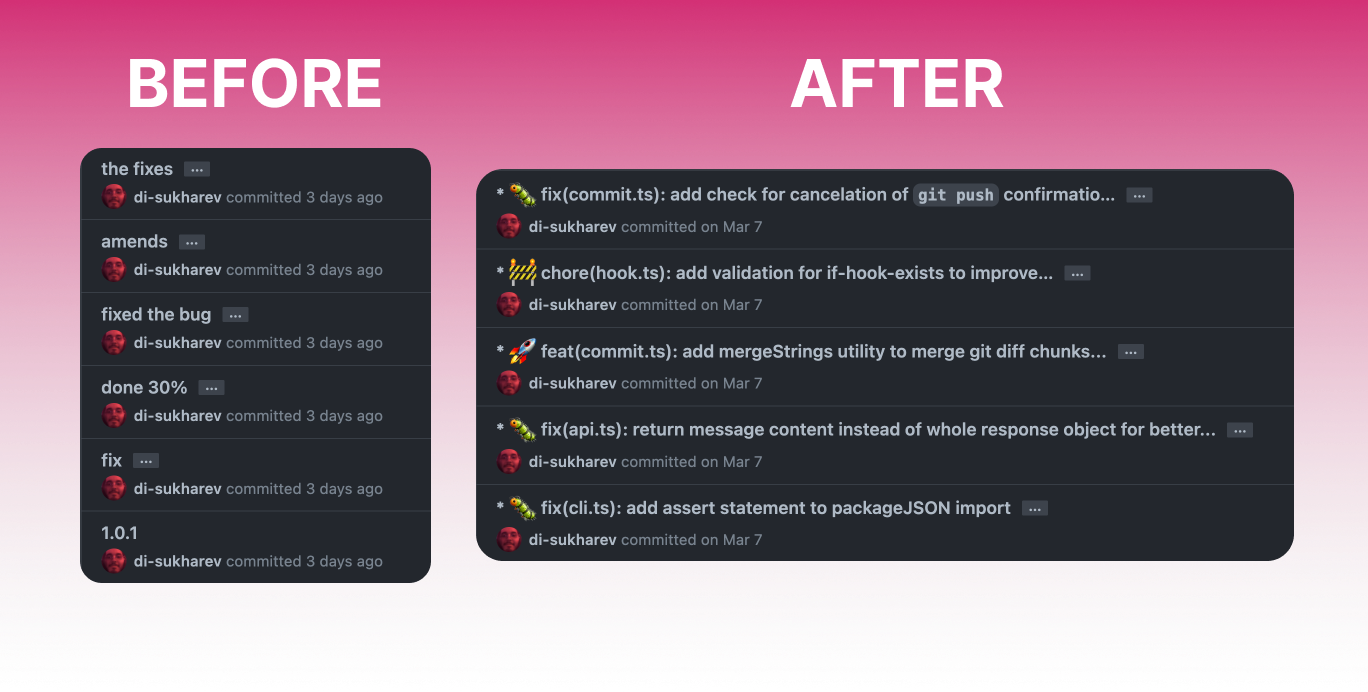
How it works in practice
The tool installs as a global CLI package via npm. You make changes to your project, and instead of the usual commit command, you call oco:
npm install -g opencommit
Next, you need to set an API key. By default, the utility is configured for OpenAI models (for example, gpt-4o-mini):
oco config set OCO_API_KEY=sk-...
After that, the workflow is simplified to the extreme. You make changes to files and run:
git add .
oco
The oco command will call the model itself, pass the diff of changes, and suggest ready-made text. If everything looks good, you press Enter and the commit is created. If you want to skip manual confirmation, there's the oco --yes flag.
Working without sending code to the cloud
Many developers cannot send source code to third-party servers due to security requirements or corporate policies. OpenCommit has integration with local runners for this.
The tool can communicate with Ollama and llama.cpp. For local work, you just need to spin up Ollama with the required model (for example, Llama 3 or Mistral) and switch the configuration:
oco config set OCO_AI_PROVIDER='ollama' OCO_MODEL='llama3:8b'
If the GPU server is on a separate machine in the local network, you just need to specify the endpoint address:
oco config set OCO_API_URL='http://192.168.1.10:11434/api/chat'
The same scheme works for llama.cpp by running the built-in HTTP server llama-server.
Configuring for team standards
OpenCommit has several useful settings that make generated messages suitable for real team development.
Conventional Commits and commitlint
Out of the box, the utility generates messages in Conventional Commits format (feat: ..., fix: ..., chore: ...). If your repository already has @commitlint configured, you can switch the utility to use local linter rules:
oco config set OCO_PROMPT_MODULE=@commitlint
On the first run, the command will create a local .opencommit-commitlint file, from which the model will take examples and constraints for text generation.
Ignoring unnecessary files
Sending thousands of lines of changed lock files to the prompt is pointless and costly in terms of tokens. Files *.lock and *-lock.* are excluded automatically, and for others you can create .opencommitignore:
path/to/large-asset.zip
**/*.jpg
dist/**
Templates with ticket numbers
Often you need to include the task number from Jira or GitHub Issues at the beginning of the message. For this, there's template support via the $msg placeholder:
oco '#1042: $msg'
The utility will substitute the generated description in place of $msg, leaving the task prefix untouched.
Integration with Git Hook
The most convenient way to work with OpenCommit is to hook it to the prepare-commit-msg hook. Then you won't even need to remember the oco command.
The hook is enabled with:
oco hook set
Now when you call git commit (or press the commit button in VS Code / WebStorm interface), OpenCommit will automatically generate text and insert it into the editor's input window. You'll be able to tweak the wording right away if the model missed an important detail.
Nuances and limitations
When using the utility, there are a couple of things to keep in mind:
- Diff size. If you've changed hundreds of files at once, the request may hit the model's context limit or generate too generic a description. OpenCommit works best with small, atomic commits.
- GitHub Action. The repository has a ready-made action for automatically fixing commits when pushing to a branch. You need to be careful with this: the action performs an interactive rebase, rewriting commit SHAs. This scenario cannot be used for shared branches (
main,dev).
Who will find it useful
OpenCommit solves the problem of careless commit history management in pet projects and small teams. If you're too lazy to manually format commits according to guidelines, the tool saves a ton of time.
The easiest way to start is with a global installation and local Ollama: this way you can immediately test the generation quality on your repositories without spending on tokens.
Projets similaires