Interactive Network Map and Vulnerability Scanner Based on L0p4Map
When you arrive at a new site or connect to an unfamiliar office subnet, the standard routine is always the same. You open a terminal, run nmap -sP or arp-scan, and then try to piece together the overall picture from hundreds of lines of output. Which host is the gateway here? Where is that forgotten printer with an unsecured web interface? Who plugged their home router into the patch panel?

Usually, for visualization you either have to draw diagrams manually in Draw.io or set up bulky inventory systems like Zabbix. Recently I came across the L0p4Map repository, created by developer HaxL0p4. It's a Python and PyQt6 desktop application that handles the groundwork: quickly discovers hosts via ARP, queries them through Nmap and SNMP, and then immediately renders an intuitive topology graph.
What's Under the Hood at L0p4Map
The core idea behind the project is simple: combine proven network utilities under a neat dark-themed GUI. Rather than reinventing port scanning, the author wrapped Nmap, Scapy, and pcap calls into a multi-threaded application with an interactive engine powered by vis.js.
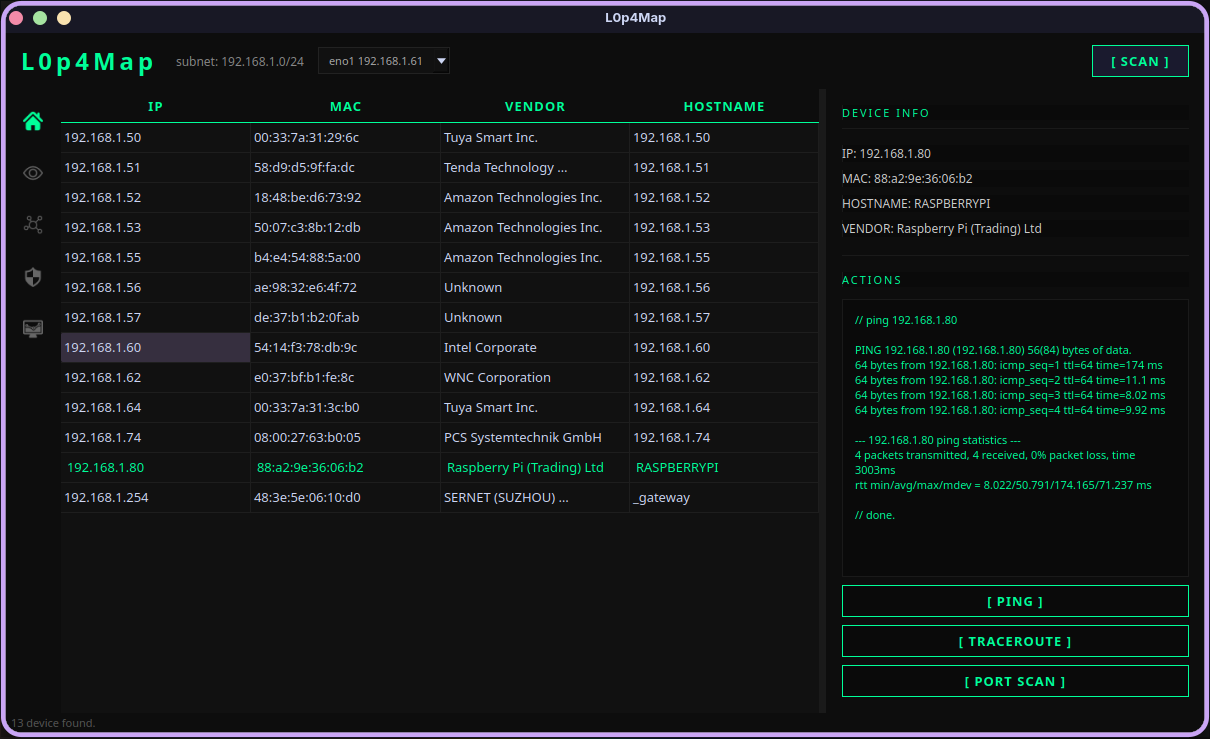
The program runs cross-platform on Linux (Debian, Arch), Windows 10/11, and macOS. Working with low-level packets requires superuser or administrator rights, since ARP scanning and raw traffic capture won't work without them.
How Network Operations Work
Instead of monotonously waiting for a full range scan, L0p4Map breaks the process into several logical stages.
1. Fast Discovery and Fingerprinting
First, the utility sends rapid ARP requests across the subnet mask selected by the interface. Vendor names are pulled directly from the local IEEE OUI database.
Next, the program attempts to determine the roles of discovered nodes. It combines four data sources for this:
- TTL values in responses to distinguish Linux/macOS from Windows or network equipment.
- Reverse DNS, NetBIOS, and mDNS/Avahi to find actual network names.
- Direct
sysDescrqueries via SNMP without heavy third-party libraries. - Quick probing of typical ports characteristic of infrastructure hardware.
As a result, a host is immediately tagged with an icon: gateway, switch, access point, PC, phone, or virtual machine. Embedded management servers and printers (iLO, SATO, Zebra, XPort) that admins often leave with default credentials are detected separately.
2. Live Network Topology
The most visual part of the program is the interactive map. The engine builds a connection tree, placing the gateway at the top, switches and routers on the second level, and grouping end clients under their parent nodes.
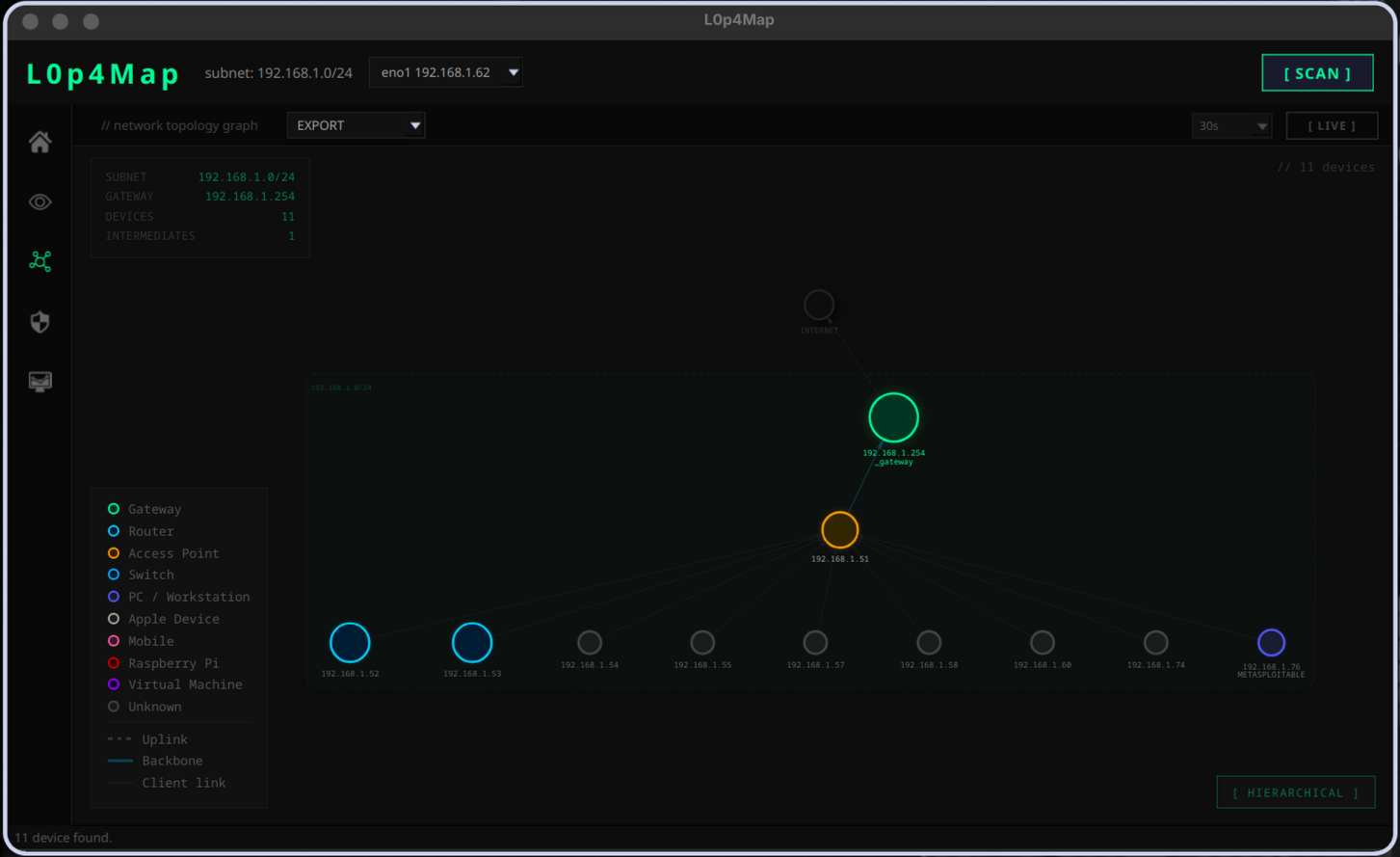
The graph has two display modes: strict hierarchy (Hierarchical) and the spring algorithm (Force Atlas). If the network has multiple subnets configured, the program highlights them with dashed outlines right on the canvas.
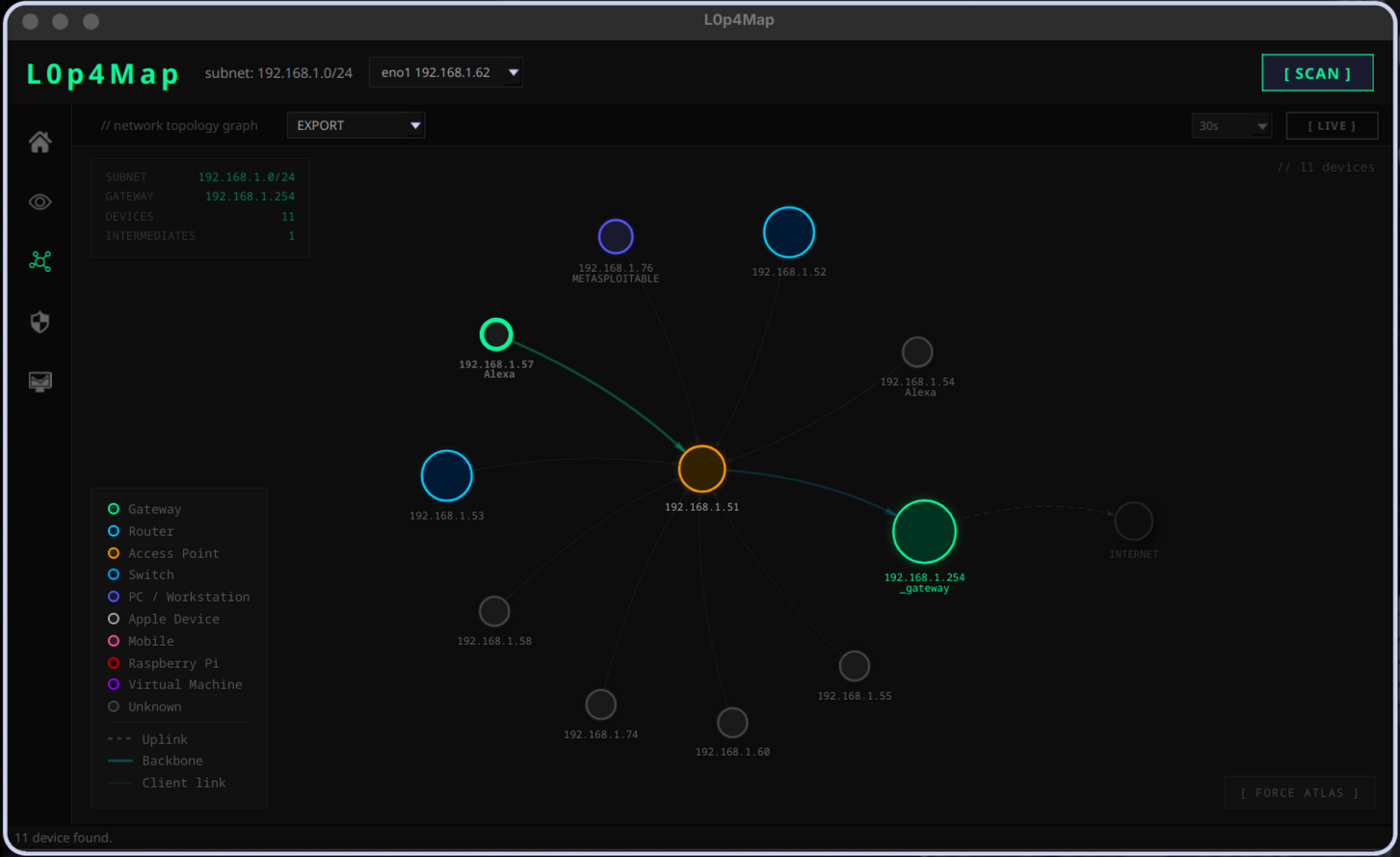
Links between nodes also have their own type: uplink to external network, trunk link between switches, and client connection. Any node can be renamed with a double-click, and the final diagram can be exported to PNG or CSV.
3. Attack Surface Assessment and CVE
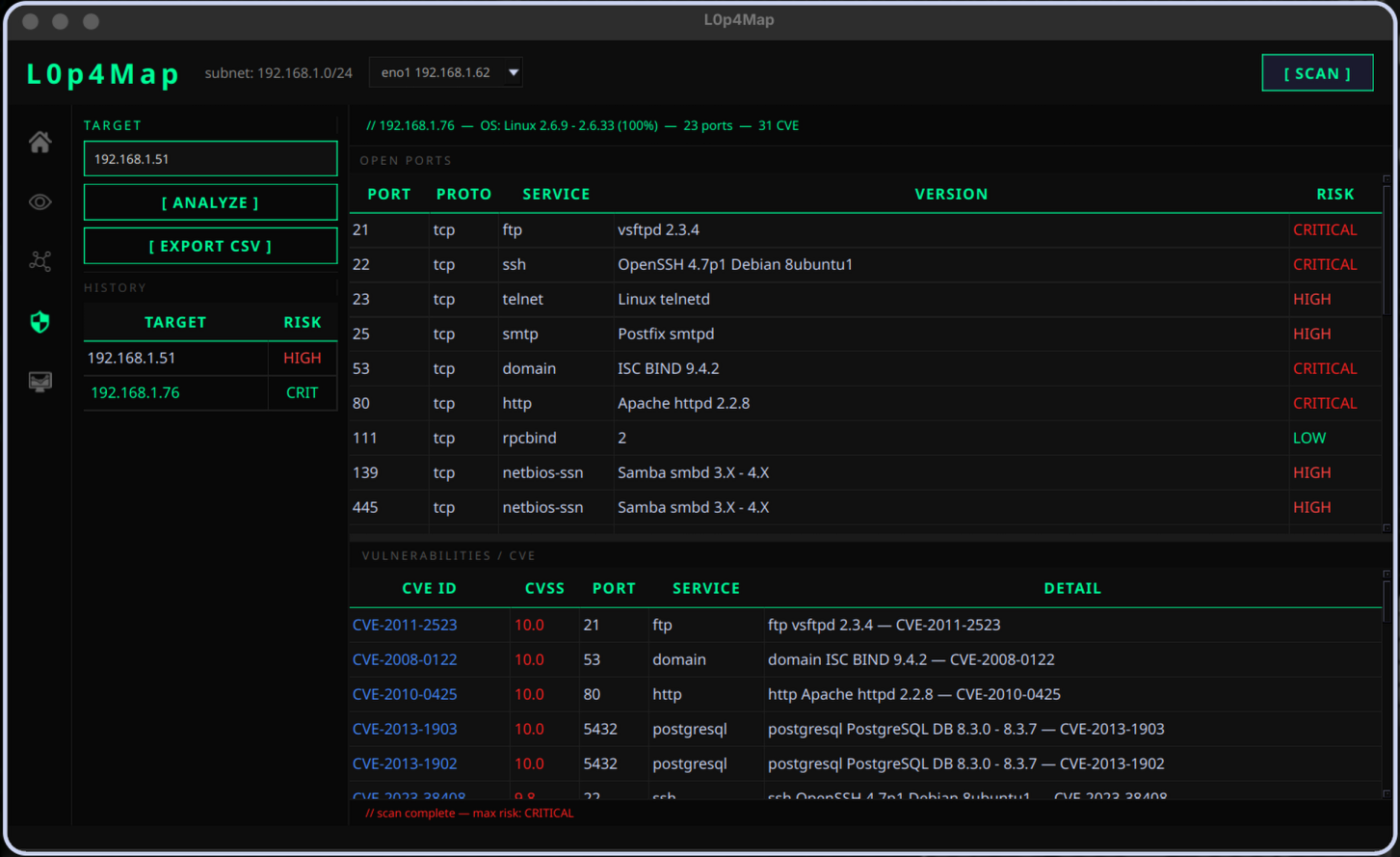
Once the basic network framework is clear, you can move to detailed audit of a specific IP. In the Attack Surface section, the program runs a full Nmap with banner grabbing scripts for HTTP, SMB, FTP, SSH, and SSL.
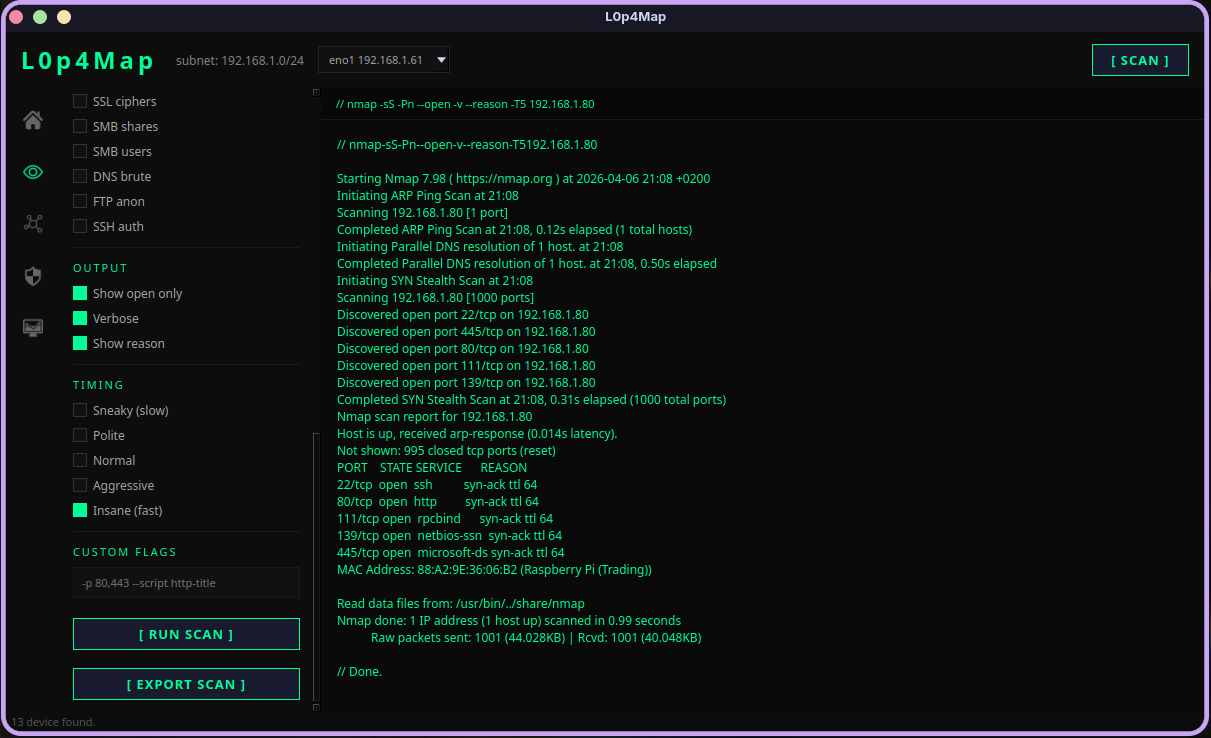
Results are cross-referenced with the vulnerability database via vulners scripts. L0p4Map displays found CVEs directly in a table with CVSS scores and clickable links to the National Vulnerability Database.
4. Built-in Traffic Analyzer and Passive Monitoring
If you don't want to constantly make noise with active scans in the segment, you can enable a background daemon. It passively listens to ARP and mDNS packets. As soon as a new unauthorized device appears on the subnet, the application immediately sends a notification.
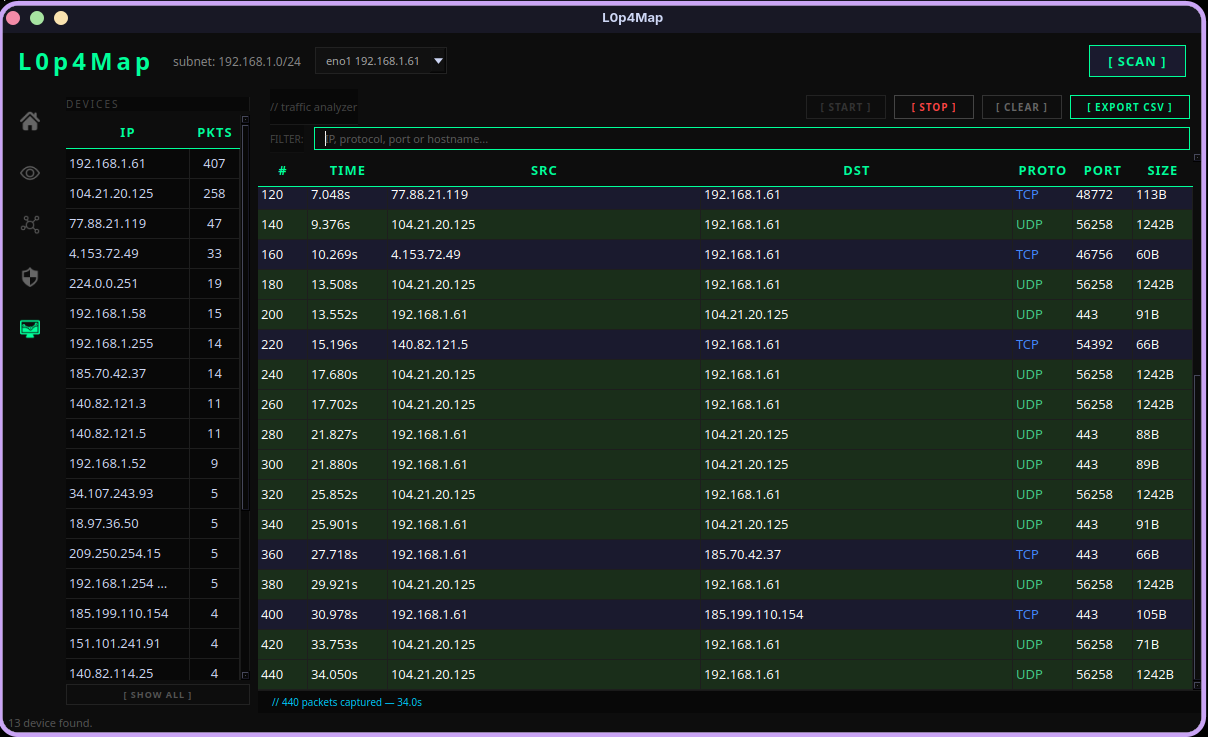
The Traffic Analyzer tab works like a mini version of Wireshark: shows a stream of packets in real time, colors protocols differently, and groups statistics by host. Noticed suspicious traffic from an unknown address — double-click and immediately send it for port scanning.
Installation and Quick Start
You'll need Python 3.11+, Nmap installed, and packet capture libraries (libpcap on Linux/macOS or Npcap on Windows) to run it.
Installation on Linux
Arch Linux users can install the package directly from AUR:
yay -S l0p4map
On Ubuntu, Debian, or other distributions, clone the repository manually:
git clone https://github.com/HaxL0p4/L0p4Map.git
cd L0p4Map
python3 -m venv venv
source venv/bin/activate
pip install -r requirements.txt
chmod +x L0p4Map.sh
Launch requires root privileges:
sudo ./L0p4Map.sh
Running on Windows
On Windows, make sure Npcap is installed in WinPcap API compatibility mode.
git clone https://github.com/HaxL0p4/L0p4Map.git
cd L0p4Map
python -m venv venv
venv\Scripts\activate
pip install -r requirements.txt
Launch the terminal as Administrator, then start the script:
python L0p4Map.py
Practical Workflow
A typical local segment audit process in L0p4Map looks like this:
- Select the working interface from the dropdown on the toolbar.
- Click the Scan button for quick ARP neighbor discovery.
- Open the Graph tab and view the resulting diagram. If the topology is complex, switch between Hierarchical and Force Atlas.
- Select suspicious nodes and use the Attack Surface tab to search for open services and CVE.
- Enable the Live or Continuous Monitoring toggle so the application watches for new hosts during your work.
Impressions and Conclusions
L0p4Map wins favor by not trying to be an all-in-one solution like enterprise SIEM systems, but by solving a specific practical problem for pentesters or network engineers. The program brings together console utility calls, parses their output, and organizes everything neatly on an interactive map.
Who will find this project useful:
- System administrators for quick inventory of small office networks.
- Security specialists during initial reconnaissance on engagements.
- Home lab enthusiasts who want to visualize their server and IoT device zoo.
One nuance to note is the requirement to run as root, but for software of this class that's a standard requirement. The source code is open under the GPLv3 license, the project is actively developed, so forking and adapting the parsing logic for your own needs won't be difficult.
Projets similaires