Unreal Engineとモダンニューラルネットワークを余計な苦労なしで接続する方法
Imagine this: you're making a game and want to add an NPC that doesn't just spit out three pre-written lines, but actually understands the player. Or, even more interesting, you want a neural network to help you build levels right in the editor, placing props based on text descriptions.
Usually this turns into a quest of writing API wrappers, fighting with asynchronous requests in C++, and trying not to lose your mind from model updates every two weeks. The UnrealGenAISupport project by developer prajwalshettydev takes care of this routine. It's a plugin that bridges Unreal Engine and the zoo of modern LLMs.
What This Project Is About
UnrealGenAISupport is an open-source plugin for UE versions 5.4 to 5.7 that brings together work with OpenAI, Claude, DeepSeek, Google Gemini, and even Elon Musk's Grok in one place. The author clearly set out to create a "Swiss Army knife" for game designers who need to quickly integrate generative AI into their projects.
Interestingly, the project isn't limited to simple chat. It includes MCP (Model Context Protocol) support, which allows neural networks to literally "see" your project and control it.
Key Features Worth Trying Out
1. Editor Control via MCP
This is probably the most promising part. Using the MCP protocol, you can connect Claude Desktop or Cursor directly to a running Unreal editor. The README has examples where the neural network spawns objects, changes their transformations, applies materials, and even generates Blueprints.
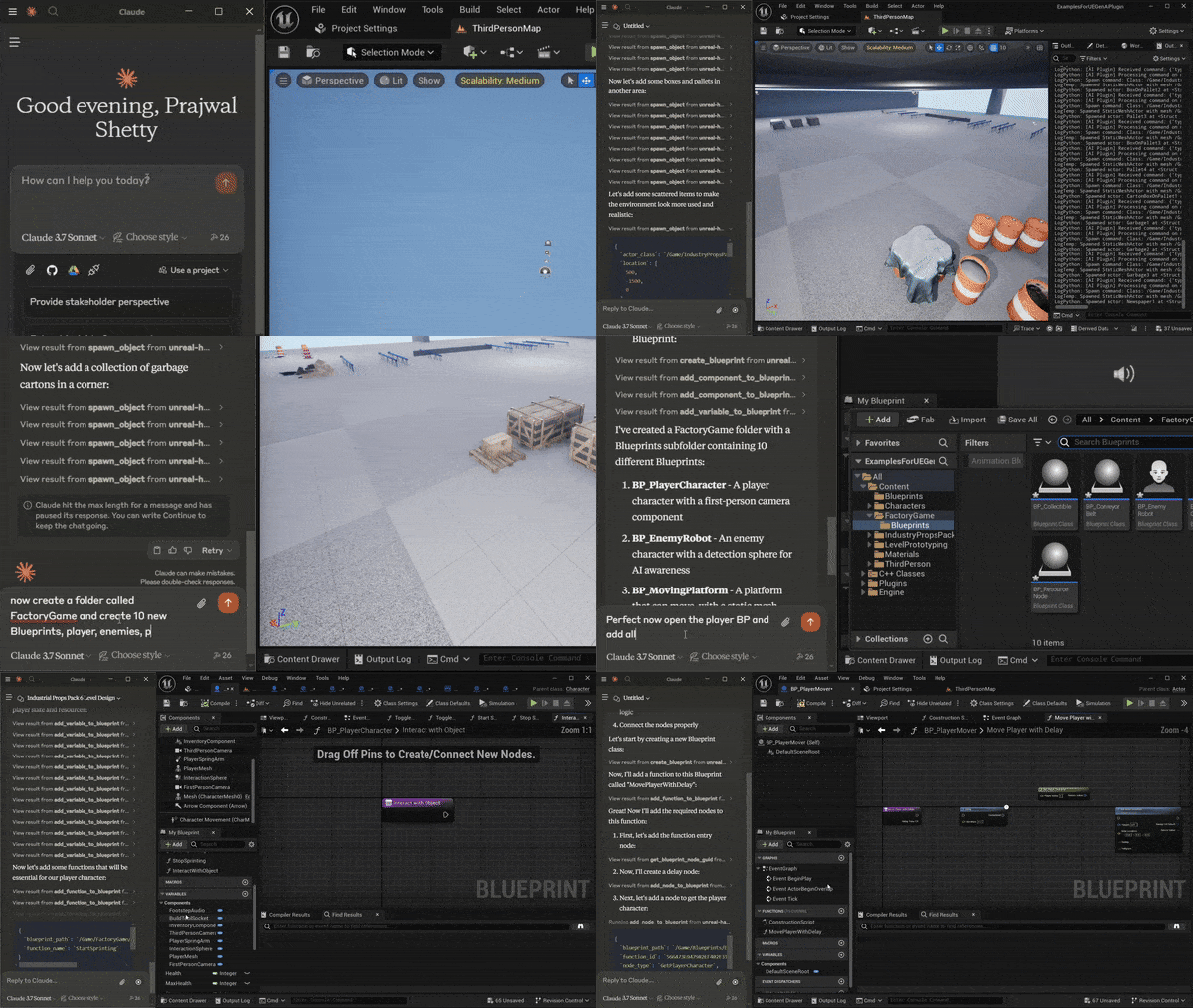
Of course, the known issues list honestly states that nodes in Blueprints may still connect incorrectly, and there's no Undo/Redo. But for prototyping or automating tedious tasks — this is already a working tool.
2. DeepSeek and "Reasoning" Model Support
Everyone's talking about DeepSeek R1 right now for its ability to "think" before responding. R1 support is already in the plugin. The developer warns: since these models take a long time to respond, Unreal's standard 30-second timeouts won't work. You'll need to tweak the configs in DefaultEngine.ini:
[HTTP]
HttpConnectionTimeout=180
HttpReceiveTimeout=180
3. Structured Outputs
If you want the neural network to return not just text, but data that the game can parse (for example, stats for a new item or coordinates for spawning enemies), the plugin supports JSON schemas. You feed the model a schema, and get clean JSON output that can easily be converted into a data structure inside UE.
The C++ example looks clean:
UGenAISchemaService::RequestStructuredOutput(
    TEXT("Сгенерируй список из 3 врагов для ледяной локации"),
    MySchemaJson,
    [](const FString& Response, const FString& Error, bool Success) {
       // Здесь парсим Response
    }
);
4. Multimodality and 3D
In the paid Pro version, the author offers integration with ElevenLabs (voice) and Meshy (3D model generation). But even in the free version, there are enough tools to get started: Vision API support (analyzing game screenshots with neural networks) and basic functions for working with Chinese models like Qwen, which is relevant for many right now.
How It Works Under the Hood
The plugin is written in C++, but maximally friendly to Blueprint enthusiasts. Almost all functions are exposed as Nodes, so you can build an AI agent without writing any code at all.
The architecture is simple: the plugin doesn't drag heavy external dependencies. For MCP, it uses a small Python server that communicates with the editor via sockets. This means you'll need to enable Python Editor Script Plugin in your project settings.
Who This Is For
I see two main scenarios:
- For NPC and quest developers: If you need to quickly test a hypothesis with "smart" dialogues, this plugin will save you a week of network layer development.
- For automation tools: If you're tired of manually placing thousands of trees or creating repetitive materials, you can try delegating this to Claude via MCP.
Personal Observations and Nuances
The project is active, updates come frequently, but you need to understand — this isn't a ready-made "out of the box" solution for release on Steam. It's a powerful development framework.
By the way, the author honestly addresses security: don't hardcode API keys into your game build. For testing in the editor, keys are taken from environment variables (for example, PS_OPENAIAPIKEY), and for production you'll need to set up your own backend proxy so players don't steal your OpenAI balance.
If you've been wanting to try LLMs in Unreal for a while but didn't know which angle to approach the API from — UnrealGenAISupport is a great starting point.
You can check out the code and examples in the repository: prajwalshettydev/UnrealGenAISupport And for a quick start, there's a test project where everything is already configured.
関連プロジェクト