How to make an AI agent write minimal code and forget about overengineering
Remember that type of person in IT departments? Oval glasses, long ponytail at the back of the head, has been at the company longer than version control has existed. You show them fifty lines of new code, they silently stare for a couple seconds, erase everything and write one line that does the same thing.
Modern autonomous AI models like Claude Code, Codex, or Cursor suffer from the opposite problem. If you ask an agent to add a simple date picker to a form, they'll install a third-party package, create a wrapper component, write styles, and open a discussion about timezones. Code grows, dependencies multiply, token bill increases.
The repository DietrichGebert/ponytail solves exactly this problem. The project replaces the model's habit of building elaborate castles with the logic of that same developer with the ponytail: don't sit over extra code, use native capabilities and standard libraries.

Why AI agents need senior-level "I don't care" attitude
Every additional fragment of code is a potential bug, an extra step during review, and a delay on each LLM call. Models default to generating more than asked. They strive to look useful by wrapping mundane operations in abstractions.
Ponytail delivers a set of rules and hooks for LLM agents that force the model to stop before writing the first line. Instead of building architectural scaffolds, the agent goes through a short ladder of decisions:
- Is this even needed? If not, the task is skipped (YAGNI).
- Is there a suitable fragment in the codebase? Reuse it.
- Can a standard library solve the task?
- Is there a native browser or platform feature?
- Can the task be solved in one line?
- Only at the very end — write minimal working code.
Security logic remains untouched. The model doesn't cut input validation, error handling, permission checks, or accessibility parameters. Settings only trim architectural fat.
Detailed breakdown:
<!-- Обычно агент ставит тяжелый JS-календарь -->
<!-- С подключенным Ponytail: -->
<input type="date">
What the numbers show
The project author tested the rules' effectiveness on a real project. For the test, they took the FastAPI + React template from tiangolo and had Claude Code (on Haiku 4.5 model) perform 12 feature-writing tasks. Results were compared against a clean agent without additional instructions.
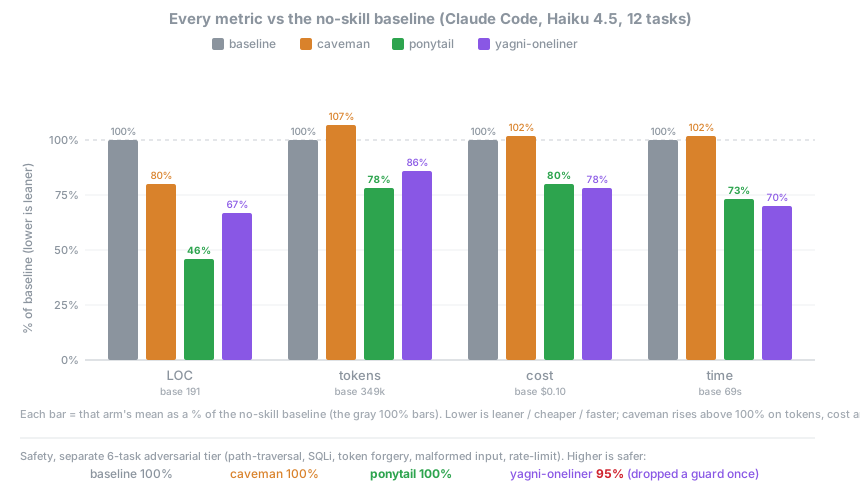
Measurement summary:
- Created code volume (LOC): reduced by an average of 54% (on individual tasks like native color picker, savings reached 94%).
- Token costs: reduced by 22%.
- Total call cost: dropped by 20%.
- Task resolution time: shortened by 27%.
- Adversarial security tests pass rate: 100%.
Other techniques participated in the benchmarks. For example, the caveman prompt cuts down agent chatter in chat but doesn't change the written code itself. Rule sets formatted as "YAGNI + one-liners" reduce code by 33%, but often cut security checks, dropping test success rate to 95%. Ponytail was the only option that saved resources across all metrics without losing reliability.
How to install and configure
Platform support here is broad. The plugin is adapted for two dozen tools, from CLI utilities to IDE plugins.
For Claude Code, installation consists of two commands in the built-in chat:
/plugin marketplace add DietrichGebert/ponytail
/plugin install ponytail@ponytail
For Codex in the console:
codex plugin marketplace add DietrichGebert/ponytail
codex plugin add ponytail@ponytail
If you work in Cursor, Windsurf, or Cline, simply copy the rules file from the repository (.cursor/rules/, .windsurf/rules/, or AGENTS.md) into your project. Instructions will be picked up automatically when the session starts.
In console clients, special commands become available:
/ponytail— view or switch aggression mode (lite,full,ultra,off)./ponytail-review— check current git diff with a list of lines to delete./ponytail-audit— full repository audit for redundant abstractions./ponytail-debt— collect all deferred hacks and simplifications into a single list.
Mode ultra is designed for cases when the codebase is so tangled that it's easier to demolish half the abstraction layers.
Practical benefits
The tool will be useful for developers who delegate routine refactoring, closing Jira tickets, or writing CRUD components to AI agents. Without strict constraints, agents flood the repository with duplicate utilities, fake helpers, and unnecessary npm packages.
Ponytail works as a strict mentor over the model's shoulder. It saves API balance, speeds up response generation, and eliminates the need to clean up neural network mess during code review.
If you're tired of a simple request like "add a button" resulting in three new files and changes to package.json, this project is definitely worth trying.
関連プロジェクト