Zilla Gateway Links Apache Kafka and AI Agents via Single Config
Anyone who has tried to push events from Apache Kafka directly to the frontend or mobile clients knows this pain. Browsers cannot work with Kafka's binary protocol. You end up writing endless microservice adapters, spinning up WebSocket bridges, or cobbling together workarounds with Server-Sent Events. The situation gets even more complicated when IoT with the MQTT protocol appears nearby, and the business demands connecting AI agents via the MCP (Model Context Protocol) to this infrastructure as well.
Instead of a bunch of custom proxy servers, the developers from the Aklivity team proposed a single gateway called Zilla.
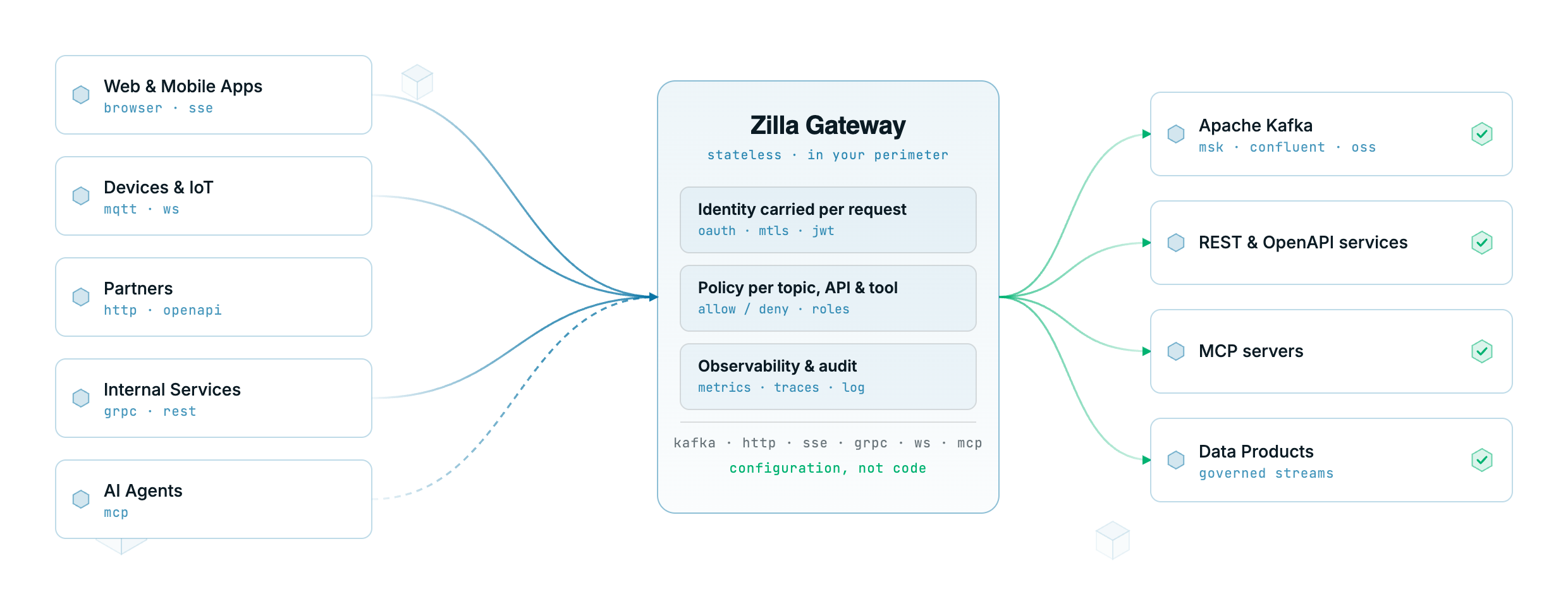
What Zilla Can Do
Essentially, Zilla combines two roles. The first role is familiar: it's an event-driven gateway (Event Gateway). It accepts incoming requests over HTTP, WebSocket, gRPC, or SSE and translates them directly to Kafka topics or MQTT brokers without writing server-side code.
The second role appeared with the update to version 2.0. Zilla learned to work as an MCP Gateway for large language models and autonomous agents. If your AI assistant needs tools from different sources (internal REST APIs, Kafka topics, external MCP servers), Zilla aggregates them into a single managed endpoint.
All the magic is configured declaratively through a single zilla.yaml file. You describe bindings, routing rules, schema validation, and security policies, then run the binary or container.
Four Key Features of the Project
Direct REST and WebSocket Forwarding to Kafka Topics
You no longer need to write a backend in Go or Java just to accept an HTTP POST and put the payload into a topic. Zilla takes the request body, validates it against the schema, and writes it to Kafka.
Reading works similarly: the frontend opens an SSE connection or WebSocket, and the gateway streams messages from partitions directly to the client code with caching support.
Tool Federation for AI Agents
Instead of connecting an LLM to five different MCP servers with separate keys and formats, you point the agent to the gateway address:
http://localhost:7114/mcp
Zilla automatically groups available toolkits through intuitive namespaces:
github__create_pr
payments__refund
kafka__produce_message
The agent sees a unified catalog of functions, and the gateway itself decides where to send the call: to the payment system's REST API, to GitHub, or to a message queue.
Context Control and Lazy Tool Loading
When you have dozens of tools, the model's context window quickly fills up with schema descriptions. Zilla divides tools into "hot" (eager) and "cold". The agent first receives a basic list of capabilities, and detailed specifications are pulled in only when actually needed. This saves tokens and reduces response latency.
Built-in Guards and Data Validation
The gateway validates incoming and outgoing data structures against JSON Schema, Avro, and Protobuf schemas. If the model generates an incorrect call or the client sends malformed JSON, the request is blocked at the gateway level before reaching the internal circuit.
Under the Hood
The gateway is written in Java, but the architecture differs significantly from classic enterprise applications. The developers aimed to reduce memory overhead and latency, so they applied several low-level optimizations:
- Generation of lightweight structures (flyweights) for working with binary buffers without unnecessary heap allocations.
- Binding a connection to a single worker for the entire session lifetime, which eliminates expensive thread synchronization.
- Frame exchange between streams across bindings through shared memory with back-pressure support.
- A caching layer for Kafka that fetches a record from the broker once and distributes it to thousands of subscribers.
Thanks to this, Zilla practically adds no network latency when proxying streams.
Quick Start
The easiest way to try the gateway is through Docker Compose.
If you need REST over Kafka:
git clone https://github.com/aklivity/zilla.git
cd zilla/examples
docker compose --project-directory http.kafka.crud up -d
After startup, we verify message sending:
curl -X POST http://localhost:7114/items \
  -H 'Content-Type: application/json' \
  -d '{"name": "test-item", "price": 42.50}'

curl http://localhost:7114/items
If you're experimenting with AI agents and the MCP protocol:
docker compose --project-directory mcp.proxy up -d
The gateway will spin up a single entry point on port 7114 with Streamable HTTP support and expose metrics on port 7190.
Nuances and Limitations
When getting acquainted with the project, there are a couple of things to keep in mind.
Zilla has its own configuration model. The zilla.yaml files turn out to be quite detailed: you need to understand the concepts of vaults, bindings, routes, and pipelines in detail. If you're used to simple Nginx configs, the syntax here will take time to learn.
The second point concerns licensing. The base version is distributed under the Aklivity Community License. It's free for any internal workloads and production use, but prohibits selling Zilla as a standalone service. Advanced features like distributed state storage based on Redis/Hazelcast or extended OAuth authorization are moved to the commercial Zilla Plus version.
Is It Worth Trying
Zilla addresses two integration pain points at once. It eliminates writing boilerplate code around Kafka and brings order to the zoo of tools for AI agents.
The project is especially useful if:
- You're building an event-driven system and want to deliver data to clients over web protocols without extra layers.
- You're developing AI agents and are tired of administering scattered MCP servers and API keys.
- Your infrastructure has MQTT and Kafka coexisting, requiring a single entry point and monitoring.
You can start with ready-made examples in the repository: there are clear scenarios for most typical tasks.
Related projects