How to reduce a date bundle to two kilobytes without the pain
Every frontend developer has at least once looked at a Webpack Bundle Analyzer report with quiet horror. A huge slice of the pie was almost always occupied by Moment.js along with dozens of locales that nobody asked to bundle. The project has long since moved to legacy status, the authors themselves recommend looking for alternatives, but old habits die hard. The familiar method chaining and string formatting are ingrained in your fingers at the muscle memory level.
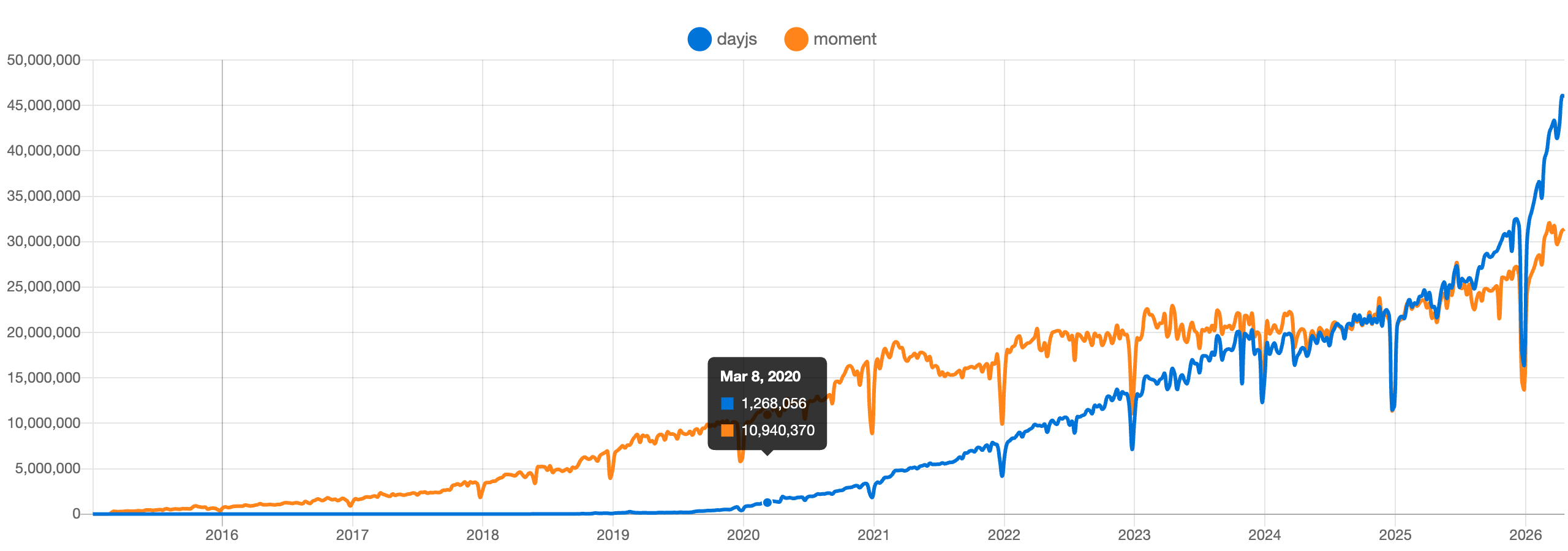
That's exactly what Day.js was created for. The library weighs just 2 kilobytes gzipped, while maintaining almost 100% API compatibility with Moment.js.

What's under the hood and why it's so lightweight
The main problem with old libraries was their monolithic nature. You included a package just for date formatting, and the bundler dragged along timezone parsers, relative time handling, and translations into a hundred languages.
Day.js is built differently. The core contains basic parsing, validation, simple manipulations, and formatting with standard patterns. All other functionality is split into independent plugins. If you need to calculate quarters of the year or a complex custom pattern, you import a separate module.
Locales work on the same principle. No Spanish or Chinese will end up in your final bundle until you explicitly call an import for the needed file.
import dayjs from 'dayjs'
import 'dayjs/locale/ru'

dayjs.locale('ru')
Immutability without surprises
If you've worked with the old Moment, you've probably stumbled upon mutation pitfalls. All it took was passing a date object to a helper function and calling .add(1, 'day') there, and the original date would change throughout the entire application. Debugging such bugs was a dubious pleasure.
Day.js makes all objects immutable. Any manipulation operation returns a new instance, leaving the original untouched.
const today = dayjs('2024-01-01')
const tomorrow = today.add(1, 'day')

console.log(today.format('YYYY-MM-DD'))    // 2024-01-01
console.log(tomorrow.format('YYYY-MM-DD')) // 2024-01-02
This behavior eliminates the need for unnecessary object cloning before each calculation.
Familiar API and method chaining
Switching to new tools often gets stalled by the need to retrain the team. With Day.js, there's no need to retrain. Almost every method looks exactly the same as in code written five years ago.
Parsing, value changes, and formatting can be chained together:
dayjs()
  .startOf('month')
  .add(7, 'day')
  .set('hour', 12)
  .format('YYYY-MM-DD HH:mm:ss')
Conditional checks also look concise:
const deadline = dayjs('2024-12-31')
const isExpired = dayjs().isAfter(deadline)
Plugins for non-standard tasks
Minimalism of the core doesn't mean a lack of features. When basic functionality runs out, plugins come into play. This is done in a couple of lines using the dayjs.extend() method.
For example, if your project needs rare formatting tokens or ordinal numbers:
import dayjs from 'dayjs'
import advancedFormat from 'dayjs/plugin/advancedFormat'

dayjs.extend(advancedFormat)

dayjs().format('Q Do k kk X x')
Relative time (format like "5 minutes ago"), UTC handling, calculating day differences accounting for business hours, and ISO week support are connected the same way. You only pay with bundle size for what you actually use in your project.
Who the project is good for and who should skip it
Day.js fits perfectly into applications where first page load speed matters. For landing pages, mobile interfaces, admin panels, and client dashboards, it's one of the best options in terms of features-to-size ratio.
However, there are situations where you should choose other options:
- If you're building an architecture from scratch targeting modern browsers, take a look at the native
Intlobject or the upcoming Temporal API. For simple formatting tasks, a third-party library may not be needed at all. - If your project already actively uses a functional approach and lodash-style architecture, you might find it more convenient to use
date-fns, where functions are imported individually.
For all other cases, especially when migrating from a Moment.js codebase, Day.js remains the most painless and fastest solution. You simply change the import name in your packages and cut dozens of kilobytes of useless weight from your bundle.
Related projects