Inside the Dark Reading Room Built with Next.js 14 and Bun
Developers love rewriting blogs. It's already a meme: instead of writing posts, we tear down the old stack and rebuild the interface from scratch every six months. The process almost always results in a cookie-cutter template. But sometimes you come across source code where the author paid a bit more attention to the details.
The other day I was exploring the woosal1337/blog repository — it's the personal website of developer Ege Celebi. The project has gathered just over 300 stars on GitHub. Hidden inside are several interesting solutions for graphics generation, typography, and working with MDX.
Under the Hood
There's no heavy CMS like Ghost or Strapi here. The author chose static generation and high loading speed.
The build is based on three things:
- Next.js 14 with App Router and React 18.
- Bun as the package manager and runtime.
- Biome for code linting and formatting.
Bun saves time on dependency installation, and Biome replaces the classic ESLint and Prettier combo. To run the linter with auto-fix, the project uses the bun run check command.
Tailwind CSS is used for styling. Color and token settings are extracted into app/globals.css. Geist Sans handles article reading, and Geist Mono is used for code blocks.
Covers Without Designers or Midjourney
The main highlight of the repository is banner generation for articles. Usually authors either search for a suitable image on Unsplash, generate images with neural networks, or create cards in Figma.
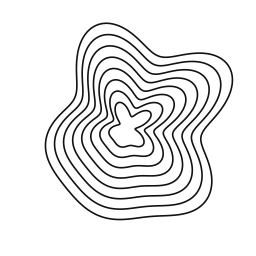
Ege solved the problem differently. In the lib/contour.ts file, there's an algorithm that takes a post title and turns it into a contour pattern. You get a deterministic SVG banner. Each title corresponds to its own unique drawing, and there's no need to call external services for this.
The same contour mark is used as the logo and favicon, maintaining a unified identity.
Liquid Glass and ASCII Animations
Visually, the site looks like a dark editorial page. The design uses ultra-thin borders (hairline borders) and a unified animation curve for transitions.
The interface contains several visual discoveries:
- Round controls with a liquid glass effect.
- Frosted tags for categories and labels.
- Left-side article table of contents with a navigation marker that smoothly scrolls along. The marker's behavior is modeled after the LineNav component.
- Live ASCII surfaces. In the
components/blocks/ascii/folder, you'll find an animated torus (the famous ascii donut), digital rain, plasma, and tunnel effects. The author ported them from the soft-club-ui library and recolored them to match the site's monochrome palette.
Project Structure and MDX
All articles are stored directly in the App Router page tree: app/(website)/blog/(post)/[slug]/page.mdx.
This approach combines routing logic and content itself. UI components are clearly separated:
components/ds/contains reusable basic design system elements.components/blocks/stores complex domain logic and animations.
How to Run Locally
You'll need Node.js version 20 or higher and Bun installed. No environment variables need to be configured.
Clone the repository and start the local server:
bun install
bun dev
To check with the linter and format the code:
bun run check
Why Look at These Sources
The repository is worth opening if you're planning to build your own site or looking for clean examples of frontend architecture. In the code, you can pick up:
- Biome configuration in a Next.js project.
- Implementation of vector card generation based on text.
- Integration of Canvas and ASCII effects into React components.
- Organizing Tailwind tokens in a single CSS file.
The code is licensed under MIT, but the text content and images are protected by copyright. Copying articles isn't a good idea, but studying the architecture and applying the ideas in your own project is a great plan.
Related projects