diKTat Turns Kotlin Code Review into an Automated Routine

Ever been in a situation where a third of your pull request comments are about formatting disputes? Someone left a negative boolean like isNoError, someone mixed up the order of methods in a class, and someone compared floating-point numbers using the == operator. Technically the code compiles and tests pass, but reading such a codebase six months later becomes physically painful.
Usually for Kotlin, teams go with the ktlint and detekt combo. The first one keeps an eye on indentation and spacing, the second looks for obvious code smells. But there's a gray area between them when it comes to architectural style and conventions, where teams either write their own rules or waste time on manual comments. The diKTat repository from the SaveOurTool team solves exactly this problem.
What is diKTat
The project is a strict set of code convention rules for Kotlin. Technically, diKTat is built on top of ktlint and analyzes the AST of files. The repository contains an extensive guideline broken down into sections: naming, KDoc comments, class structure, functions, working with types and variables.
The tool includes over a hundred checks, many of which aren't found in other static analyzers at all. The main convenience is that diKTat can not just complain to the console, but also automatically fix found violations on the fly.
Non-obvious Checks That Save Your Code
Most linters focus on formatting. DiKTat digs deeper and catches semantic oddities.
Naming and Logic Cleanliness
DiKTat has a built-in ban on double-negative variable names. If you declare a flag val isNotValid = false, the linter will require renaming it to a positive equivalent. Constructs like !isNotValid break your brain when reading, so this rule saves everyone's nerves.
It also checks function calls with negation. Instead of !list.isEmpty(), the tool will persistently suggest writing list.isNotEmpty().
Class Member Ordering
A common problem in large Kotlin files is the mess of fields, functions, and objects. DiKTat strictly controls the structure:
- Compile-time constants
- Regular properties
- Late-init properties
- Init blocks (and the tool prohibits spawning multiple
initblocks without explicit necessity) - Constructors
- Public, internal, protected, and private methods
- Companion object
If someone puts a private helper before the public API, the CI build will fail.
Type and Computation Safety
The tool prohibits direct comparison of types Float and Double via ==. Due to the peculiarities of binary representation of floating-point numbers, such comparisons often lead to hard-to-catch bugs. DiKTat will force you to use delta checking via abs(a - b) > EPS or switch to BigDecimal.
Another nice check tracks redundant casts. If Kotlin has already performed a Smart Cast inside a condition, calling as Type will be marked as unnecessary noise.
// Было
if (x is String) {
    print((x as String).length)
}

// Стало после автофикса
if (x is String) {
    print(x.length)
}
How to Run and Configure
DiKTat can be run via terminal, integrated into Gradle or Maven builds, or connected through the Spotless aggregator.
Adding to Gradle
For projects using Gradle with Kotlin DSL, the plugin is connected in a couple of lines:
plugins {
    id("com.saveourtool.diktat") version "2.0.0"
}

diktat {
    inputs {
        include("src/**/*.kt")
        exclude("src/test/kotlin/excluded/**")
    }
    reporters {
        plain()
        html {
            output = file("build/reports/diktat.html")
        }
    }
}
Checks are run with the command ./gradlew diktatCheck, and auto-fixing everything the analyzer can reach is done via ./gradlew diktatFix.
Fine-Tuning Rules
Configuration lives in a standard YAML file diktat-analysis.yml. Each rule is enabled or disabled separately, and many have specific parameters:
name: HEADER_MISSING_OR_WRONG_COPYRIGHT
  enabled: true
  configuration:
    isCopyrightMandatory: true
    copyrightText: Copyright (c) MyTeam, 2024. All rights reserved.

name: HEADER_NOT_BEFORE_PACKAGE
  enabled: true
  ignoreAnnotated: [Generated, Controller]
If you need to suppress a specific check locally, the standard annotation @Suppress("FUNCTION_NAME_INCORRECT_CASE") or a general @Suppress("diktat") works right in the code.
Gradual Adoption via Baseline
Enabling a strict linter on an old project with 50,000 lines of code without preparation is impossible. Developers will drown in thousands of warnings.
For this, diKTat has a baseline mode. On the first run, the utility generates an XML file with all current issues in the project:
./diktat --baseline=diktat-baseline.xml "src/**/*.kt"
The baseline file is committed to the repository. After that, the linter stops complaining about old code and only blocks the build if someone introduces new violations in a fresh commit.
GitHub Actions Integration
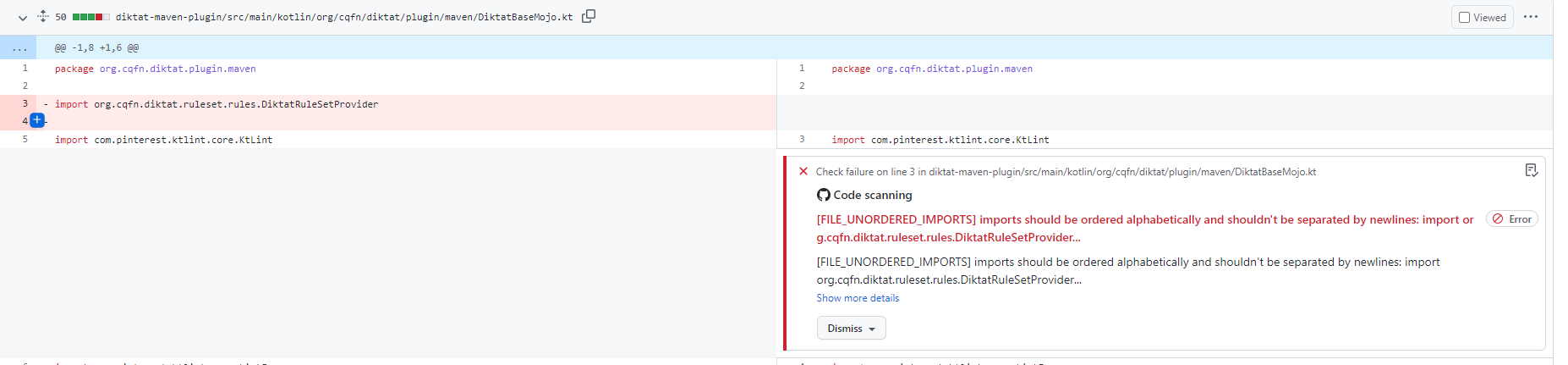
The tool can output reports in SARIF format. Combined with GitHub Actions, style errors and warnings are highlighted right in the pull request interface with exact line references. No need to configure third-party bots for comments.
name: Upload SARIF report
  uses: github/codeql-action/upload-sarif@v1
  if: always()
  with:
    sarif_file: build/reports/diktat/diktat.sarif
Is It Worth Trying
DiKTat is very uncompromising. Its guideline requires explicit import ordering, limits function length to thirty lines, controls KDoc documentation presence for public methods, and prohibits unnecessary var.
For a pet project with two people, such restrictions will seem excessive. But if a distributed team works on a service or you're developing an open-source library, diKTat removes the headache of style synchronization and frees up code review time for discussing architecture rather than whitespace. The easiest way to start is by adding the Gradle plugin in single-module check mode and generating a baseline.
Related projects