How to Check MCP Servers for Hidden Threats and Backdoors
Connecting third-party extensions to AI assistants has quickly become commonplace. We unhesitatingly add new MCP servers to Cursor, Windsurf, or Claude Desktop so the model can read documentation, query databases, or execute scripts. Yet few people actually read the source code of these utilities before running them. Big mistake.
Any external tool gets direct access to the model's context and your system. If a tool's description contains a subtle instruction (prompt injection), or a package quietly sends environment variables to an external server, spotting the trick manually is difficult. The team at Cisco AI Defense has released an open-source project mcp-scanner — a command-line utility and Python library designed specifically for auditing MCP servers.
What the scanner can do
The tool checks four MCP protocol entities at once: function descriptions (tools), pre-configured prompts, static resources, and server system instructions.
Inside, it runs a hybrid analysis system. The scanner doesn't limit itself to signature matching — it combines several approaches:
- YARA signature analysis. Checks code and schemas for typical attack patterns, shell command calls, and sandbox escape attempts. Runs locally and fast, no API keys needed.
- LLM-as-a-judge semantic verification. Sends tool schemas and system prompts to a model (supports OpenAI, Bedrock, Azure, or local Ollama) to detect hidden injections and discrepancies between a function's description and its actual behavior.
- Source code behavioral audit. A static analyzer matches docstrings against function bodies in Python, TypeScript, Go, Rust, Java, and five other languages. If a function claims to be a calculator but initiates HTTP requests internally, the scanner raises an alert.
- PyPI and npm package sandboxing. The utility can download packages and run them in an isolated Docker container, identifying malicious code before you install it on your system.
An interesting detail: the repository includes a Readiness Analyzer. It contains 20 heuristics and looks for purely engineering issues: forgotten timeouts, missing retry logic for network failures, and poor error handling.
Quick start in the terminal
The easiest way to install the utility is via uv:
uv tool install --python 3.13 cisco-ai-mcp-scanner
If you just want to check what's already configured in your editors, run a scan of known configs:
mcp-scanner --scan-known-configs --analyzers yara --format summary
The command will find Claude Desktop, Cursor, and Windsurf config files on your machine, connect to the configured servers, and run basic YARA rules.
To check a local server running over stdio, pass the launch command:
mcp-scanner --analyzers yara,prompt_defense --format table \
  stdio --stdio-command uvx --stdio-arg mcp-server-fetch
If you have a remote endpoint running, the check starts the same way:
mcp-scanner --server-url https://mcp.deepwiki.com/mcp --analyzers yara --format summary
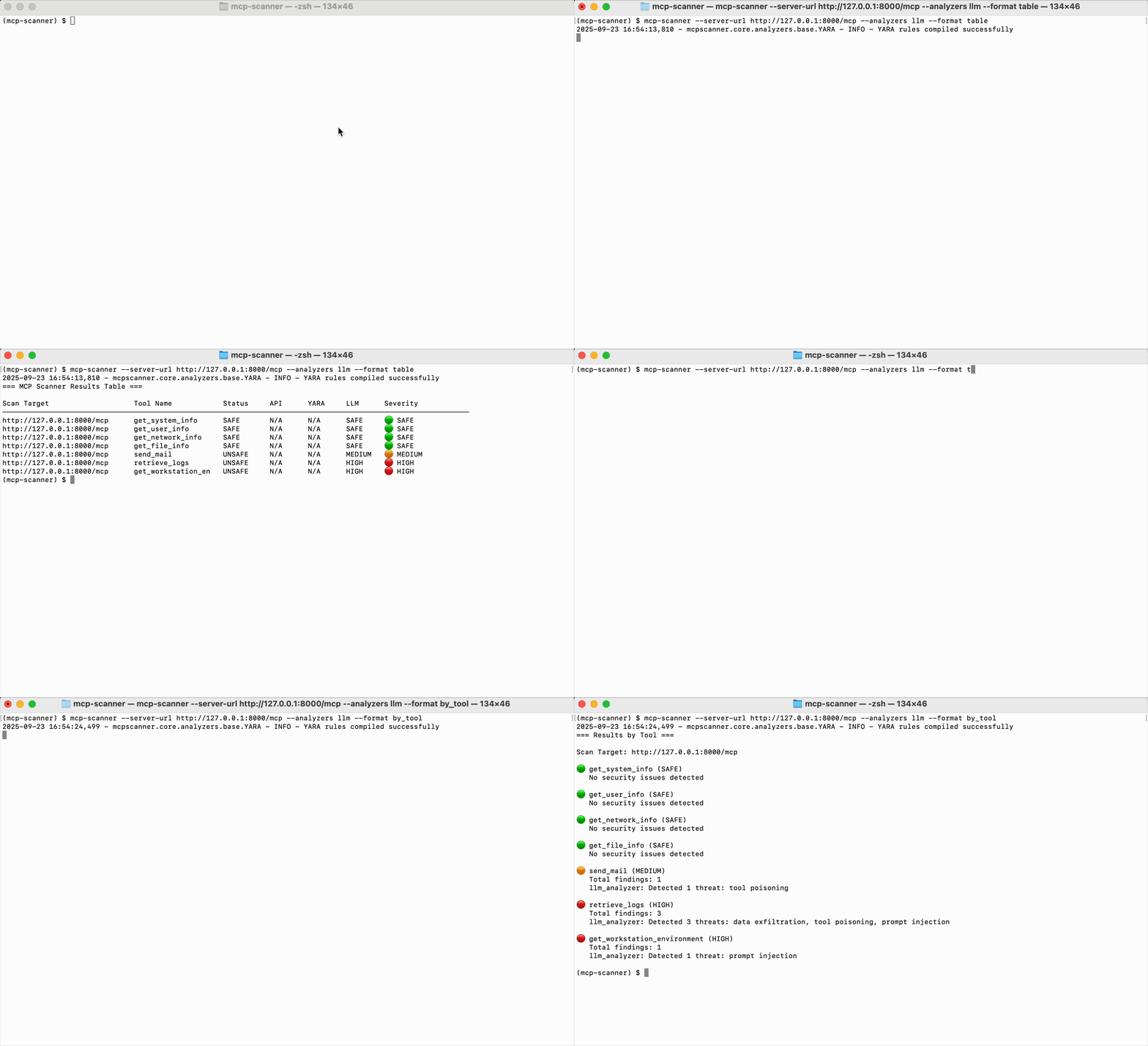
The utility will output a summary for each tool with its security status and a list of detected threats.
=== MCP Scanner Results Table ===

Scan Target: http://127.0.0.1:8002/sse

Scan Target                   Tool Name     Status     API      YARA     LLM      Severity
-----------------------------------------------------------------------------------------
http://127.0.0.1:8002/sse     exec_secrets  UNSAFE     HIGH     HIGH     HIGH     HIGH
http://127.0.0.1:8002/sse     safe_command  SAFE       SAFE     SAFE     SAFE     SAFE
Using in code and CI/CD
The project is designed not just as a CLI, but also as a standalone SDK. It's convenient to embed into backend gateways or tool validation pipelines before publishing to your company's internal registry.
import asyncio
import logging
from mcpscanner import Config, Scanner, set_log_level
from mcpscanner.core.models import AnalyzerEnum

async def main():
    set_log_level(logging.ERROR)

    config = Config(
        llm_provider_api_key="your_llm_api_key"
    )
    scanner = Scanner(config)

    # Проверяем удаленный сервер
    results = await scanner.scan_remote_server_tools(
        "http://127.0.0.1:8000/mcp",
        analyzers=[AnalyzerEnum.YARA, AnalyzerEnum.LLM]
    )

    for res in results:
        status = "OK" if res.is_safe else "ВНИМАНИЕ"
        print(f"Инструмент: {res.tool_name} -> {status}")

asyncio.run(main())
For closed-loop pipelines, there's an static mode. You can export tool schemas to JSON in advance and scan them offline without spinning up servers and making network requests:
mcp-scanner --analyzers yara static --tools ./output/tools-list.json
What to keep in mind
The project is open source under the Apache 2.0 license. Basic analyzers (YARA, pip-audit, Prompt Defense, and readiness checks) run fully autonomously and for free.
For deep semantic analysis, you'll need either an API key to any LLM via LiteLLM, or a locally running model via Ollama. The Cisco AI Defense Inspect API engine connects optionally if you already have a subscription to their enterprise security services.
The tool is useful for developers building their own MCP servers for self-checking before release, as well as teams integrating AI agents into internal company workflows.
Gerelateerde projecten