Voice Clone Studio brings together all popular voice neural networks in one window
If you've ever tried to set up local speech synthesis or voice cloning, you probably remember the dependency hell. One model needs PyTorch 2.1 with old torchaudio libraries, another requires a fresh CUDA build, and a third needs a separate ONNX Runtime version. The result is five virtual environments piling up on disk, each with its own Gradio interface on a random port.
Developer under the nickname FranckyB decided to put an end to this chaos and released the Voice Clone Studio project. Essentially, it's a modular all-in-one tool that brings together Qwen3-TTS, Microsoft VibeVoice, Fish Speech, LuxTTS, Resemble AI Chatterbox, and the MMAudio effects generator under one hood.
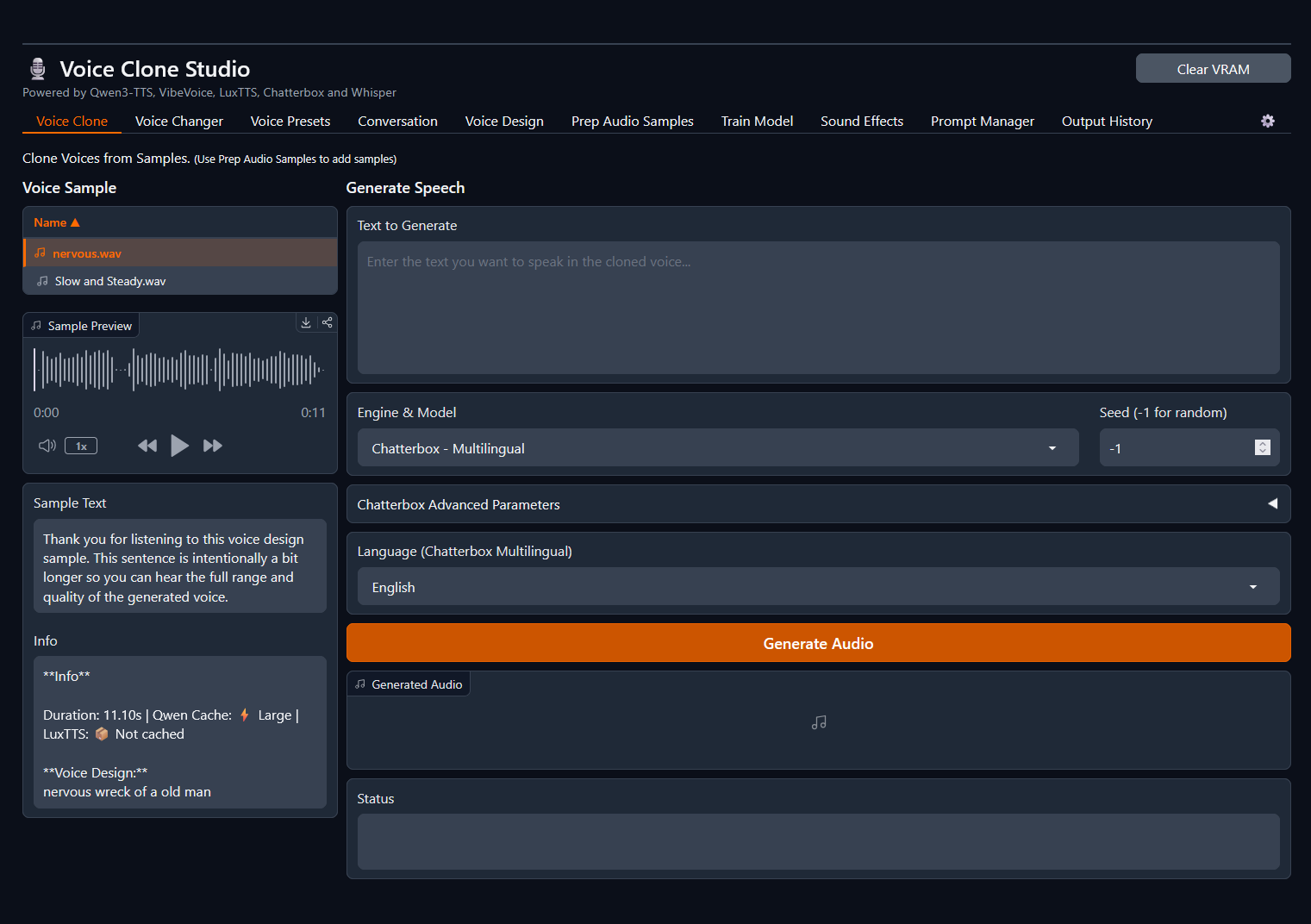
What this thing can do
Instead of keeping five tabs open with different scripts, everything here is split into tabs with a unified data pipeline.
Voice cloning and emotions
The basic scenario is straightforward: you upload a short 3–10 second audio sample, enter the text with the original transcription, and get the result. But the beauty is that you can switch between engines on the fly using the dropdown:
- Qwen3-TTS in 0.6B and 1.7B variants
- VibeVoice (1.5B, full model and 4-bit quantized)
- Fish Speech S2 Pro with 4B parameters
- LuxTTS and Chatterbox
If you select the Fish Speech engine, you can insert intonation tags directly into the text, like [whisper], [laughing] or [excited]. The system knows over 15,000 such markers. The developer also made a nice touch: if you switch back to Qwen or VibeVoice, the tags are automatically removed from the text before sending to the model, so your scripts don't break.
Dialogue scenarios for podcasts
One of the most interesting tabs is Conversation. It's designed for long dialogues between multiple speakers.
The script is written in a unified text format:
[1]: Привет, как продвигается проект?
[2]: Отлично, только что собрал окружение без конфликтов.
[3]: Можно к вам присоединиться?
In Qwen mode, there are 9 built-in narrators with adjustable pauses between lines. And if you switch the mode to VibeVoice, you get continuous track generation up to 90 minutes long with four speakers using your own voice samples. The model automatically places accents and sometimes even adds subtle ambient room noise for realism.
Voice design from text description
When there's no ready audio file for cloning, the Voice Design tab based on Qwen3-TTS comes in handy. You simply describe the desired character in words: age, gender, emotional tone, a light British accent, or a quiet and insidious speaking manner. The neural network generates a unique voice from scratch.
Voice changing and sound effects
The Voice Changer module works on Chatterbox via speech-to-speech conversion. You can speak text into the microphone, select a target timbre from saved samples, and the model will re-record your speech in a different voice while preserving the original timings and intonation.
For video dubbing, MMAudio was added to the project. You either enter a text description of the sound, or drop in a ready video clip without audio. The neural network analyzes the video and generates synchronized sound effects at 44.1 kHz quality.
Data preparation and fine-tuning
Voice Clone Studio has a built-in audio preparation workspace (Prep Audio). You can drop in a long video, extract the audio track, remove noise via DeepFilterNet, normalize the volume, and automatically cut the file into phrases using Qwen3-ASR or Whisper.
There's also the Train Custom Voices module here. If basic cloning from a short sample isn't enough for you, the project launches local LoRA fine-tuning for VibeVoice or Qwen. The interface displays loss graphs and epoch progress, and the trained weights immediately drop into the presets folder. On a CUDA-enabled GPU, training on a small dataset takes 10 to 30 minutes.
What's under the hood
The project architecture is modular. The main script voice_clone_studio.py is only about 230 lines and dynamically loads tabs from the modules/core_components/tools/ directory. Unneeded models or heavy tabs can be disabled in settings to avoid cluttering the interface and memory.
Among the interesting engineering solutions:
- CUDA Graphs acceleration support (Faster-Qwen3-TTS project), which gives a 5–10x inference speedup for Qwen.
- Distributing models across different GPUs. If you have two GPUs in your system, you can put speech generation on one card, and ASR recognition and local LLM on the second.
- Built-in Prompt Manager. It connects to a local llama.cpp or Ollama server, downloads a GGUF model, and helps generate dialogue or system prompts right in the interface.
Launch and caveats
The minimum comfortable threshold is 8 GB VRAM on NVIDIA GPUs. On macOS, the project will also run via MPS (Apple Silicon), but the training tab will be automatically hidden since training is CUDA-focused.
A quick launch on Linux looks like this:
git clone https://github.com/FranckyB/Voice-Clone-Studio.git
cd Voice-Clone-Studio
chmod +x setup-linux.sh
./setup-linux.sh
./launch.sh
For Windows, there's a ready-made setup-windows.bat, as well as a Docker Compose configuration if you don't want to install SOX and FFMPEG directly on the system.
A few practical nuances to be aware of:
- Python 3.11 is recommended. Version 3.12 may have issues building wheels for DeepFilterNet noise reduction.
- Linux and macOS users should avoid installing the
openai-whisperpackage due to environment conflicts. VibeVoice ASR and Qwen3 ASR work great as defaults instead. - The first generation on any sample has a delay while voice prompts are cached, but subsequent lines are assembled significantly faster.
Who will find this project useful
Voice Clone Studio addresses three clear needs. First, it's an excellent testing ground for anyone who wants to compare the quality of VibeVoice, Qwen3, and Fish Speech on the same audio material without dealing with consoles. Second, podcast and audiobook creators will appreciate the Conversation module with 90-minute generation. Third, it's a ready-made workstation for preparing datasets and training custom voice models without writing training scripts.
Projetos relacionados