How to Organize Car Expenses with Tracktor
I had gas receipts piling up in my glove box for years, scattered oil change notes scattered across my phone notes, and my OSAGO policy was always getting lost somewhere in the depths of my email. Sound familiar? If you have two cars in the family or a motorcycle on top of that, keeping track of scheduled maintenance and insurance deadlines becomes a separate quest. Most mobile apps for car tracking are either stuffed with ads, require a paid subscription, or store your data on someone else's servers.
Recently I stumbled upon the Tracktor project on GitHub. It's a self-hosted garage management service that brings together fuel fill-ups, repairs, inspections, insurance, and reminders. I decided to deploy it on my home server and see how convenient it is in everyday life.
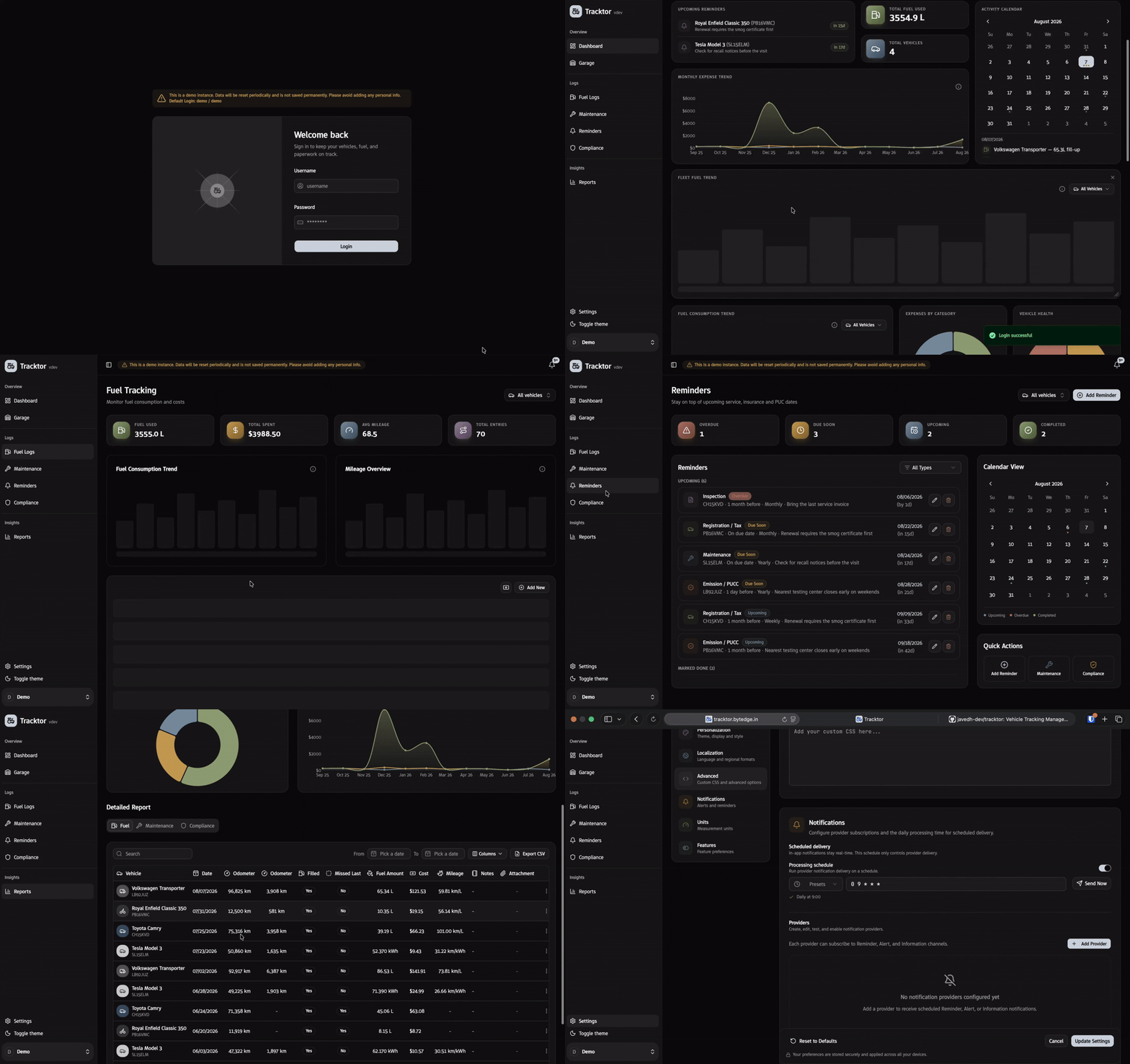
What the service can do
The project creator focused on the basic things every car owner needs without unnecessary bells and whistles.
The main page greets you with a customizable dashboard. Widgets can be dragged around to surface what matters most: recent expenses, fuel consumption, or an upcoming service.
Several core sections are built in.
The garage supports any number of vehicles. For each car or motorcycle, you can set its fuel type, base mileage, and specifications. Convenient if the family has multiple cars or you're helping relatives keep track of their fleet.
Fuel tracking calculates average fuel consumption and cost-per-kilometer trends. You enter liters, amount, and current odometer reading, and the system builds graphs and detects anomalies on its own. If consumption suddenly starts climbing, it's immediately visible in the reports.
The service log stores the history of repairs, consumable replacements, and scheduled maintenance. Each entry can have a cost and the mileage at which the work was performed attached to it.
Document control and reminders save you from expired insurance and inspection deadlines. You enter the policy expiration date or the next brake fluid replacement interval, and the service warns you well in advance of the deadline.
Reporting compiles expenses into clear charts. You can instantly see what share of your budget goes to gas versus planned maintenance and insurance.
The interface has module toggles: if you don't need environmental certificate tracking or detailed analytics, those blocks can be disabled in settings with a single button. The interface is translated into 11 languages, with Russian included out of the box.
Under the hood
The project architecture looks clean and modern. There are no bulky microservices or heavy databases requiring gigabytes of RAM.
The frontend and backend are written in SvelteKit with the fresh Svelte 5 and styles in Tailwind CSS. For data storage, the developer chose the combination of SQLite and Drizzle ORM.
This stack gives obvious advantages:
- Minimal resource consumption. The app will run without issues on an old Raspberry Pi, a cheap virtual machine for a couple of dollars, or in a Proxmox LXC container.
- Simple backups. The entire database fits in a single SQLite file, which is easy to copy on a schedule to a local archive or the cloud.
- Fast responsive interface without delays when navigating between screens.
Though there's a warning in the repository: the project is under active development, so releases may contain breaking changes. The author explicitly advises setting up regular database backups before updating.
Quick Docker setup
The fastest way to get the app running is to launch the ready-made Docker image via docker-compose.
Create a docker-compose.yml file:
services:
  app:
    image: ghcr.io/javedh-dev/tracktor:latest
    container_name: tracktor-app
    restart: always
    ports:
      - '3333:3000'
    volumes:
      - tracktor-data:/data

volumes:
  tracktor-data:
Start the container with the command:
docker compose up -d
After startup, the web interface will be available at http://localhost:3333 or via your server's IP address on the local network.
Authentication uses the classic username and password combination with sessions. If you plan to expose access externally, it's enough to put the app behind a reverse proxy like Nginx, Caddy, or Traefik with an HTTPS certificate.
Who will find this project useful
Tracktor is a good fit for those who like to keep personal data under their own control and value autonomy.
It solves these tasks well:
- Owners of multiple cars or motorcycles who are tired of juggling service books and receipts.
- Home hosting enthusiasts looking for a lightweight replacement for commercial expense tracking services.
- Small family fleets where you need transparent visibility into total transportation costs.
If you've been wanting to organize your vehicle's service history and stop keeping track of spark plug replacement dates and insurance renewals in your head, the project is definitely worth testing. Check out the Tracktor repository, spin up a container, and see for yourself.