CCleaner Replacement Without Ads and Telemetry — Exploring the Open-Source Kudu Utility

Remember when about ten years ago CCleaner was installed on almost every home and work computer? At some point the utility changed owners, gained background agents, ad banners, and persistent prompts to buy a premium subscription. Finding a decent alternative without surprises turned out to be harder than it seemed.
A project called Kudu recently appeared on GitHub. It's fully open-source software under the MIT license that handles system maintenance and cleaning up accumulated junk.
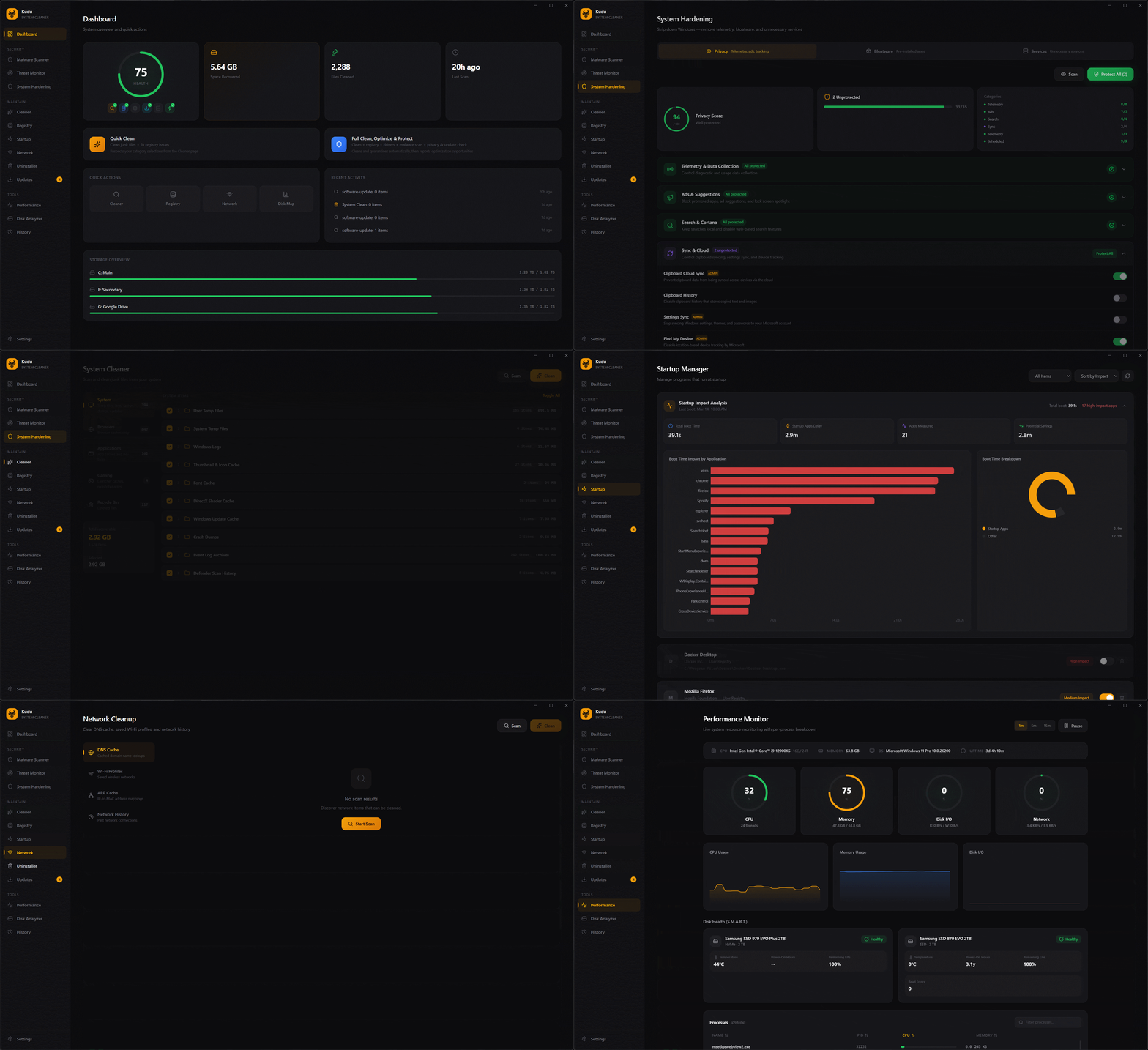
What Kudu Can Do
The developers bundled several tools under one roof that used to require digging into different corners of the system or installing separate programs.
Main features of the utility:
- Cleaning temporary files, browser caches, error reports, and application logs.
- Disk analyzer with a visual representation of which folders are eating up space.
- Managing Windows startup items and services with an assessment of their impact on boot speed.
- Bulk updating programs through console package managers like winget, Chocolatey, Scoop, and npm.
- Fine-grained privacy tuning — disabling built-in telemetry, advertising ID, and tracking in Windows.
- Searching for malicious files using signatures and heuristics, as well as secure data wiping via overwriting.
The CLI mode is a nice touch. If you don't like clicking through a GUI or need to run cleanup on a dozen machines across a network, the utility is easy to invoke from the command line.
Cleanup Rules Without Writing Code
An interesting engineering decision in Kudu is the separation of application logic from cleanup rules. The authors didn't hardcode paths to all known programs' caches inside the TypeScript source code.
Each rule for removing junk from a specific application is described by a plain JSON file. This means if you want to teach the utility to clean up temporary files from your specific IDE or local server, you just need to add a simple config.
Such a rule looks something like this:
{
  "id": "my-custom-app",
  "name": "Custom Dev Tool",
  "category": "apps",
  "targets": [
    {
      "os": "win32",
      "paths": [
        "%LOCALAPPDATA%/MyCustomTool/Cache/*",
        "%LOCALAPPDATA%/MyCustomTool/Logs/*"
      ]
    },
    {
      "os": "darwin",
      "paths": [
        "~/Library/Caches/MyCustomTool/*"
      ]
    }
  ]
}
No need to recompile the project or dig through someone else's code. Create a JSON, drop it into the rules folder, and the utility will pick it up on the next scan.
Practical Use Case
The main advantage of open-source code in utilities like this is transparency. When a program offers to delete a couple of gigabytes from system directories, you want to know exactly what's going to the trash. In Kudu, before cleanup, you can expand any item and see the full list of files marked for deletion.
For system administrators and DevOps engineers, the scripting potential is interesting. Through CLI, you can set up regular cleanup of build servers or employee workstations:
kudu clean --all --silent
Such a command will perform scanning and deletion across all rules without popups and confirmations, which is convenient for tasks in Cron or Task Scheduler.
Things to Keep in Mind
The project is fresh, the repository was created recently, though it has already gathered over a thousand stars. Since the utility can remove old drivers, clean the registry, and modify Windows services, it should be approached with caution. Before running deep cleanup for the first time, it's best to create a system restore point — thankfully, Kudu's interface has a dedicated button for that.
Kudu is worth trying if you need a simple PC maintenance tool without hidden telemetry, ads, and paid subscriptions. The project is equally well-suited for quick express-cleaning of a home computer and for embedding into automated maintenance scenarios via the command line.
Related projects