Free Terminal AI Assistant That Outperforms Claude Code on Real Tasks
Developers at Anthropic recently released the Claude Code CLI client, setting a high bar for terminal AI assistants. But what if the subscription is too pricey and you don't want to lock your workflows into a single provider? The creators of the Codebuff project took a different approach. They released Freebuff — a free version of their CLI agent, funded by non-intrusive text ads in the terminal.
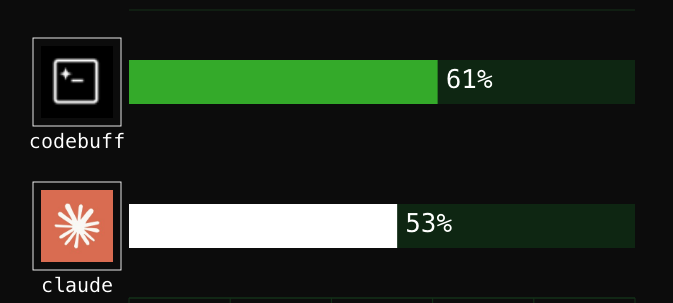
What's interesting is the results. According to the authors' benchmarks on 175 tasks from real open-source projects, the system achieves 61% successful edits compared to Claude Code's 53%. Let's break down how this accuracy is achieved and how to use the tool in everyday development.
How the Multi-Agent Approach Works
Most terminal assistants send all context and your prompt to a single large language model. As a result, the neural network tries to simultaneously search files in the project, plan architecture changes, edit code, and ensure nothing breaks. In large repositories, this approach often fails.
In Codebuff and Freebuff, tasks are split between specialized agents. When you ask the tool to add authentication to an API, a whole team kicks in:
- File Picker Agent scans the repository, analyzes folder structures, and finds only the relevant files.
- Planner Agent sequences the edits.
- Editor Agent makes changes to the source code.
- Reviewer Agent checks the result and runs tests.
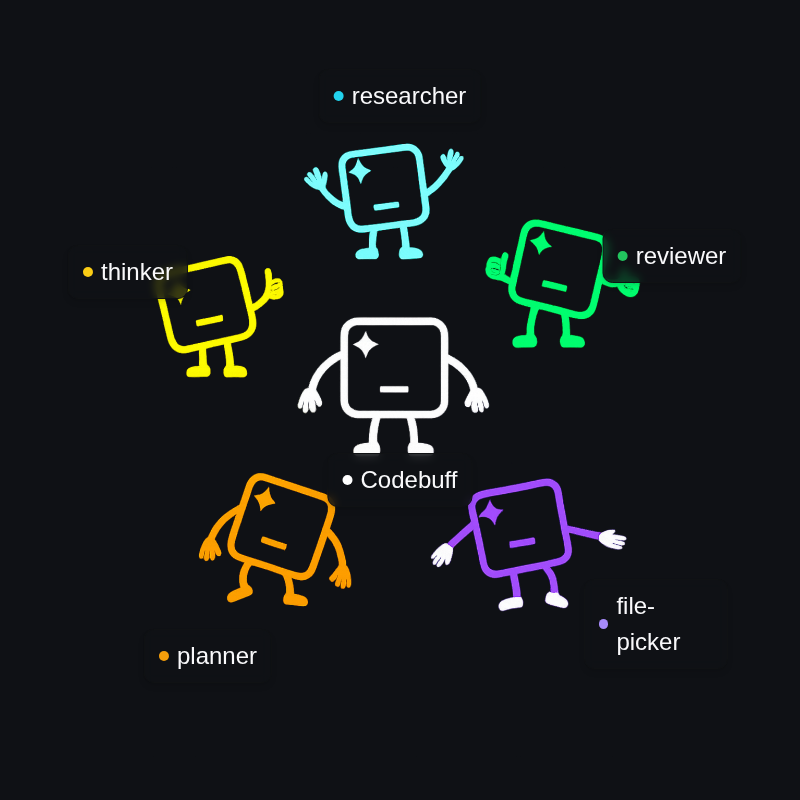
Each individual step is handled by a model best suited for that task. For example, Gemini 3.1 Flash Lite is used for fast file searching, while DeepSeek V4 Pro, MiMo 2.5, or MiniMax M3 handle code generation and planning.
Quick Start with Freebuff
The tool installs via the standard Node.js package manager and doesn't require credit card registration or API key setup.
npm install -g freebuff
After installation, simply navigate to your project folder and run:
cd ~/my-project
freebuff
Within the console interface, you describe the task in plain language. The agent finds the relevant code locations, makes edits, and runs your tests to verify the changes work.
For more precise operation, the terminal includes helper commands and references:
- Mentioning files via
@filenameto explicitly specify context. - Addressing specific agents via
@AgentName. - Running terminal commands via
/bashor the!prefix. - Saving project context to a
knowledge.mdfile (created via the/initcommand).
Monetization through text ads keeps the service free. The authors honestly note in the documentation: prompt and code data may be analyzed for ad targeting and model training, unless you use the paid self-hosted version with your own keys.
Creating Custom Agents in TypeScript
If the base functionality isn't enough, the Codebuff platform offers an SDK and the ability to create custom agents. Initialize this in your project root:
/init
This command creates a .agents/ folder with TypeScript templates. You can write an agent tailored to your team's specific workflow. Here's an example of an agent that analyzes git changes and creates proper commits:
export default {
  id: 'git-committer',
  displayName: 'Git Committer',
  model: 'openai/gpt-5-nano',
  toolNames: ['read_files', 'run_terminal_command', 'end_turn'],

  instructionsPrompt:
    'You create meaningful git commits by analyzing changes, reading relevant files for context, and crafting clear commit messages that explain the "why" behind changes.',

  async *handleSteps() {
    yield { tool: 'run_terminal_command', command: 'git diff' }
    yield { tool: 'run_terminal_command', command: 'git log --oneline -5' }
    yield 'STEP_ALL'
  },
}
Logic is split here: console commands git diff and git log run first, then control passes to the neural network to generate the commit description.
Embedding into Your Apps via SDK
For automating tasks in CI/CD or integrating into your own utilities, developers prepared a separate npm package @codebuff/sdk.
Installing the package:
npm install @codebuff/sdk
Example code for invoking the base agent from TypeScript:
import { CodebuffClient } from '@codebuff/sdk'

const client = new CodebuffClient({
  apiKey: 'your-api-key',
  cwd: '/path/to/your/project',
  onError: (error) => console.error('Codebuff error:', error.message),
})

const result = await client.run({
  agent: 'base',
  prompt: 'Add error handling to all API endpoints',
  handleEvent: (event) => {
    console.log('Progress', event)
  },
})
Unlike Claude Code, where you're tied to Anthropic's infrastructure, Codebuff supports connecting any model through OpenRouter. This lets you choose solutions for your specific budget or use local variants.
Is It Worth Trying
Freebuff looks like a great option for developers who need a smart repository assistant without monthly subscription bills. The multi-agent system genuinely solves the "forgetfulness" problem neural networks have with large codebases.
Downsides to consider: the ad-based model in the free version and context sharing for targeting. If you're working on closed corporate code, it's smarter to look at the paid Codebuff version or use the SDK with your own API keys. For pet projects and open-source work, Freebuff is available right now.
Related projects