How to Make a Terminal AI Agent Infinitely Optimize Your Code

Think about how you usually speed up tests or reduce your frontend bundle. You change a couple of lines in the config, run the build, check the seconds in the console. Slower — you roll back. 5% faster — you commit and try the next wild idea. This process eats up hours of routine work, even though it's essentially a mechanical cycle of hypothesis testing.
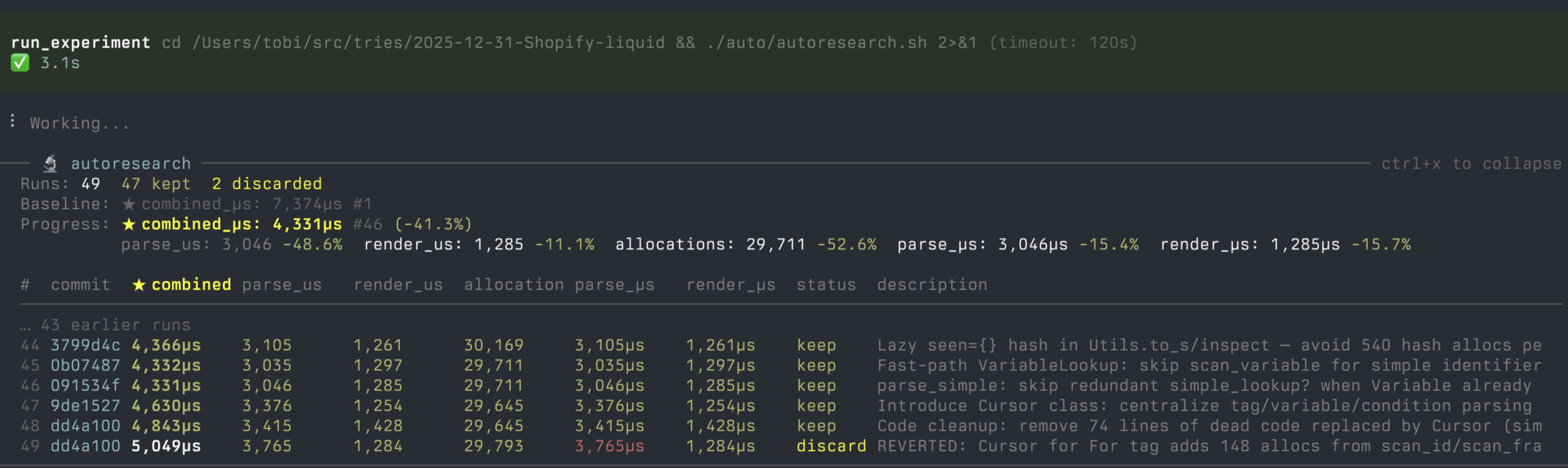
Andrei Karpathy recently demonstrated the concept of autonomous experiments in the autoresearch repository. Developer davebcn87 took this idea further and released pi-autoresearch — an extension for the terminal AI agent pi. The extension delegates routine optimization to the neural network: the agent formulates an idea, makes changes to files, measures the result, saves successful findings, and rolls back regressions.
How the autonomous cycle works
The entire idea rests on a simple rule: try an idea, measure it, save on success, discard on failure.
The agent works directly in your repository. When you start a session, the extension creates a separate folder .auto/ at the project root. It stores all working files:
.auto/prompt.md— a document describing the current task, measurement rules, and a list of what the agent has already tried..auto/measure.sh— a bash benchmark script that returns a string with a numeric metric value..auto/log.jsonl— a structured log of each attempt with the commit hash and status..auto/checks.sh— an additional script for verifying tests and types, so the agent doesn't break logic for the sake of pretty numbers.
When the model's context window overflows or the agent restarts, it simply re-reads .auto/prompt.md and the tail of the log. The entire experiment history isn't lost when the context is compressed.
pi install npm:pi-autoresearch
After installation, simply run the skill:
/skill:autoresearch-create
The agent will ask a few clarifying questions about the goal, target files, and run command, or figure them out from the project context on its own. Then it will take baseline metrics and immediately dive into an infinite loop.
Fighting random noise in measurements
Any benchmark is subject to fluctuations. Background OS processes, CPU heating, or network delays can create the illusion of speedup where there is none.
To filter out false wins, pi-autoresearch calculates a confidence score based on median absolute deviation (MAD). After three runs, the extension begins comparing the achieved improvement against the noise level of the entire series:
- Value ≥ 2.0x is highlighted in green — the gain noticeably exceeds background noise.
- Range 1.0–2.0x is shown in yellow — there is a gain, but it's on the edge of error margin.
- Value < 1.0x glows red — the result lies entirely within statistical error.
The tool doesn't force a rollback decision on the agent; it just suggests rechecking a questionable run.
Preventing breakage through backpressure
Neural networks love to cheat. If you ask the agent to reduce test execution time, there's a strong temptation to simply delete half the test files or insert stubs.
To prevent such tricks, .auto/checks.sh contains mandatory correctness checks:
#!/bin/bash
set -euo pipefail
pnpm test --run
pnpm typecheck
The verification script runs after each successful measurement. If tests fail or type checking breaks, the experiment is immediately marked as failed (checks_failed), and all changes in the working branch are rolled back. The execution time of the checks themselves isn't added to the main speed metric.
Sorting chaos into clean branches
During a multi-hour cycle, the agent creates dozens of commits, constantly changing different files. Merging such a log directly into the main branch would be a nightmare for the reviewer.
To solve this problem, there's a command:
/skill:autoresearch-finalize
The skill analyzes .auto/log.jsonl, groups successful changes into independent logical blocks, and proposes a structure for your approval. After confirmation, the tool creates separate clean branches from the initial commit. Each branch contains strictly one logical set of changes with the gain description in the commit message, making them easy to review and merge separately.
Monitoring and hooks
You can monitor progress directly in the terminal or through the browser:
- The widget above the editor constantly shows a results table.
- The key combination
Ctrl+Shift+Fopens a full-screen terminal dashboard with an attempt list. - The command
/autoresearch exportgenerates an interactive web page with metric dynamics charts.
If the basic cycle isn't enough, you can place executable files before.sh and after.sh in the .auto/hooks/ directory. They trigger at iteration boundaries. Through them, you can set up sending system notifications to the desktop, searching for ideas in external documentation, or maintaining a training journal. The script receives context via standard input in JSON format, and its stdout output is passed to the agent as a system hint.
Things to keep in mind
Autonomous cycles can quickly drain your API balance if left unattended overnight. It makes sense to set an iteration limit right away in the .auto/config.json file:
{
  "maxIterations": 30
}
The agent will stop as soon as it completes thirty experiments.
The tool performs well on tasks with clearly measurable numeric results: optimizing webpack build size, speeding up unit test execution, tuning hyperparameters for training small models, or tweaking Lighthouse scores. If you already use the pi console agent, the project is definitely worth trying on a real optimization task.
Related projects