How to quickly create a decent icon for a pet project without Figma and a designer
Sound familiar: you just finished polishing your MVP, wrote tests, set up the build, and then the project needs an icon. Opening heavy Figma just for a simple badge with a gradient and glyph feels like too much effort. Drawing blindly in code or hunting down sketchy online converters full of ads isn't exactly appealing either.
Recently stumbled upon the AppIcon Forge repository. It's a lightweight open-source web tool built specifically for moments like this. It handles all the tedious work of laying out square and rounded icons for mobile and desktop applications.

What the generator can do
The core idea is simple: give developers a clean interface with sliders and instant preview, without the bloat of vector graphics tools.
Here are a few examples of what you can put together in a couple of clicks:
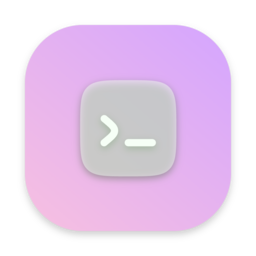



Breaking down the features in more detail, the service covers all basic needs:
- Iconify catalog integration. The interface includes search across a massive database of vector icons with over 200,000 symbols. Type in a keyword, pick a glyph, and instantly preview it on a background.
- Text and typography support. You can create a logo from one or two letters, adjust the font, letter spacing, and apply gradients to the text.
- Upload your own assets. If standard icons don't fit, you can drop in a local SVG or raster image.
- Background style customization. Supports linear and radial gradients, drop shadows with blur, border width and color, and corner rounding.
By the way, the project author left a useful warning in the README about fonts. If you generate a text-based icon, the app may pull in your OS system fonts by default. For commercial releases, it's better to switch to open Google Fonts to avoid licensing issues.
How to run the project
The simplest option is to open the ready-made version on GitHub Pages and start building your asset right away. No installation required.
If you prefer keeping utilities like this local or want to deploy a copy inside a closed network, the project spins up in just a couple of commands.
Running with pnpm
For local TypeScript and Vite development:
# Клонируем репозиторий
git clone https://github.com/zhangyu1818/appicon-forge.git

# Переходим в папку проекта
cd appicon-forge

# Ставим зависимости
pnpm install

# Запускаем локальный dev-сервер
pnpm dev
After that, the interface will be available in your browser at http://localhost:5173/appicon-forge/.
Running in Docker
If you don't want to deal with Node.js and package managers, there's a ready-made Dockerfile:
git clone https://github.com/zhangyu1818/appicon-forge.git
cd appicon-forge

# Собираем и запускаем контейнер
docker build -t appicon-forge .
docker run -d --name=appicon-forge --restart=always -p 5173:80 appicon-forge
Or via Docker Compose, if you already have home service infrastructure set up:
docker-compose up -d
What tasks it's useful for
Of course, this tool won't replace a graphic designer's work on complex branding. But for everyday developer tasks, it's more than enough:
- Quick prototypes and pet projects that need a neat placeholder instead of a default white square.
- Internal corporate utilities and admin panels where launch speed matters more than a unique style.
- Creating favicons for websites or icons for PWA manifests.
- Styling browser extensions.
The project is distributed under the permissive MIT license. The codebase is clean and compact, so if you want, you can fork the repository and add your own grid templates or specific export formats for iOS and Android.
Related projects