Forget fixed slides and meet the concept of slips
Anyone who has ever prepared a talk for a meetup or a lecture for students has inevitably run into the rigid constraints of presentation software. You want to show a twenty-line code snippet with explanations, but it simply doesn't fit on the screen in a readable size. You either have to shrink the font to unreadable microtext or split your idea across four separate slides, losing context.
I recently stumbled upon an interesting project called Slipshow. The author decided to approach the presentation format from a different angle and completely abandoned fixed slide heights.
What are slips and how they differ from slides
At the core of Slipshow lies the concept of a slip. It's the familiar slide we know, but without a bottom height limit. Content inside a slip can stretch downward indefinitely.
During your presentation, you press a navigation key, and the virtual camera smoothly scrolls down, revealing previously hidden blocks of text, diagrams, or code. The screen doesn't flash, the audience's attention isn't disrupted by abrupt transitions, and you maintain the integrity of your narrative.
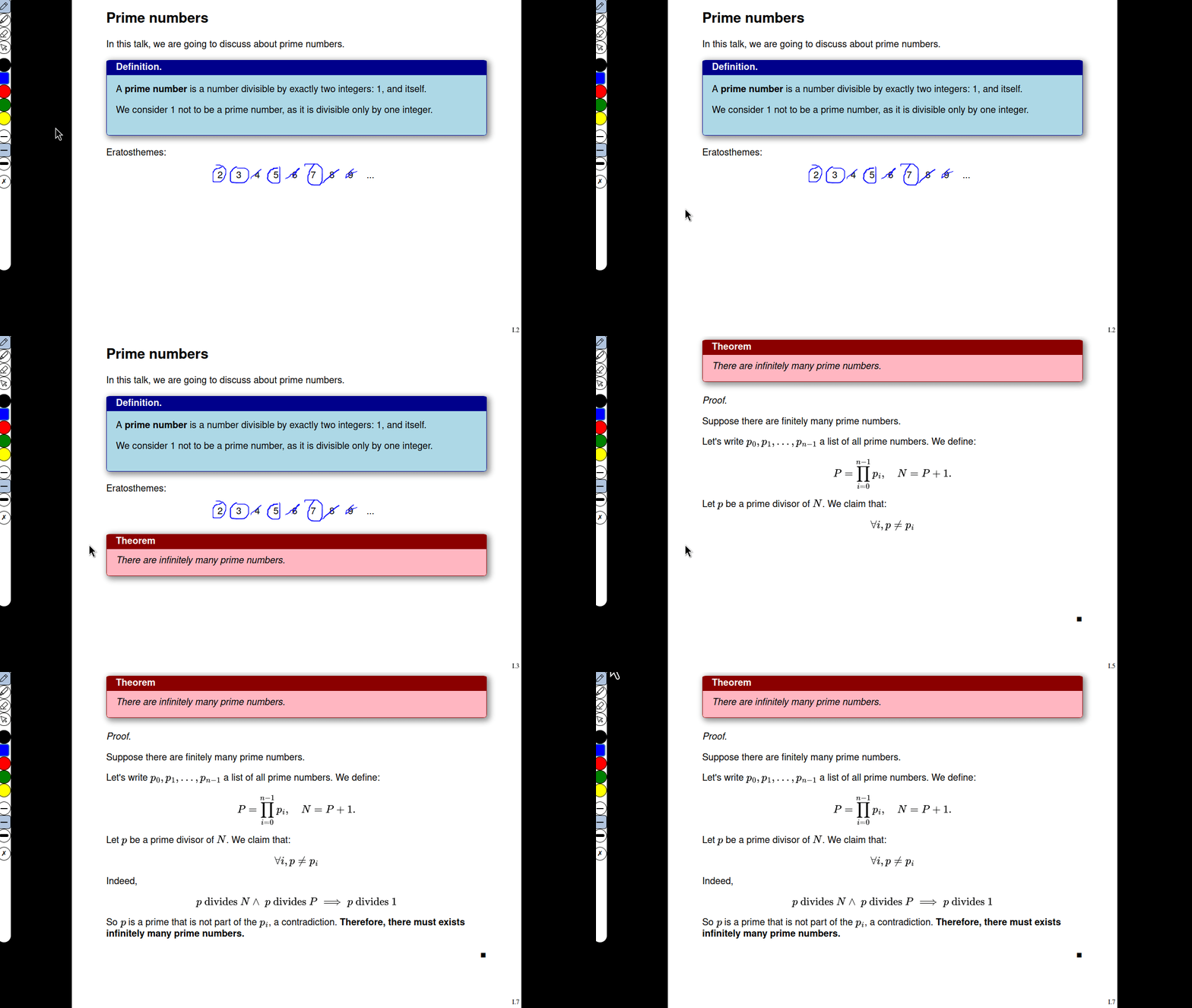
Unlike infinite canvases like Miro or the old Prezi, where viewers often get motion sickness from chaotic zooms in all directions, this approach maintains a strict vertical axis. Camera movement is predictable and set by the author in advance.
What the engine can do
All the magic of Slipshow is built from plain text. You write extended Markdown, and the compiler transforms it into a single standalone HTML file. This file opens in any browser offline, without needing to spin up local servers or carry Node.js on someone else's laptop.
The project has several interesting features that set it apart from combinations like Reveal.js or Marp.
Smooth scrolling instead of clicks
The audience sees a logical continuation of the thought, not a brand new screen from scratch. When you're explaining a service architecture or refactoring a function step by step, the previous context remains visible at the top while a new block appears from below.
Playback of hand-drawn diagrams
During presentation preparation, you can draw a diagram or formula by hand. The engine records the drawing process, saves it, and during playback reproduces it stroke by stroke. This works great for educational materials when you need to draw attention to a specific detail in a diagram.
Step-by-step script execution
You can embed custom JavaScript code into a presentation and tie it to presentation steps. This enables interactive widgets, algorithm animations, or dynamic charts right inside the slip.
Under the hood and development details
An interesting detail: the project is written in OCaml. This is a rather unusual choice for presentation tools, where the web stack typically dominates. Yet the output is clean HTML and JS that doesn't require the viewer to install any runtime.
The project isn't abandoned. Recently, the NLNet foundation granted Slipshow funding through the European NGI Commons Fund program for 2025 and 2026. This inspires optimism about future releases and support.
The repository is distributed under the free GPLv3 license. Documentation is available on a separate website with an interactive tutorial on markup and configuring custom themes.
Who will find this project useful
Slipshow isn't suitable for every scenario. If you need a quick business presentation with fancy animations from PowerPoint for management, this tool probably won't help.
But the tool will excel in other tasks:
- Technical conference talks with detailed code snippet walkthroughs.
- University lectures on mathematics, algorithms, or data structures where formulas and derivations require sequential explanation.
- Internal architectural demos within engineering teams.
- Educational materials that need to be distributed to colleagues as a single standalone file.
Where to start
If you're used to writing presentations in Markdown and are tired of fighting font sizes on regular slides, check out the official documentation at docs.slipshow.org or look into the panglesd/slipshow repository. The slip format requires a slight shift in thinking when laying out material, but the result looks fresh and helps maintain audience focus.
相关项目