Local Kubernetes in a Minute Without Heavy VMs
Testing Kubernetes manifests or operators on a remote cloud cluster is an expensive and slow approach. Waiting for builds, pushes to the registry, and deployment to a dev environment gets old fast. Previously, Minikube or K3s were commonly used for local tests. But when you need to run quick integration tests in CI or spin up on a laptop in seconds, virtual machines and extra abstraction layers just get in the way.
Engineers from Kubernetes SIGs encountered this problem back in 2018 when they needed to test Kubernetes itself. For this, they wrote kind (Kubernetes IN Docker).
The tool turned out so successful that regular developers started actively using it for everyday work and running CI/CD pipelines.
How kind works
The idea is simple. Instead of running full virtual machines for each cluster node, kind spins up regular Docker containers. Inside such a container runs systemd, container runtime, and Kubernetes components.
kubeadm handles component deployment, so the environment is as close as possible to a real production cluster.
The project is written in Go and works everywhere container runtime runs. Besides Docker, Podman and nerdctl are supported, and it can run on Linux, macOS, and Windows.
Installation and running your first cluster
If you already have Go and Docker on your system, spinning up a basic cluster takes literally one line:
go install sigs.k8s.io/[email protected] && kind create cluster
If you don't want to install Go, binaries are easy to download via standard package managers.
On macOS:
brew install kind
On Linux:
curl -Lo ./kind https://kind.sigs.k8s.io/dl/v0.32.0/kind-linux-amd64
chmod +x ./kind
sudo mv ./kind /usr/local/bin/kind
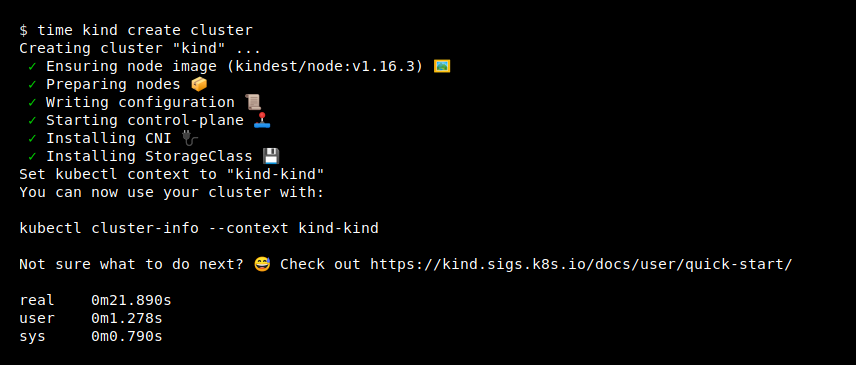
After that, the kind create cluster command will create a single-node cluster. The utility will automatically configure your kubectl, switching the context to the new cluster.
Let's verify it works:
kubectl get nodes
When you no longer need the cluster, delete it with the kind delete cluster command.
Multi-node clusters and advanced configuration
A single-node cluster is fine for simple tests, but real problems in Kubernetes often surface when working with multiple nodes, taints, and affinity. kind can spin up clusters of any complexity using a declarative config.
Create a kind-config.yaml file:
kind: Cluster
apiVersion: kind.x-k8s.io/v1alpha4
nodes:
role: control-plane
role: control-plane
role: control-plane
role: worker
role: worker
Run cluster creation with the config file:
kind create cluster --config kind-config.yaml
As a result, you'll get a highly available cluster with three control-plane nodes and two worker nodes on your machine. And all of this spins up inside regular containers without extra load on your CPUs.
Fast loading of local images
One of the most convenient features for developers is passing local Docker images directly into the cluster without private registries.
Usually the chain looks like this: build an image, push to Docker Hub or a local Nexus, pull into the cluster. kind shortens this step. You build an image locally and immediately load it into the nodes:
docker build -t my-app:v1 .
kind load docker-image my-app:v1
After that, you can safely specify image: my-app:v1 and imagePullPolicy: Never in your application manifest. The cluster will see the image right away.
What it's useful for in practice
The project has already collected over 15,000 stars on GitHub and has become the de facto standard for testing Kubernetes infrastructure. Here are the main scenarios where it saves time:
- Integration testing in CI. Spinning up kind inside GitHub Actions or a GitLab CI runner takes seconds. You can easily spin up a fresh cluster, run tests for a Helm chart or operator, and delete it right after the pipeline completes.
- Local development of controllers and operators. When you're writing your own CRD or operator in Go/Python, you need fast feedback. kind spins up instantly and resets to a clean state easily.
- Learning and experiments. Want to test Ingress controller behavior, a CNI plugin, or see how an application behaves when one of the nodes goes down? Setting up such a playground on a local laptop takes a couple of minutes.
What to keep in mind
Before launching, keep a couple of nuances in mind. kind was primarily created for testing, so don't try to use it in production.
Note that working with local ports requires explicit port forwarding in the cluster config (extraPortMappings). If you need to reach a service inside kind from the host machine, you'll have to specify the required ports in the configuration file in advance.
Otherwise, kind is a great replacement for bulky virtual machines. It's fast, predictable, and resource-friendly.
Related projects