How to Run a Fast Website Parser for LLMs on 14 Megabytes of RAM

The last time I tried to deploy a local stack for web scraping in a RAG pipeline, my modest VPS quickly begged for mercy. The combination of browser engines, task queues, and heavy runtimes instantly devoured gigabytes of memory. If you've also tried self-hosting popular solutions like Firecrawl, you probably remember those system requirements.
Recently, the fastCRW project came to my attention (in the repository it's simply called crw). The author rewrote the familiar scraping and crawling functions in Rust, fitting everything into a compact binary.
What the project can do
fastCRW was conceived as a direct alternative to Firecrawl and Tavily. It fetches web pages by URL and delivers them as clean Markdown, ready for language models to consume, or as structured JSON.
The tool handles four main tasks:
- Scrape: converts a page into Markdown, raw HTML, or a screenshot.
- Crawl: systematically traverses site pages via internal links while respecting robots.txt.
- Map: builds a link map of a resource without fully loading each page.
- Search: searches the internet and immediately exports the results.
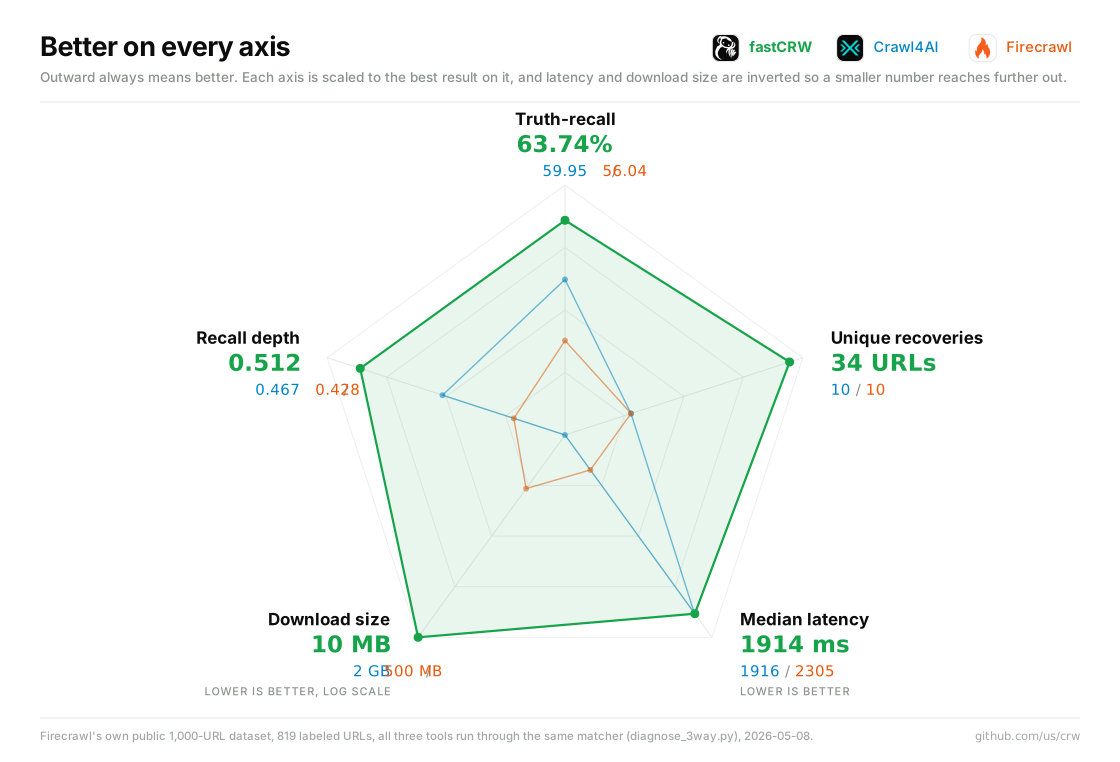
According to benchmarks in the repository, on an open dataset of a thousand addresses, fastCRW showed good loading speed and data extraction completeness, while idling the binary uses only about 14 megabytes of RAM.
How to work with this
You can try the utility locally without registration, or connect a cloud backend with a free tier.
Installation in the terminal:
curl -fsSL https://fastcrw.com/install | sh
Immediately after this, the CLI is available. A simple call will return parsed Markdown directly to the output stream:
crw https://example.com
Integration into code
For developers, there are ready-made libraries. Here's what data collection looks like in Python:
from crw import CrwClient

client = CrwClient()
page = client.scrape("https://example.com", formats=["markdown"])

print(page["markdown"])
For Node.js, the syntax is practically the same:
import { CrwClient } from "crw-sdk";

const client = new CrwClient();
const page = await client.scrape("https://example.com", {
  formats: ["markdown"],
});

console.log(page.markdown);
Connecting to AI assistants via MCP
An additional advantage is Model Context Protocol support. This means the utility can be quickly connected as a tool for Claude Desktop, Cursor, or any other agent.
Command for automatic MCP setup:
npx -y crw-mcp@latest install
After installation, the model gains the ability to independently search the web and read pages without workarounds with external scripts.
Deployment options and licensing
The project has two paths for usage. The first is running a local binary on your own servers under Linux or macOS. The second is a cloud API with ready-made heavy JavaScript rendering and search.
It's important to review the licenses if you plan to deploy the tool in production. The engine itself and the MCP server are distributed under the strict AGPL-3.0 license. Client libraries for Python and TypeScript are open under the familiar MIT.
Who will find this useful
fastCRW is an excellent choice if you're building RAG systems, collecting data for model fine-tuning, or creating autonomous AI agents. The project eliminates the need to maintain a heavy browser fleet just to extract plain text from articles and documentation.
If you're tired of dedicating half your server resources to heavy parsers, try running crw locally — the difference in memory consumption is noticeable from the first seconds.
Related projects