How to save resources and time when launching dozens of OpenShift clusters
Anyone who has deployed Kubernetes or OpenShift to production knows this pain. You want to spin up a small isolated cluster for staging or a separate team, but deploying at least three nodes for master nodes with etcd and controllers is overkill. If you need ten, thirty, or a hundred clusters, cloud bills quickly become astronomical, and the time to create another environment stretches into tens of minutes.
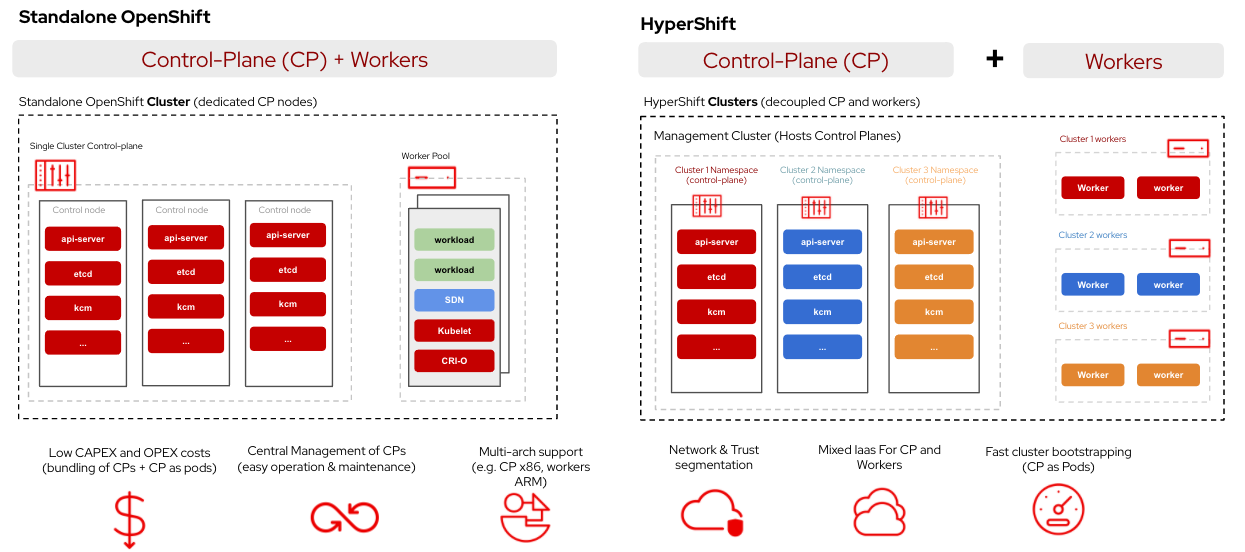
Red Hat engineers ran into the same problem and released a solution as open source. The project is called HyperShift (or Hosted Control Planes). Essentially, it's a layer that moves the cluster's control plane from separate nodes into regular pods within a central management cluster.
Let's explore how this works and who benefits from it.
The core architectural focus
In a classic OpenShift or Kubernetes setup, each cluster has its own dedicated virtual or physical machines for the API server, etcd, controllers, and scheduler. You pay for these nodes even if the cluster is mostly idle.
HyperShift separates the control plane from worker nodes.
You have one large management cluster. When you need to create a new OpenShift cluster for users or development teams, HyperShift deploys the new cluster's management components — etcd, kube-apiserver, openshift-apiserver — as standard pods (Deployment and StatefulSet) right in the management cluster.
Meanwhile, worker nodes are created separately wherever you need them: in AWS, Azure, or on bare metal. They connect to the API server running as a pod in the management infrastructure.
Why change the familiar approach
If you manage multiple clusters, the benefits are immediately apparent in three areas.
First — cost efficiency. Instead of purchasing at least three VMs for master nodes for each individual cluster, you leverage the resources of an existing management cluster. As a result, dozens of control planes run on a single resource pool, achieving much denser packing.
Second — infrastructure provisioning speed. Bootstrapping a full node with an operating system, etcd configuration, and component initialization takes 15 to 45 minutes. Control plane pods in HyperShift start in minutes or even seconds. This completely changes the approach to dev/test environments: a cluster becomes a temporary resource that's easy to spin up for a task and quick to delete.
Third — separation of responsibilities and security. Developers and applications get access only to their worker nodes and API server. They have no physical or network access to the machines running the control plane or etcd. The operations team centrally updates and monitors all API servers in one place.
How it looks in practice
HyperShift maintains 100% compatibility with the standard Kubernetes API and OpenShift Container Platform (OCP) tools. From a developer or CI/CD pipeline perspective, the created cluster is indistinguishable from a regular one: you get a standard kubeconfig and work through kubectl or oc.
Management happens through the CLI utility hypershift or via Custom Resources (CRD), which fits perfectly into GitOps approaches like ArgoCD.
Here's an example of what creating a cluster in AWS via CLI looks like:
hypershift create cluster aws \
  --name dev-cluster \
  --node-pool-replicas 2 \
  --base-domain example.com \
  --pull-secret /path/to/pull-secret.json \
  --aws-creds /path/to/aws-credentials
Behind the scenes, the command will create the CRD HostedCluster and NodePool. HyperShift will spin up control plane pods in the management cluster, provision a pair of EC2 instances in AWS for worker nodes, and link them together.
Under the hood and nuances
The project is written in Go and is actively developed by the OpenShift team. The repository already has over 500 forks, though stars are still relatively few — just over five hundred. This is because HyperShift was for a long time an internal Red Hat technology for the ROSA service (Red Hat OpenShift Service on AWS), and is now gradually becoming the standard for on-premises and multi-cloud installations.
Important features include:
- Complete isolation between the management cluster and client workloads.
- Support for deploying worker nodes across different providers: AWS, Azure, KubeVirt, Bare Metal.
- Unified update vector. Updating the OpenShift version for the control plane can be done independently by changing the version in the CRD without immediately rebooting all worker nodes.
Are there any pitfalls? Of course. The management cluster becomes a single point of failure for the control planes of all your client clusters. If the management cluster goes down, services running on worker nodes will continue to work, but manageability will be lost until the infrastructure is restored. Therefore, the management cluster's reliability and etcd backups have elevated requirements.
Who should take a look
HyperShift isn't necessary if you have a single monolithic cluster for the entire company. But it becomes a lifesaver if:
- You're building a platform for internal teams and want to provide isolated clusters on demand.
- You're selling a SaaS solution based on Kubernetes with physical separation of clients.
- You're tired of paying for idle master nodes in public clouds.
You can try the project using the official documentation at hypershift.pages.dev. You'll need an existing OpenShift 4.x cluster as the management cluster and access to AWS or local VMs for creating workers.
Related projects