Wi-Fi Cards for Hassle-Free Connections
Every time guests come over or colleagues gather for a meetup, the same conversation starts. "What's the Wi-Fi password?" — and you start dictating a weird sixteen-character string, mixing uppercase "O" with zero and lowercase "l" with one. You can, of course, take a photo of the sticker on the router, but it looks pretty bad, and the router is often hidden somewhere in a closet under a pile of cables.

The wifi-card project solves this everyday minor annoyance in a remarkably elegant way. It's a lightweight generator of neat cards with a QR code and wireless network login details.
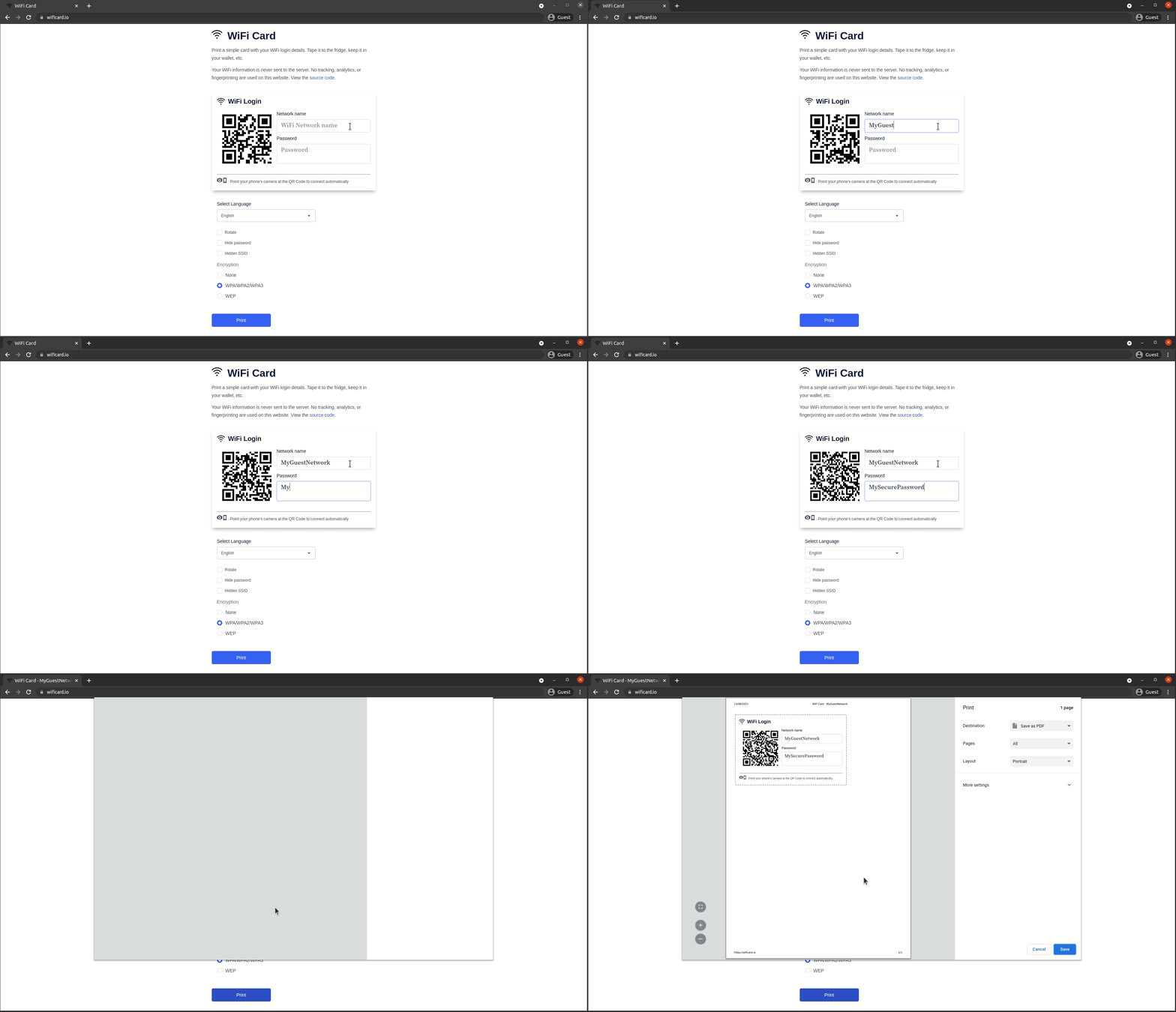
How the Project Works
Essentially, this is a React frontend application that generates the card right in the browser. You enter the network name (SSID), select the encryption type (WPA/WPA2/WPA3, WEP, or open network), type in the password, and hit the print button.
The smartphone camera on iOS or Android reads the resulting QR code with the standard scanner and immediately offers to connect to the network. Guests no longer need to type the password manually.
Extra karma points to the author for the privacy-focused approach. Your data isn't sent anywhere: the service works entirely on the client side, with no server backend and no telemetry collection.

What the Generator Can Do
The card has several nice details that the author thought through in advance:
- Password hiding. If the card will be displayed in a semi-public place, you can hide the password text field, leaving only the QR code.
- Hidden network support (Hidden SSID). The phone will know how to set up the connection even if the network doesn't broadcast its name.
- Print-ready layout. The cards are centered, have a neat border, and look great on regular A4 paper as well as on thick cardstock.
- Multilingual support. The project has been translated into almost 40 languages, including Russian, so guests from any country will understand the card.
How to Run It Yourself
If you don't want to use the public wificard.io site or plan to deploy the utility on your office's internal local network, the project is easy to run locally.
The fastest way is the official Docker image:
make run
The container will start on http://localhost:8080.
For local development or layout tweaks, you'll need Node.js and Yarn:
# Установка зависимостей и запуск dev-сервера
make dev
The server with live-reload will open on http://localhost:3000. The project has Prettier configured, and code formatting is automatically checked before commits via pre-commit hooks.
If you want to add a new translation, just extend the src/translations.js file:
{
   id: 'de-DE',              // код локали
   name: 'German - Deutsch', // отображаемое имя
   rtl: false,               // true для языков с письмом справа налево
   translation: {
      ...
   }
}
Where This Comes in Handy
I printed one of these cards and attached it to the fridge with a magnet at home. It saved a ton of time during the holidays.
Besides home use, the format is perfect for:
- Coworking spaces and office meeting rooms, so visitors don't bother the sysadmins.
- Small cafés or barbershops where guest Wi-Fi is password-protected.
- Rental apartments and hotels, when login credentials are posted right in the entryway.
wifi-card is a great example of a small open source project that takes one narrow task and solves it without a bloated interface and intrusive trackers. The source code is clean, runs with a single command, and saves nerves when receiving guests. If you regularly have to dictate your network password, print yourself one of these cards once.
Related projects