The History and Fall of Create React App, a Web Development Legend
Remember 2016? Trying to quickly spin up a simple React project back then was like assembling a cabinet without instructions. You had to manually wire up Webpack, configure Babel, write configurations for CSS loaders, and set up a local dev server. Setting up the environment took an entire day, even though you hadn't touched a single line of your actual application code.
Then Facebook released Create React App (CRA). A single npx create-react-app my-app command generated a ready-to-go project. No prompts, no dialog boxes, no thousands of lines of configuration.
Today this tool has been officially marked as deprecated and sent into long-term retirement. The React documentation directly advises switching to alternatives like Vite or Next.js. Let's explore how CRA transformed the frontend industry, what was under the hood, and why its era came to an end.

What Create React App Did
The tool's idea fit into the "zero-configuration" concept. The developer got a working stack without needing to dig into build tool settings.
All infrastructure was hidden inside a single package — react-scripts. It was a black box containing Webpack, Babel, ESLint, and PostCSS.
A quick start looked like this:
npx create-react-app my-app
cd my-app
npm start
After about thirty seconds, a page would open in your browser at http://localhost:3000.

The directory structure ended up extremely clean. No .babelrc or webpack.config.js files in the root:
my-app
├── README.md
├── node_modules
├── package.json
├── public
│   ├── favicon.ico
│   ├── index.html
│   └── manifest.json
└── src
    ├── App.css
    ├── App.js
    ├── App.test.js
    ├── index.css
    └── index.js
How It Worked Under the Hood
CRA was built on three principles: a single build dependency, zero initial setup, and an escape hatch command.
Single Dependency
Previously, updating tooling turned into hell. Updated Webpack — Babel broke. Updated Babel — an ESLint plugin stopped working.
In CRA, react-scripts was responsible for everything. Updating this single library updated the entire build chain underneath. It bundled:
- JSX, ES6+, and TypeScript support out of the box
- Automatic vendor prefix injection in CSS via Autoprefixer
- Interactive test runs with Jest and file watching
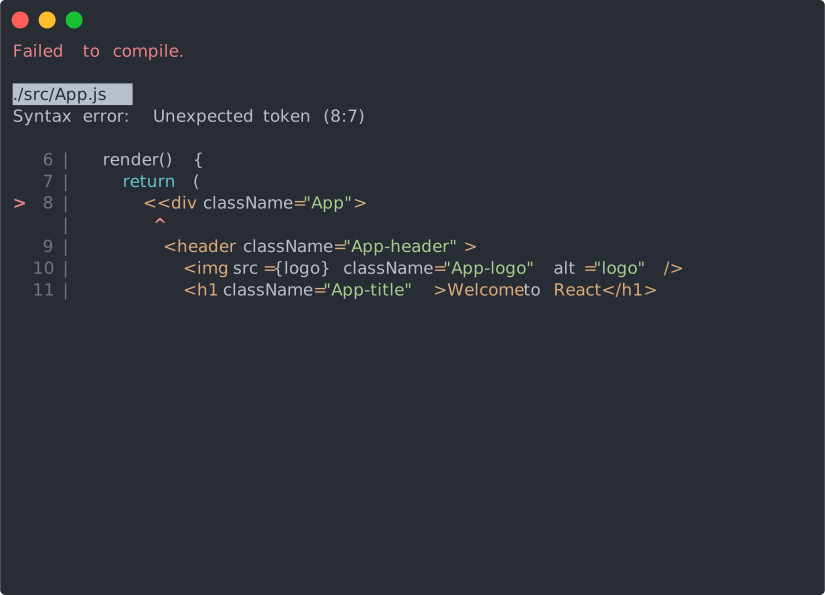
- Build error overlays directly in the browser
If you made a typo in the syntax, CRA showed a clear screen pointing to the exact line and character:
The Eject Mechanism
What if the default configuration wasn't enough? Say, you needed a rare plugin for processing specific file types.
For such cases, the creators added the npm run eject command. It literally turned the project inside out: removed react-scripts and copied all hundreds of lines of Webpack and Babel configs straight into your project.
This was a one-way ticket. There was no way to get the clean structure back, and you had to maintain the sprawling configuration mess yourself.
Why Create React App Became Obsolete
Time worked against CRA. Technologies moved forward, and the tool's architectural decisions turned into weaknesses.
First, speed. Webpack rebuilds and analyzes the entire project from scratch when starting the dev server. When a project grows to hundreds of components, startup and hot reload take tens of seconds. Vite, which came later, uses native browser ES modules and builds code on the fly with the blazing-fast Go compiler esbuild.
Second, the shift toward SSR and server components. CRA could only build client-centric Single Page Applications (SPA) — an empty HTML file that filled with scripts in the user's browser. Good SEO and a fast first paint required server-side rendering, which CRA simply couldn't provide.
Third, bloated size. The node_modules folder for a freshly created project weighed hundreds of megabytes, and installing dependencies took a couple of minutes even on a fast connection.
What to Use Instead of CRA
The official React guide gives clear directions:
- Vite — if you need a fast SPA, a pet project, or a personal blog without server-side rendering. It starts in milliseconds and runs noticeably faster.
- Next.js or Remix — if you're building a full-fledged production app with SSR, routing, image optimization, and server components.
- Expo — if you plan to write a cross-platform mobile app with React Native.
Memory of a Legend
Create React App did the most important thing: it set a high standard for Developer Experience. It showed the entire industry that building a web application could be simple and not require deep Webpack knowledge on your very first day of work.
Starting new serious projects on CRA today has no practical value. But if you stumble upon a three-year-old tutorial or need to quickly spin up a sandbox — CRA will still work.
Related projects