Robotics and Computer Vision in Python Without Paid MATLAB Licenses
Why Robotics Engineers Stuck with MATLAB for So Long
If you studied or worked in robotics five to ten years ago, you probably remember the Robotics Toolbox for MATLAB. Peter Corke created it back in the 1990s. For a long time, this library remained the standard for academia and engineering labs. Need to build a spatial transform matrix, plot a manipulator trajectory, or compute inverse kinematics—you'd immediately open MATLAB.
The main drawback is immediately apparent: licensing costs. Integrating MATLAB code into modern production pipelines also presents significant challenges. Several years ago, the author completely rewrote the tools in Python, and in 2023 released the third edition of the book Robotics, Vision & Control along with the open RVC3-python repository.
What's Included
The repository contains examples and a unified wrapper for four specialized libraries:
- Robotics Toolbox handles kinematics, dynamics, and manipulator trajectories.
- Machine Vision Toolbox tackles image processing, feature point detection, and stereo vision.
- Spatial Maths Toolbox takes care of 3D transformation math, quaternions, and Lie groups SE(3)/SO(3).
- BDSim helps simulate dynamic systems and block diagrams.
All source code is distributed under the MIT license. To eliminate manual dependency management, the creators bundled everything into a single package.
Quick Start via Interactive Console
The developers made a convenient CLI utility rvctool. It spins up an IPython session with all necessary modules, math functions, and ready-made models of popular hardware pre-imported.
Installation takes one command:
pip install rvc3python
Then launch the working environment:
rvctool
The console takes cues from MATLAB's syntax experience. If you omit the semicolon at the end of a line, the expression result prints immediately to the terminal. At the same time, you have full access to regular Python with all its conveniences.
Manipulator Kinematics in a Few Lines
Let's define a model of the Franka Emika Panda industrial robot, compute its flange pose, and solve the inverse kinematics problem.
panda = models.ETS.Panda()
T = panda.fkine(panda.qz)
sol = panda.ikine_LM(SE3.Trans(0.4, 0.5, 0.2) * SE3.Ry(np.pi/2))
The fkine method computes forward kinematics and returns an SE3 rigid transformation matrix. The ikine_LM method finds joint angles using the Levenberg-Marquardt algorithm.
Calling the panda.teach(panda.qz) method opens a graphical window where you can move joint sliders and watch the robot's poses change.
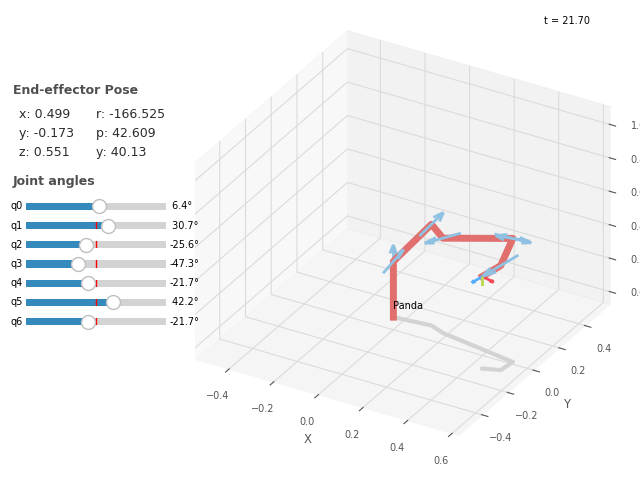
Image Processing and Computer Vision
For basic computer vision tasks, there's no need to hook up bulky external frameworks. For example, SIFT keypoint matching on two frames looks like this:
sf1 = Image.Read("eiffel-1.png", mono=True).SIFT()
sf2 = Image.Read("eiffel-2.png", mono=True).SIFT()
matches = sf1.match(sf2)
matches.subset(100).plot("w")
Under the hood, it uses battle-tested NumPy and SciPy. If you need deep learning examples from Chapter 11 of the book (such as neural network segmentation), PyTorch is pulled in with a separate flag:
pip install rvc3python[pytorch]
Control System Simulation
The bdsim package deserves special mention. It's an attempt to create a Simulink alternative without the bulky development environment.
Block diagrams are created directly in Python code or assembled visually through the graphical editor bdedit. Data is saved to regular JSON files with the .bd extension. The repository already includes 25 ready-made tutorial models from the book, which you can run directly from rvctool.
Things to Keep in Mind Before Running
Before getting started, there are three points worth noting:
- Python 3.8 or higher is required due to active use of type annotations.
- Apple Silicon chips (M1/M2/M3) may have rendering quirks with Open3D. The project wiki has a separate page with workarounds.
- Code works in Jupyter Notebook and Google Colab, but complex 3D animation may lag due to the specifics of frame transmission to the web interface.
Who Will Find This Repository Useful
If you teach robotics, are writing a thesis, researching navigation algorithms, or want to quickly test a hypothesis without setting up heavy environments like ROS 2, RVC3-python will save you a lot of time. The project eliminates the need to write custom wrappers for transformation matrices and provides a ready-made foundation for prototyping.
Related projects