Rewriting Kubernetes from Scratch in Rust: A Look at the Rusternetes Project
Jokes about systems programmers trying to rewrite everything in Rust have long become a classic trope. Usually, such endeavors end at the "Hello World" stage or parsing basic configurations. But with Rusternetes, the story turned out completely different. The project's author went after Kubernetes itself and rewrote it from scratch.
This isn't a wrapper around Go code or a stripped-down test mock. The repository contains a full-fledged control plane and node components: API server, scheduler, controller manager, kubelet and kube-proxy. Everything is written in Rust without third-party Go dependencies.
The project contains over 216,000 lines of code, split across 10 crates, 31 controllers, and more than 3,100 unit tests. The developers verify compatibility using the official Kubernetes e2e test suite (v1.35) via Sonobuoy. Currently, Rusternetes successfully passes 94% of conformance tests (415 out of 441).
Why Another Kubernetes
The original Kubernetes is written in Go and requires considerable resources. To spin up even a minimal local cluster like minikube or k3s, you have to allocate a virtual machine or run several heavy containers with etcd.
Rusternetes solves this problem with flexible deployment options. It has three operating modes:
- Classic cluster with etcd. All components run in separate containers and communicate with an etcd cluster.
- Replace etcd with SQLite or Redis. Instead of etcd, Rhino is connected—an etcd-compatible gRPC server written in Rust. The API settings and binaries remain the same; only the compose file changes.
- All components in a single binary. API server, scheduler, controller manager, kubelet, and kube-proxy run as Tokio async tasks within a single process. The cluster state is written to a single SQLite file or Redis instance.
The All-in-One mode solves the pain points of local development, CI/CD pipelines, and running the orchestrator on edge devices (Edge/IoT), where every megabyte of RAM counts.
Built-in Web Interface
Rusternetes has a built-in monitoring dashboard. It's embedded directly in the API server binary, so nothing extra needs to be configured or deployed.
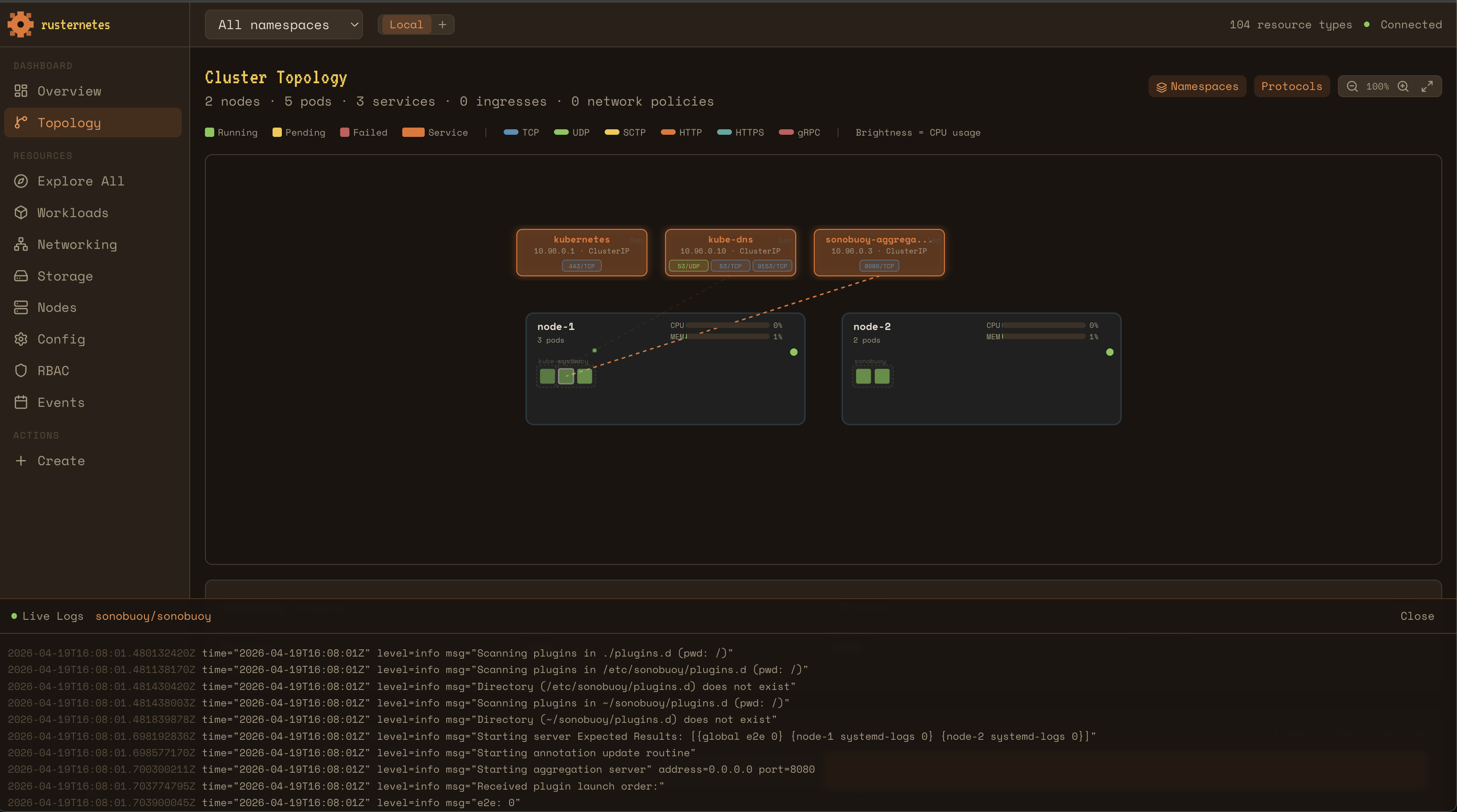
The interface shows a cluster topology map with traffic animation, a CPU and RAM load heatmap, container log streaming, and allows you to view ConfigMap, Secrets, RBAC manifests, and deployment status.
What's Inside: Project Architecture
The repository is organized as a Cargo workspace of 10 crates.
┌───────────────────────────────────────────────────────────────┐
│                       Control Plane                           │
│                                                               │
│  ┌──────────────────┐  ┌──────────────┐  ┌────────────────┐   │
│  │  API Server      │  │  Scheduler   │  │  Controller    │   │
│  │  Axum + TLS      │  │  Affinity    │  │  Taints        │   │
│  │  REST + Watch    │  │  Preemption  │  │  Manager       │   │
│  │  RBAC + Webhooks │  │              │  │  31 control    │   │
│  │  Web Console     │  │              │  │  loops         │   │
│  └────────┬─────────┘  └──────────────┘  └────────────────┘   │
│           │                                                   │
│  ┌────────▼─────────┐                                         │
│  │ Storage          │                                         │
│  │ etcd|SQLite|Redis│                                         │
│  └──────────────────┘                                         │
├───────────────────────────────────────────────────────────────┤
│                       Node Components                         │
│                                                               │
│  ┌──────────────────┐  ┌──────────────────────────────────┐   │
│  │  Kubelet         │  │  Kube-Proxy                      │   │
│  │  bollard (Docker)│  │  iptables routing                │   │
│  │  Probes+Volumes  │  │  ClusterIP/NodePort/LB           │   │
│  └──────────────────┘  └──────────────────────────────────┘   │
└───────────────────────────────────────────────────────────────┘
Each part of the cluster is responsible for its own area of work:
- api-server: Written using the Axum framework. Handles REST API, Watch API via Server-Sent Events, validating and mutating webhooks, CEL rule evaluation, and RBAC authorization.
- scheduler: Selects nodes for pods based on affinity/anti-affinity, taints, tolerations, and resource constraints.
- controller-manager: Contains 31 reconciliation loops. Handles Deployment, ReplicaSet, StatefulSet, DaemonSet, Job, CronJob, HPA, Ingress, and CRDs.
- kubelet: Communicates with Docker or Podman via the
bollardcrate. Tracks container lifecycle, runs liveness and readiness probes, and mounts volumes (hostPath, configMap, secret). - kube-proxy: Manages iptables rules for ClusterIP, NodePort, and LoadBalancer service types.
How to Run for Testing
Building requires a recent Rust, the protobuf compiler, and Docker or Podman.
The fastest way to test is the All-in-One mode with SQLite:
cargo build -p rusternetes
./target/release/rusternetes --data-dir ./cluster.db
If you want to spin up a more honest emulation of a multi-component environment via Docker Compose:
git clone https://github.com/calfonso/rusternetes.git
cd rusternetes

export KUBELET_VOLUMES_PATH=$(pwd)/.rusternetes/volumes
docker compose -f docker-compose.sqlite.yml build
docker compose -f docker-compose.sqlite.yml up -d
bash scripts/bootstrap-cluster.sh

export KUBECONFIG=~/.kube/rusternetes-config
kubectl get nodes
After bootstrap, you can interact with the cluster using the standard kubectl utility.
Practical Usefulness and Conclusions
Bringing Rusternetes into production right now isn't worth it: although the project passes 94% of e2e tests, it remains experimental. Nevertheless, it has three excellent use cases.
First, it's an ideal study guide for learning Kubernetes internals. Reading Rust source code with clear module breakdown is much more pleasant than digging through the huge monolith of the original K8s.
Second, running a cluster in a single process with SQLite saves resources on test environments and in CI/CD.
Third, the project is useful for running orchestration on weak hardware like Raspberry Pi or embedded IoT platforms.
If you're interested in systems development in Rust or how orchestrators work, the project definitely deserves a star on GitHub.
Related projects