Gobang - The TUI Database Client You've Been Waiting For

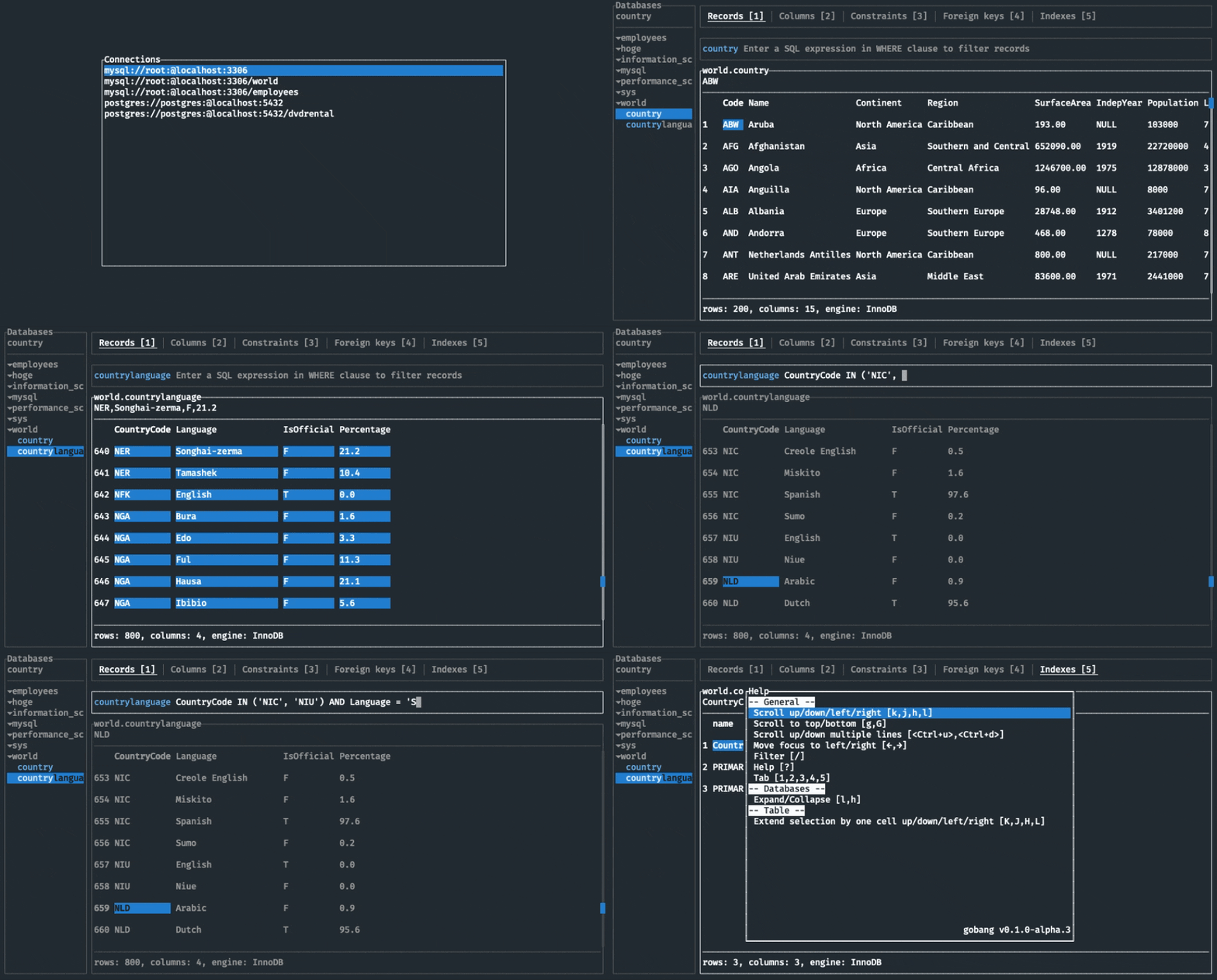
Do you know the feeling of having to switch between heavyweight GUI clients for different databases? Or when you need to quickly check a table structure but only have a terminal at hand? Japanese developer TaKO8Ki created an elegant solution — Gobang, a TUI tool for working with MySQL, PostgreSQL, and SQLite.
Why Gobang Is Not Just Another Client
Gobang stands out from other tools with three key features:
- Full mouse-free operation — all actions are performed with the keyboard, with convenient vim-like hotkeys
- Cross-platform compatibility — works equally well on macOS, Windows, and Linux
- Minimalist interface — nothing extra, just data and convenient navigation
Who Will Find Gobang Useful
- Developers who frequently work with different databases
- Database administrators who value speed
- Fans of terminal tools and minimalist interfaces
- Those tired of heavyweight GUI clients like DBeaver or TablePlus
5 Reasons to Try Gobang Right Now
- Quick access to data structure — with one press you can view tables, columns, indexes, and constraints
- Convenient filtering — just like in vim, through the
/command - Easy data copying — the
ykey copies the cell value to the clipboard - Flexible configuration — all connections are stored in a simple TOML file
- Multiple database support — MySQL, PostgreSQL, and SQLite out of the box
How It Works Technically
Gobang is written in Rust, which guarantees:
- High performance
- Minimal resource consumption
- Reliable operation
The project uses the following libraries:
tui-rsfor building the interfacesqlxfor working with databasesclapfor command-line argument parsing
Installation in a Minute
Depending on your system:
# Для пользователей Homebrew (macOS/Linux)
brew install tako8ki/tap/gobang

# Для Windows через Scoop
scoop install gobang

# Через Cargo (если есть Rust)
cargo install --version 0.1.0-alpha.5 gobang
Practical Use: From My Experience
As a developer working with microservices, I appreciated Gobang for:
- The ability to quickly switch between different databases
- Convenient data schema viewing without extra clicks
- Working directly in the terminal, without switching between windows
Especially useful when:
- Debugging migrations
- Analyzing the structure of someone else's database
- Quick data verification during development
What's Next for Gobang
The project is still in alpha, but already very useful. The developer's plans include:
- Adding a SQL editor
- Support for additional databases
- Theme customization
- Hotkey customization
Is It Worth Trying?
Definitely yes, if:
- You work with databases from the terminal
- You value minimalist and fast tools
- You frequently switch between different databases
Gobang is a fresh take on database management, combining the power of Rust with the convenience of TUI. The project is actively developing and has already gathered over 3,000 stars on GitHub. Why not add it to your tool arsenal today?
Related projects