How to Turn Claude Code Tasks into a Visual Kanban Board
When I first ran Claude Code to refactor a monolith, the terminal quickly turned into an endless waterfall of logs. The model cheerfully decomposed the task into a dozen steps, ran tests, fixed code, and periodically got stuck on dependencies. Figuring out from that mess of output which subtask was currently running and what was blocking it became a quest of its own.
Tracking this in the terminal is inconvenient. The claude-task-viewer repository solves exactly this problem by spinning up a local web dashboard in Kanban board and timeline formats.
What This Project Is About
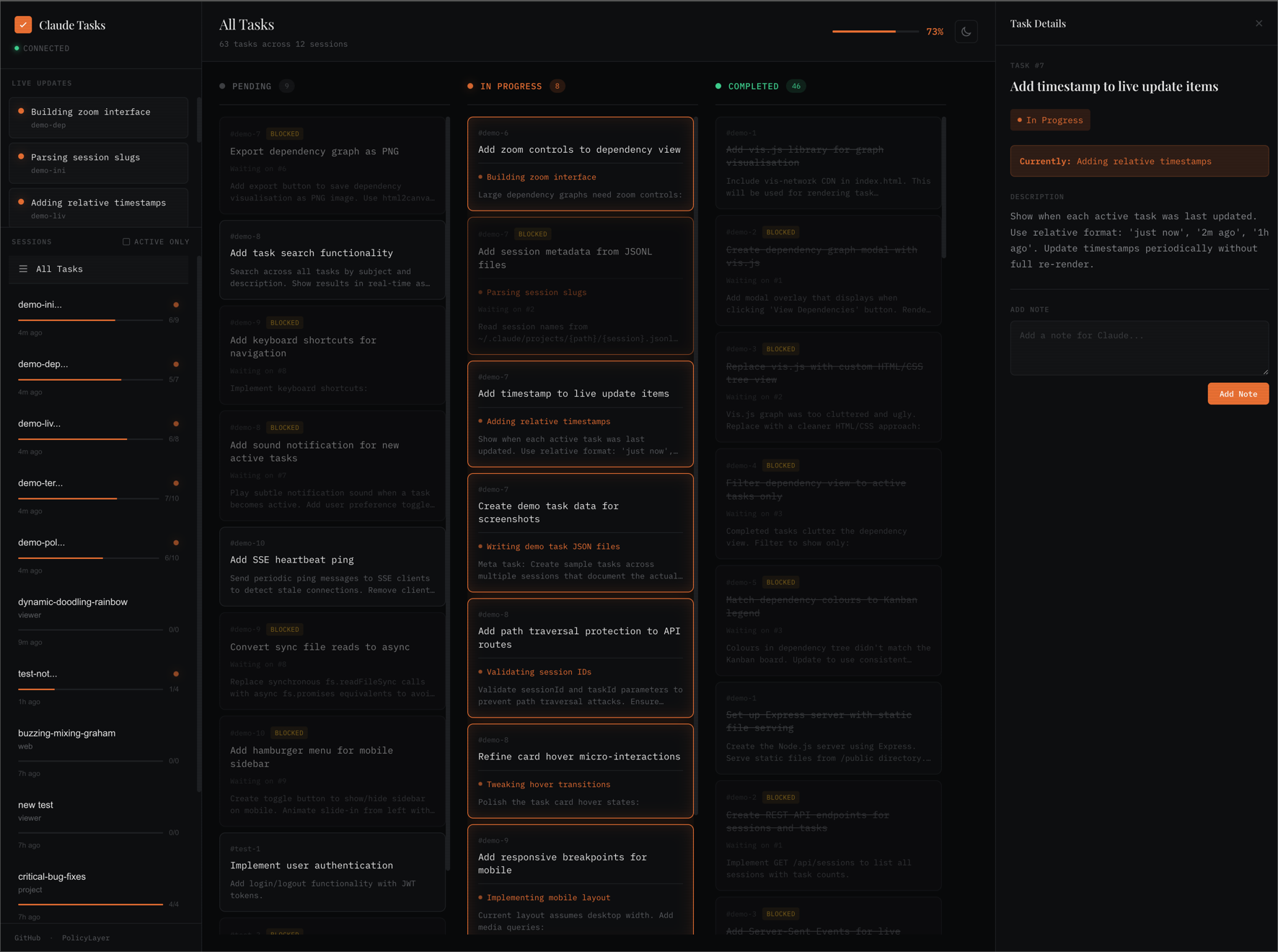
claude-task-viewer is a lightweight local interface for observing Claude Code tasks. The author's core idea is simple: observation instead of control. The utility doesn't try to set tasks or change ticket statuses on behalf of the neural network. It merely reads session state and visualizes the subtask graph that the agent generates.
The tool is suited for developers who actively run Claude Code in the background on long tasks and don't want to constantly switch to the terminal window to check progress.
Key Features in Practice
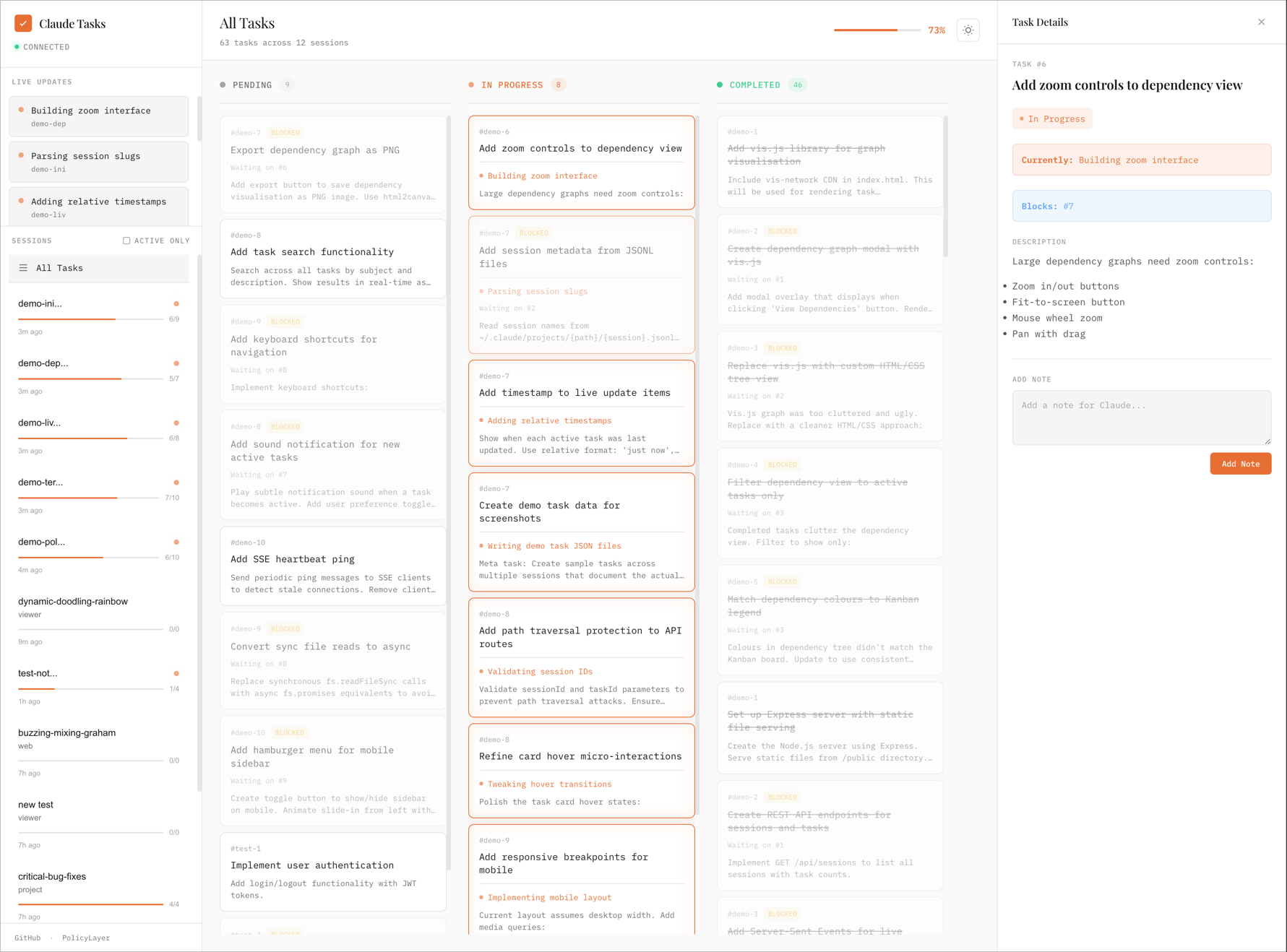
The interface looks minimalist but covers all basic work tracking scenarios.
Clear Task Status and Dependencies
The dashboard shows columns with statuses: pending, in progress, and completed. If one task blocks another, the card displays blockedBy and blocks relationships. This helps immediately see the critical path and understand why the agent got stuck at a particular step. The card also shows the activeForm field, where you can see the model's exact current action at that very second.
Kanban and Timeline as a Gantt Chart
In the header, you can switch the view from the board to a timeline. Tasks are arranged as horizontal bars from the moment of creation to the last update. The time axis scales automatically: seconds, minutes, or hours depending on session duration. Hovering the cursor shows the exact timestamp and total execution time.
Sound Alerts and Desktop Notifications
When Claude completes a long task, the browser plays a two-tone sound and sends a system notification. Clicking the notification takes you directly to the session card. This is convenient when the agent runs a build or test suite for 15-20 minutes while you're writing documentation in another tab.
Automatic Archiving and Quick Search
Sessions with no active tasks that haven't changed for over a week automatically move to a collapsed archive section. The board doesn't get cluttered with old experiments. At the same time, the built-in fuzzy search looks through session names, task descriptions, and project paths even inside the archive.
How Data Exchange Works
Under the hood, there are no heavy databases. Claude Code stores tasks locally in the ~/.claude/tasks/ directory, where each session has its own folder with JSON files:
~/.claude/tasks/
  └── {session-uuid}/
      ├── 1.json
      ├── 2.json
      └── ...
A typical task file structure looks like this:
{
  "id": "1",
  "subject": "Implement user authentication",
  "description": "Add JWT-based auth with refresh tokens",
  "activeForm": "Setting up auth middleware",
  "status": "in_progress",
  "blocks": ["2", "4"],
  "blockedBy": []
}
The Node.js backend monitors the filesystem and streams changes to the browser via Server-Sent Events (SSE). No constant polling or manual page refreshes: as soon as Claude Code creates or edits a JSON file, the card on the board moves instantly.
A simple REST API is provided for interacting with the interface. Through it, you can request a list of sessions, view raw data, or delete a stuck task:
# Получить список сессий
curl http://localhost:3456/api/sessions

# Забрать все задачи конкретной сессии
curl http://localhost:3456/api/sessions/:id
How to Launch
You can run the utility without prior installation via npx:
npx claude-task-viewer
After startup, the server will open at http://localhost:3456.
If the default port is occupied or you have multiple Claude profiles, parameters are passed via environment flags:
# Запуск на другом порту с автоматическим открытием вкладки в браузере
PORT=8080 npx claude-task-viewer --open

# Использование нестандартного каталога конфигурации
npx claude-task-viewer --dir=~/.claude-work
To build from source, just clone the repository:
git clone https://github.com/L1AD/claude-task-viewer.git
cd claude-task-viewer
npm install
npm start
You can control the board with the keyboard: the ? key brings up help, D deletes the selected card with dependency checking, and Esc closes modal windows.
The Bottom Line
claude-task-viewer does exactly one thing: it brings transparency to Claude Code processes without unnecessary complexity. There are no overloaded settings or attempts to impose its own project management workflow.
If you regularly assign complex tasks to the agent and are tired of squinting at raw logs in the console, it's worth keeping this utility open in a second browser tab. It saves attention and immediately shows what the model is busy with.
相关项目