How to Intercept HTTPS Traffic on Android Without Certificates and Manual Proxy Configuration
Every Android developer has spent at least half a working day setting up a network debugger at some point. The scenario is always the same: you need to see what the app is sending to the backend, and instead you get SSLHandshakeException.
Then the ritual begins. First, you generate a self-signed CA certificate. Then you attempt to install it in the trusted certificates store on your test device. Starting with Android 7.0 (API 24), the system ignores user certificates by default, so you need to modify network_security_config.xml, configure trust-anchors for debug builds, and rebuild the APK. If your project has SSL Pinning configured or you're testing on Android 14, where system certificate handling has been made even more restrictive, a simple response header check turns into a separate engineering task.
The atlantis-android library from the Proxyman team solves this headache radically: it eliminates the need to configure a proxy and touch the device's system certificates.
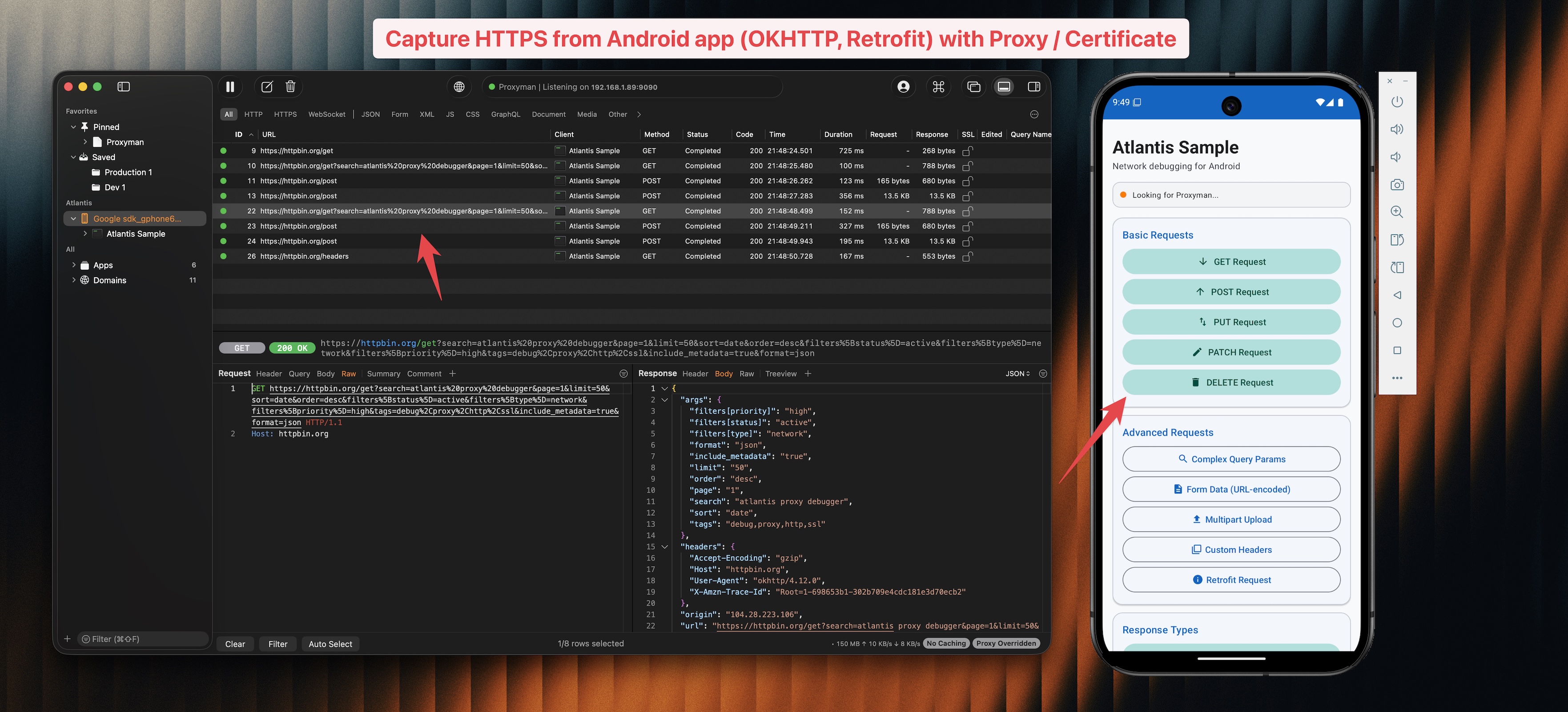
What's the idea behind Atlantis
Traditional tools like Charles, Fiddler, or Proxyman itself typically work using a Man-in-the-Middle (MitM) scheme. The device redirects all traffic to the computer's IP address, and the desktop application intercepts requests, decrypts them with its own certificate, and forwards them. This is exactly why certificate trust issues and Wi-Fi proxy configuration become problematic.
Atlantis works differently. It's a compact Kotlin library that embeds directly into the app's debug build as a network client interceptor. The interceptor reads request and response parameters at the moment when the app has already formed them or just decrypted them. The library then serializes this data, compresses it via GZIP, and transmits it directly to the Proxyman app on macOS via a separate local socket.
As a result, you get a detailed log of network activity without any intervention in Android settings, without manifest modifications, and without certificate manipulation.
What the library can do
Atlantis covers most everyday network debugging tasks:
- Intercepting regular HTTP and HTTPS requests directly from OkHttp.
- Logging WebSocket events: connection opening, sending messages, incoming packets, and session closing.
- Full compatibility with popular network clients, including Retrofit 2.9+ and Apollo Kotlin 3.x/4.x.
- Automatic discovery of a running Proxyman instance on the local network via Network Service Discovery (mDNS).
If you're running the project on the official Android emulator, the library can connect to the host machine directly, bypassing network discovery.
How to integrate into your project
The library requires Android with API 26 (Android 8.0) or higher, OkHttp version 4.x or 5.x, and Kotlin version 1.9 or higher.
First, add the JitPack repository to your settings.gradle.kts file:
dependencyResolutionManagement {
    repositories {
        google()
        mavenCentral()
        maven { url = uri("https://jitpack.io") }
    }
}
After that, add the dependency to your app's build.gradle.kts. It's best to add it strictly via debugImplementation to ensure debug code doesn't end up in release builds:
dependencies {
    debugImplementation("com.github.ProxymanApp:atlantis-android:v1.0.0")
}
The library is also available in Maven Central under the artifact com.proxyman:atlantis-android:1.0.0.
Quick start
Integration takes just a few lines of code. First, initialize Atlantis in your Application class:
class MyApplication : Application() {
    override fun onCreate() {
        super.onCreate()

        if (BuildConfig.DEBUG) {
            Atlantis.start(this)
        }
    }
}
Then add the interceptor to your OkHttpClient configuration:
val okHttpClient = OkHttpClient.Builder()
    .addInterceptor(Atlantis.getInterceptor())
    .build()
If you're using Retrofit, pass this okHttpClient instance to Retrofit.Builder(), and all requests will automatically appear in the Proxyman window.
Working with WebSocket
If your app uses websockets, the standard OkHttp interceptor won't be enough, since messages are transmitted within an already open connection. For such cases, the library provides a special wrapper for the listener:
val originalListener = object : WebSocketListener() {
    override fun onOpen(webSocket: WebSocket, response: Response) {
        // обработка открытия
    }
    override fun onMessage(webSocket: WebSocket, text: String) {
        // входящее сообщение
    }
}

val wrappedListener = Atlantis.wrapWebSocketListener(originalListener)
okHttpClient.newWebSocket(request, wrappedListener)
Now you can observe incoming and outgoing frames in real time in the desktop client.
What's inside
The library's source code is minimalistic and open under the Apache 2.0 license. The repository has almost no heavy third-party dependencies.
The architecture consists of several clear modules:
AtlantisInterceptorandAtlantisWebSocketListenerintercept data at the network stack level.GzipCompressionandBase64Utilspackage request bodies and binary payloads, reducing the load on the communication channel between the phone and computer.NsdServiceDiscoveryis responsible for discovering the_proxyman._tcpservice on the local network via the Android NSD API.Transporteropens a TCP connection to the desktop application and forwards structured packets.
Thanks to traffic compression, debugging has virtually no impact on the app's performance.
Limitations to be aware of
Before integrating the library, there are two things to consider.
First, Atlantis is tied to the Proxyman desktop client. If your team is accustomed to using Wireshark or Charles exclusively, you won't be able to forward data there through this interceptor.
Second, the library intercepts traffic only from clients where you explicitly added the interceptor. If a third-party SDK in your app makes network calls through its own HttpURLConnection or Cronet, Atlantis won't see those requests. For complete analysis of third-party binaries, you'll still need to use a classic MitM proxy.
Is it worth trying
If your main development machine runs macOS and you already use Proxyman for debugging iOS or backend, atlantis-android saves a lot of time. You forget forever about setting up Wi-Fi proxy on test phones, resetting certificates, and modifying network_security_config. Just build a debug APK, open the app on your phone, and the entire network exchange immediately appears on your screen.
Related projects