How to Tame Chaos in AI Development with Comet
A familiar story: you launch an AI agent, it cheerfully starts writing code, and ten minutes later you discover it's "hallucinating," overwriting working files, or just stuck in an infinite loop on the same error. We're used to working with LLMs in coding being either short chat sessions or unpredictable autonomous agents that need constant supervision.
Recently I stumbled upon an interesting project called Comet. It's not just another wrapper around the OpenAI or Claude API. The developers position it as a "resumable long-running task workflow." In plain terms: it's a framework that makes the neural network work according to a strict protocol, doesn't lose context when stopped, and goes through all the stages of a normal development cycle — from design to verification.
Why bother when you have Cursor or Claude Code
It seems like why build something complex when modern IDEs and CLI tools handle things well enough? The problem is discipline. A regular agent often jumps straight into code, skipping the proper design phase. Comet enforces an architectural approach.
The project combines two methodologies: OpenSpec (what we're doing) and Superpowers (how we're doing it). The entire process is broken down into five phases:
- Open — preparing the proposal and breaking down tasks.
- Deep Design — detailed design and creating the Design Doc.
- Plan & Build — creating the implementation plan and actual commits.
- Verify & Finish — testing and verification report.
- Archive — synchronizing specifications and archiving changes.
Interestingly, the agent physically cannot move to the next stage until the "guard" (verification script) triggers. For example, it won't let you close a task if there's no test report or if the .comet.yaml structure is violated.
How it works in practice
Installation is standard for Node tools:
npm install -g @rpamis/comet
cd your-project
comet init
After initialization, configs and a set of skills for the selected platform will appear in your project (more than 30 platforms are supported, including Claude Code, Cursor, Windsurf, and even GitHub Copilot).
The main feature I liked is the /comet command. It works as an entry point with memory. If you paused work, went for coffee, or rebooted your computer, /comet will determine which phase the process stopped at and offer to resume exactly from that point. You don't need to re-feed the context to the agent or remind it what you were planning to do.
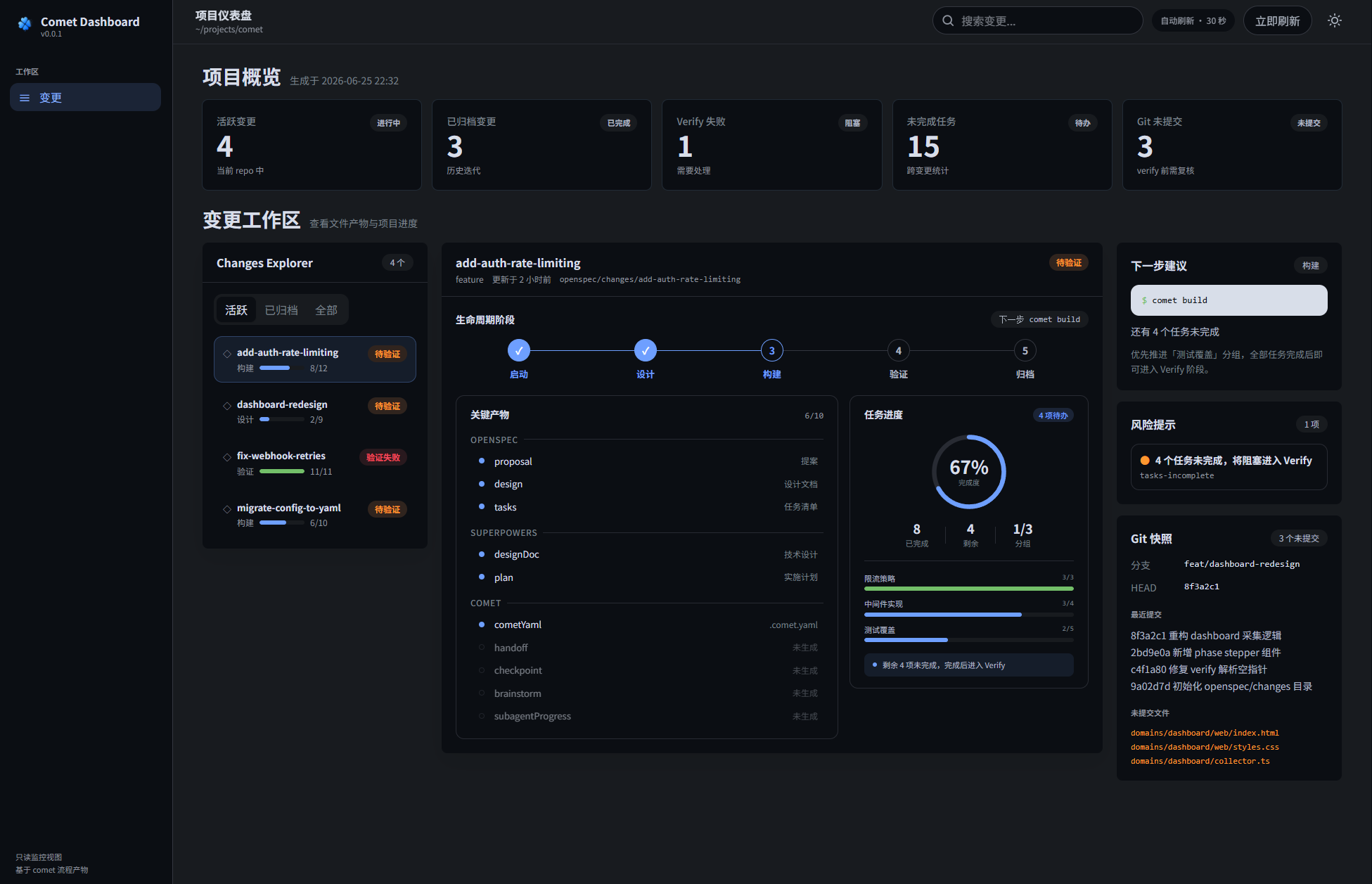
By the way, for visual learners there's comet dashboard. It's a local server that opens a neat dashboard in your browser showing all active changes, task progress, and archive history. It looks much nicer than an endless log in the terminal.
The Three Pillars of Comet
In version 0.4.0, the developers highlighted three main scenarios that cover 90% of needs:
- Coding via
/comet: The main workflow where the agent guides you step by step through the stages. - Creating skills via
/comet-any: Allows you to build your own chains of actions (skills) and package them into distributions. - Evaluation via
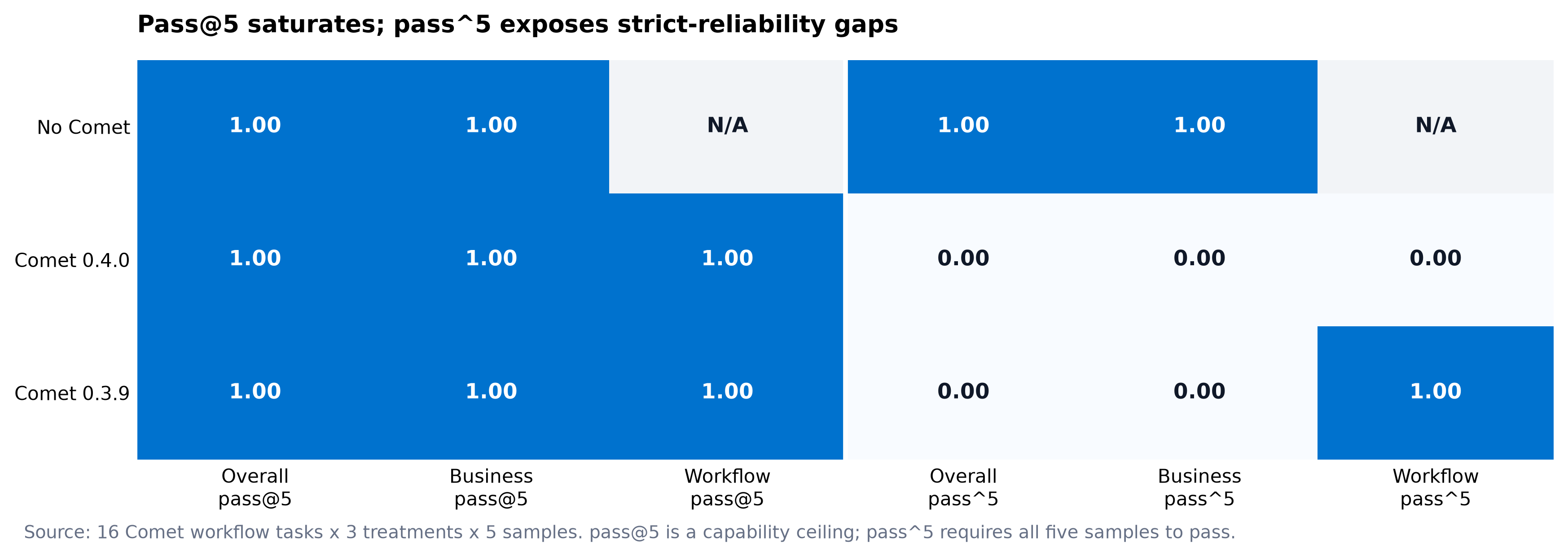
comet eval: This is probably the most technically powerful part. Instead of guessing "did my agent get smarter," you run it through tests with Pass@k and Pass^k metrics. You can even integrate this with LangSmith for serious production monitoring.
Technical Internals
The project is written in JavaScript/TypeScript and runs as a pure Node.js runtime. This is a big plus because previously similar tools often required Bash or WSL on Windows, which created extra headaches during setup.
The Comet architecture is built on state management through YAML files. In the openspec/changes/<name>/ folder, a .comet.yaml file is created that stores everything: from the current phase and selected build mode to documentation paths and verification results.
An interesting detail for those who are token-conscious: Comet has a context_compression mode. During the transition from design to build, the comet-handoff.mjs script compresses the context, removing the excess. According to the author's tests, this saves about 25–30% of input tokens without losing code quality. For large projects on Claude 3.5 Sonnet, this can save a decent amount on your balance.
Is it worth trying
Comet is a tool for those who have outgrown the "write me a Python function" stage and want to build something complex and maintainable with AI. It's right for you if:
- You're tired of chaotic agent edits that break the project in unexpected places.
- You need transparency: what exactly the agent is doing right now and why.
- You want to automate routine tasks like updating the Design Doc after making code changes.
From the downsides, I can note that the learning curve is still higher than a regular chat. You need to get used to the openspec/ and docs/superpowers/ folder structure. But if you're working on a long-term project, this discipline will pay off in the absence of technical debt, which neural networks generate very quickly.
You can check out the source code and documentation in the rpamis/comet repository. The project is actively developing, and judging by the commits, the authors are serious about making it a reliable "framework" for autonomous engineers.
Powiązane projekty