A Convenient Web Interface for the Console AI Agent pi
Working in the terminal is great as long as the context fits on one screen. The console coding agent pi is excellent for quick edits, but an hour-long debugging session turns into chaos of function calls, generated code, and error messages. Good luck finding the point in that stream where the model went off track, or remembering which file it was editing twenty minutes ago.
Developer agegr solved this problem in a very practical way: they wrote a local web shell called pi-web. The tool reads pi agent log files and spins up a convenient visual dashboard in the browser.
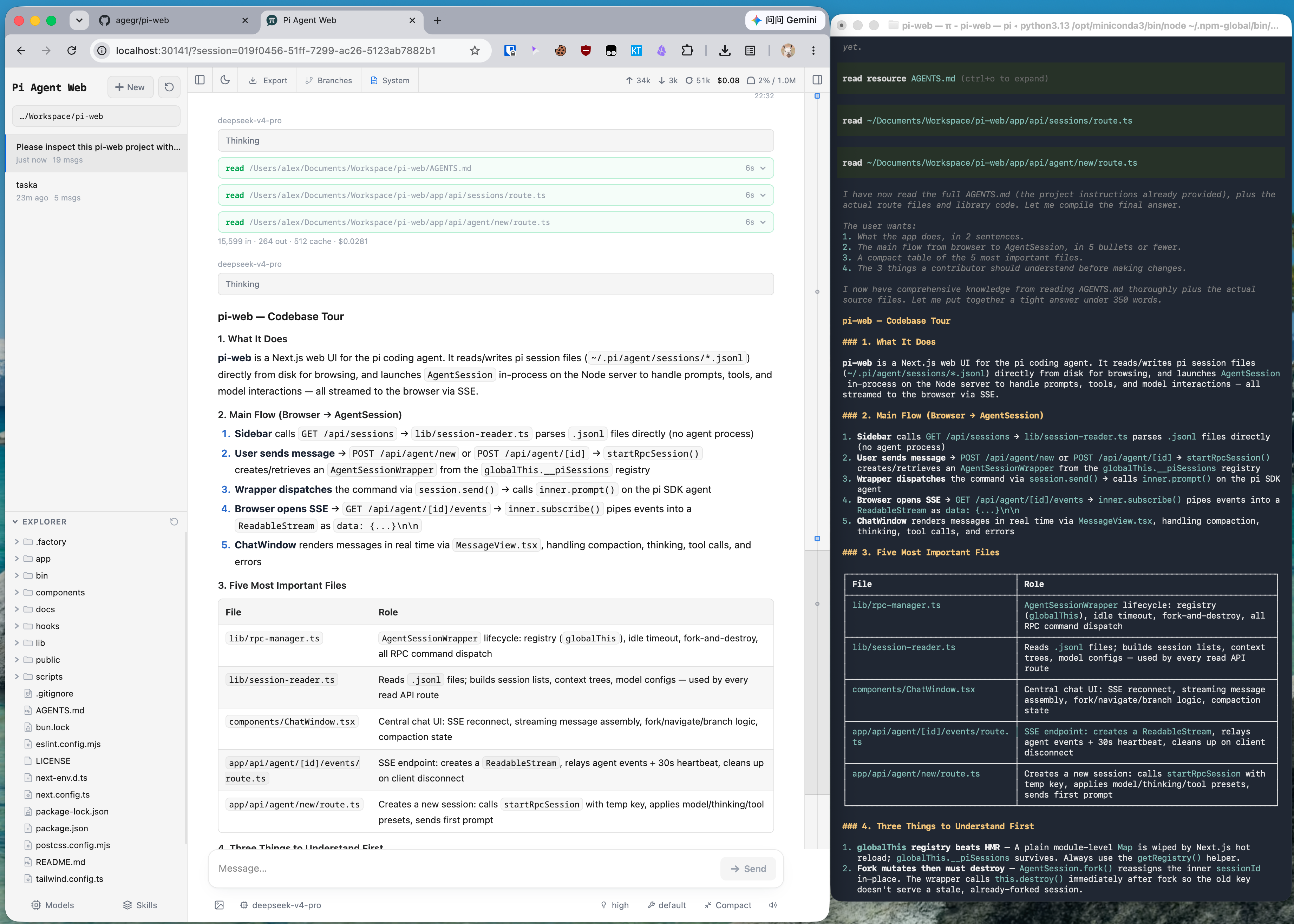
What is pi-web and how it works
At its core, pi-web is a wrapper around the console agent pi. Instead of rewriting the agent itself, the author created a frontend that parses .jsonl files from the ~/.pi/agent/sessions directory.
The application runs completely locally. You can launch it without any prior installation with a single command:
npx @agegr/pi-web@latest
The server will start on port 30141 and automatically open a tab in the browser. If the port is occupied or you need local-only access, the parameters are easily changed via flags:
pi-web --port 8080 --hostname 127.0.0.1
What changes in the workflow
The main problem with console AI dialogues is the loss of structure. In the terminal, everything looks like a solid wall of text. The web interface breaks down the same session into clear, visual blocks.
Visual session branching
When the AI agent starts hitting dead ends, in the console you either have to reset the dialogue or generate a long history of retry attempts. Pi-web has two paths for safe experimentation:
- Fork creates a separate session
.jsonlfile. You can go a new way while preserving the old result. - Editing from a selected message creates an additional branch within the same session.
File viewing alongside the chat
While the agent edits code or writes documentation, you can track changes right in the adjacent panel. The project explorer is on the left, and the preview area is on the right. The built-in viewer shows not only source files and diffs. It handles images, audio, PDFs, and DOCX documents with ease.
Transparent token and settings control
The top bar displays spent tokens, session cost, and context compression status. No more guessing how much of your limits have been used and which system prompt is active at the moment.
Model and API key management has also moved from console JSON files to a graphical interface. Through the settings panels, you can change the default model, test connections, and toggle agent skills.
Git worktrees support
If you use Git worktrees for parallel work on multiple branches, the pi-web sidebar can switch environments on the fly. The file explorer and new sessions automatically adapt to the selected checkout.
How the architecture is designed
The project is written in TypeScript using the Next.js framework. The repository structure is simple and straightforward.
The app/api folder contains endpoints for working with the agent:
agent/handles session launching and event streaming via Server-Sent Events (SSE).files/handles file reading, diffs, and change tracking.models-config/andskills/manage agent configurations.
Security is handled by the lib/file-access.ts module. It restricts the file manager to the current project and directories involved in the session. You won't be able to read a random system file through the UI.
Who will find this project useful
If you actively use the pi coding agent, you should definitely try pi-web. The project solves the main problem of CLI tools — the lack of visual clarity.
The interface becomes especially convenient in two cases:
- When debugging complex tasks that require frequently returning to past steps and comparing solution variants.
- When working with media files and documentation, when the ability to quickly preview results in the browser saves time.
The tool is actively developed: it already has over 16,000 stars on GitHub and recent commits. You only need Node.js and the pi agent installed to run it, so the setup will literally take a couple of minutes.
Powiązane projekty