How to Make a Neural Network Output Valid JSON Without Workarounds and Retry Requests
Everyone who has tried to connect a language model to a real backend has encountered this problem. You write a detailed prompt, ask the model to return strictly JSON with the required structure, test it on ten examples — everything works great. But on the hundredth request, the neural network suddenly forgets to close a quote, adds the phrase "Here is your answer!" at the beginning of the response, or invents a non-existent field. As a result, Pydantic throws a validation error, and your service crashes.
Usually, developers solve this problem with retry requests to the API, complex regular expressions, or attempts to "fix" the corrupted response after it has been generated. The developers from the .txt team took a different approach and created Outlines — a library that guides the text generation process at the individual token level.
How Controlled Generation Works
Most frameworks work with LLMs as a black box: they send text and wait for a ready string. Outlines intercepts control during sampling. At each generation step, the library checks which tokens from the model's vocabulary match the specified schema, and which ones violate the rules.
If you requested a number, the library simply zeroes out the sampling probability for all tokens containing letters or punctuation. The model physically cannot select an invalid symbol. The result is not hope for valid JSON, but a guaranteed correct structure from the first attempt.
This approach saves tokens and time. You no longer need to ask the model in the prompt "not to add extra text" or run regeneration when parsing fails.
What the Library Can Do
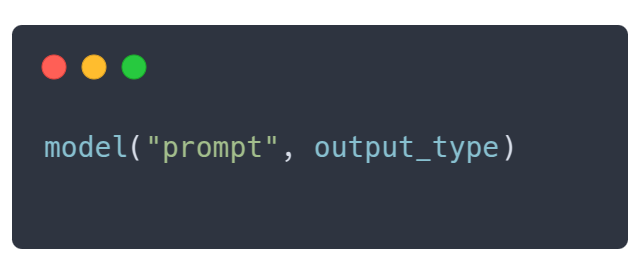
Outlines' interface tries to mimic familiar Python type syntax. You simply pass the desired data type alongside the prompt.
Fixing Response Options
If you need a choice from a limited set of values, define it through Literal or Enum. The model won't write long reasoning — it will immediately output one of the specified values.
import outlines
from typing import Literal
from transformers import AutoTokenizer, AutoModelForCausalLM

model_name = "microsoft/Phi-3-mini-4k-instruct"
model = outlines.from_transformers(
    AutoModelForCausalLM.from_pretrained(model_name, device_map="auto"),
    AutoTokenizer.from_pretrained(model_name)
)

# Модель вернет строго одно из трех слов
sentiment = model(
    "Оцени тональность ответа: 'Сервис работает отлично, спасибо!'",
    Literal["Positive", "Negative", "Neutral"]
)
print(sentiment)  # Positive
Generation from Pydantic Schemas
For complex objects, you can use standard Pydantic models. Outlines builds a grammar based on the schema and ensures the response structure fully conforms to it.
from pydantic import BaseModel
from enum import Enum

class TicketPriority(str, Enum):
    low = "low"
    medium = "medium"
    high = "high"
    urgent = "urgent"

class ServiceTicket(BaseModel):
    priority: TicketPriority
    category: str
    requires_manager: bool
    summary: str

prompt = """
Проанализируй обращение:
Срочно! Не могу войти в личный кабинет после оплаты. Через час презентация клиенту!
"""

# Модель сгенерирует JSON, который точно совпадает со структурой ServiceTicket
ticket_json = model(prompt, ServiceTicket, max_new_tokens=200)
ticket = ServiceTicket.model_validate_json(ticket_json)

print(ticket.priority)          # TicketPriority.urgent
print(ticket.requires_manager)  # True
Regular Expressions and Grammars
If Pydantic models are too unwieldy for your task, you can define a strict regular expression. This is convenient for extracting phone numbers, dates, postal codes, or creating internal DSLs.
Which Models It Works With
Outlines adapts to your stack. The library supports multiple modes:
- Local inference via
transformersandllama.cpp - Server solutions based on vLLM and Ollama
- External APIs like OpenAI and Gemini
The greatest benefit from the library is realized when working with your own local models or on-premises inference servers. That's where direct token masking control provides a 100% guarantee of structure and speeds up operation.
Production Use Cases
In practice, the library addresses several common development tasks at once:
- Automatic ticket sorting. Extracting category, urgency, and tags from incoming customer emails without the risk of getting a broken object.
- Entity extraction with incomplete data handling. Through
Uniontypes, you can allow the model to return either a filled object or an explicit string with a message about missing information. - Function calling. You can pass a regular Python function to the model, and Outlines automatically extracts types from its arguments to form correct call parameters.
- Product catalog categorization. Quickly parsing product descriptions into categories, brands, and key characteristics.
Limitations and Nuances
With all the benefits, it's important to understand the specifics of the technology. Computing masks for tokens requires additional resources. If your Pydantic schema consists of dozens of nested objects and complex regular expressions, grammar preparation before generation begins may take some time.
Additionally, if you work exclusively through the OpenAI API, the library will use the provider's internal mechanisms (Structured Outputs / JSON Mode). In this case, Outlines acts as a convenient unified interface, but the sampling process itself is controlled by the OpenAI server.
Outlines solves a real engineering problem that any team faces when bringing LLMs to production. The project removes instability from generation and allows working with neural networks like regular typed functions. If you're building backend services or autonomous agents based on open models, this tool definitely deserves a place in your toolkit.
Related projects