ToonComposer Turns Sketches into Cartoons — AI Magic for Animators
Sound familiar? You've drawn the perfect character, thought through the key poses, and ahead of you are hours, if not days, of painstaking work: drawing in-between frames, filling in colors, more drawing... This routine but essential stage of animation often kills all creative momentum. What if you could simply show a neural network the starting and ending frame, and it would build the smooth, colorful movement on its own?
That's exactly the idea that researchers from Tencent ARC brought to life with ToonComposer. This isn't just another text-to-video generation model. It's a tool that integrates into the workflow animators are already familiar with and takes over its most tedious part. Let's figure out how it works and who can benefit from it.
What Is ToonComposer and What's Its Special Feature?
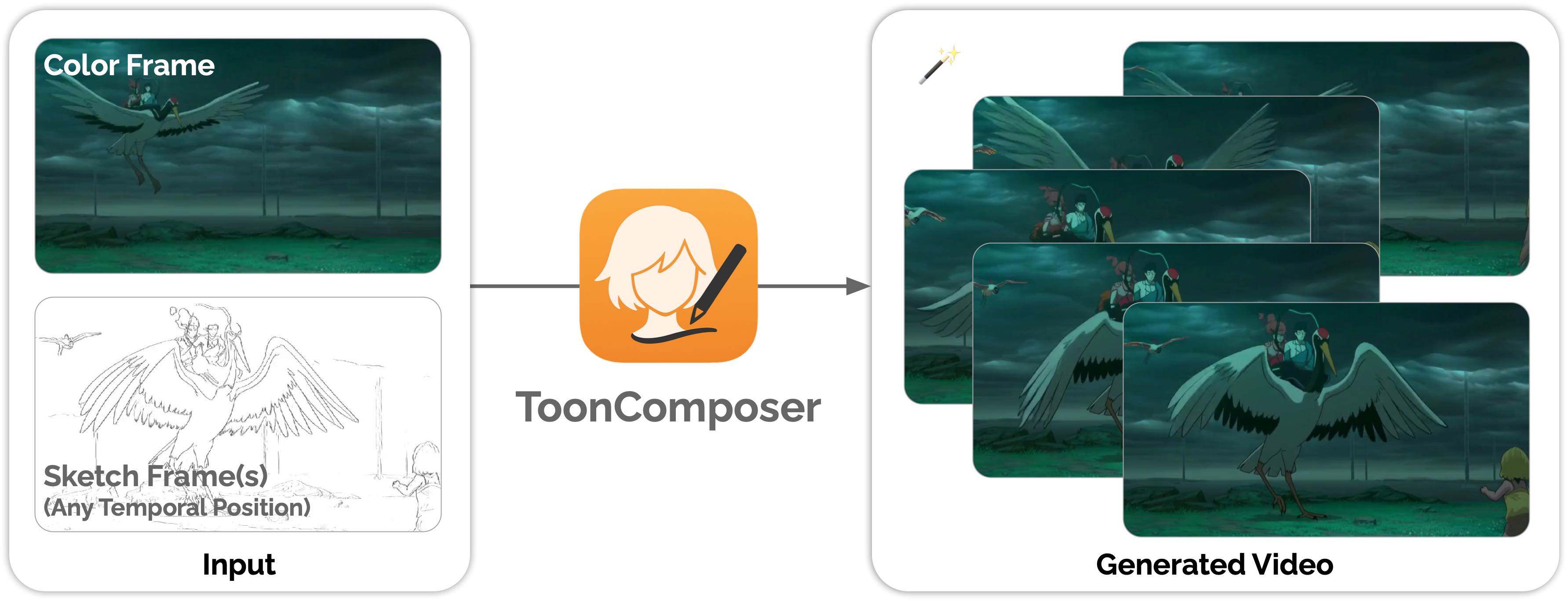
In short, ToonComposer is a generative AI system that creates animated clips based on several key frames. But the devil, as always, is in the details. Unlike many other AI video generators that create something from scratch based on text descriptions, ToonComposer works on the principle of "post-keyframing."
Imagine that you have:
- One colored key frame — this is the starting point that sets the style, palette, and character design.
- Several contour sketches for subsequent key animation moments.
You "feed" these images to the model, add a text prompt (for example, "a girl drinking tea"), and ToonComposer does all the magic: it not only creates smooth transitions between your frames (what animators call "inbetweening"), but also simultaneously colors the sketches in the style of your first colored frame.
Essentially, it combines two labor-intensive processes — inbetweening and colorization — into one automatic step. It's like assigning a task to a junior assistant who perfectly copies your style and never gets tired.
How Does It Work in Practice? Key Features
At its core, ToonComposer is based on a rather elegant idea that makes it a truly useful tool.
1. Hybrid Input: Colored Frame + Sketches
This is the main feature of the project. You don't need to fully draw every key frame. A single complete image at the beginning is enough to set the tone. The remaining key poses can be sketched as simple line art. The neural network will figure out on its own how to transfer the style, shadows, and colors to the subsequent sketches and in-between frames. This saves a tremendous amount of time.

2. Motion Control Through Masks
Want a certain part of the frame to move freely and unpredictably, like hair in the wind or steam from a cup? ToonComposer has "motion masks" for this. In the interface, you can simply paint over the area with a black brush to give it more "creative freedom." The model will stick to your key frames in the rest of the image but allow itself to get a little creative in the masked area. It's a simple but powerful way to add liveliness to your animation.
3. Text Prompts for Context
Although ToonComposer relies primarily on images, text prompts play an important role. They help the model better understand the context of the scene and character action. For example, if your key frames show a person with a cup, the prompt "a man drinking hot coffee" will help generate steam, subtle hand movement, and other small details that match the action.
Technical Details and System Requirements
For those who like to peek "under the hood," ToonComposer is built on a powerful foundation model Wan2.1 I2V 14B 480P. This explains both its impressive capabilities and its serious hardware appetite.
Be prepared: to generate 61 video frames at 480p resolution, you'll need about 57 GB of video memory (VRAM). Yes, that's not a typo. This kind of tool requires professional hardware.
Fortunately, the developers took care of those who don't have an NVIDIA A100 server at hand. You can try ToonComposer for free right in your browser via the demo on Hugging Face Spaces.
How to Run Locally?
If you have the right hardware, the installation process is fairly standard for Python projects:
-
Clone the repository:
git clone https://github.com/TencentARC/ToonComposer cd ToonComposer -
Create an environment and install dependencies. Note the specific version of
gradio:conda create -n tooncomposer python=3.10 -y conda activate tooncomposer pip install -r requirements.txt -
Launch the application:
python app.py
After that, the web interface will be available at http://localhost:7860. The script will automatically download the necessary model weights (and they're quite large), so the first launch may take some time.
Who Is This For and Why?
ToonComposer isn't a toy, but rather a prototype tool for professionals and enthusiasts that could seriously change approaches to animation creation.
- Indie game developers: will be able to quickly create sprites and character animations without spending weeks on manual drawing.
- Animators and studios: can use it to speed up production, for rough animation (animatics), or even for final polish of some scenes.
- Social media content creators: will get the ability to easily "bring to life" their illustrations, creating short and impactful videos.
- AI enthusiasts: will find an interesting example of how generative models can solve specific applied problems, rather than just creating images on demand.
ToonComposer is a vivid example of how artificial intelligence is becoming not a replacement for the artist, but a powerful assistant. It takes on the most mechanical and exhausting work, leaving the person more time and energy for creativity.
Yes, the high system requirements currently make it a niche solution. But the concept of "generative post-keyframing" looks incredibly promising. If you have a powerful GPU — definitely try running it locally. If not — don't pass by the demo on Hugging Face. This might just be what the future of 2D animation looks like.
Related projects