How to turn a local neural network into an autonomous internet researcher
Standard chatbots with web access follow a simple pattern: you ask a question, the model makes one search query, grabs a couple of snippets, and generates a quick response. If the topic is complex, a surface-level search isn't enough. You end up manually opening links, reformulating queries, and piecing together facts bit by bit.
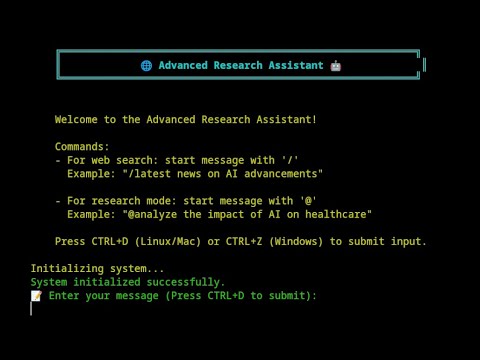
The Automated-AI-Web-Researcher-Ollama project takes a different approach. It's a Python console utility that turns a local language model running on Ollama into an autonomous research agent. You ask one question, run the script, and can calmly go drink coffee. The program itself breaks down the topic into subtasks, searches for articles via DuckDuckGo, parses websites, extracts text, and iteratively digs deeper into the topic based on the material found.
What's under the hood and how it works
The project author wrote the utility as an open prototype for working with open models. All text processing happens on your machine, so queries and downloaded texts aren't sent to third-party servers like OpenAI or Anthropic.
The algorithm works as follows:
- You formulate a research topic. For example:
@В каком году население Земли начнет сокращаться по прогнозам демографов? - The model studies the question and creates a list of five specific search directions, prioritizing them.
- For each direction in turn, the script generates search queries, sends them to DuckDuckGo, selects suitable pages, and parses their content.
- All found text along with links is immediately saved to a local text file.
- After completing the first round, the model analyzes the collected data, identifies gaps, and creates the next list of search directions.
The loop continues until you stop the process. In a short time, the script manages to make several dozen search queries and download dozens of pages.
When you press the stop command, the LLM reviews the entire accumulated file and writes a detailed final report with source links. Immediately after, an interactive mode activates where you can ask follow-up questions about the collected knowledge base.
Installation and setup
You'll need Ollama installed and Python 3.10 or newer. Since the script collects large amounts of text, the model requires a long context window. The author recommends the Phi-3 family with a 128k context window (for example, phi3:3.8b-mini-128k-instruct or phi3:14b-medium-128k-instruct).
Clone the repository and create a virtual environment:
git clone https://github.com/TheBlewish/Automated-AI-Web-Researcher-Ollama
cd Automated-AI-Web-Researcher-Ollama
python -m venv venv
source venv/bin/activate
pip install -r requirements.txt
Windows users need to switch to the feature/windows-support branch.
Then open the llm_config.py file and configure the connection to Ollama:
LLM_CONFIG_OLLAMA = {
    "llm_type": "ollama",
    "base_url": "http://localhost:11434",
    "model_name": "phi3:3.8b-mini-128k-instruct",
    "temperature": 0.7,
    "top_p": 0.9,
    "n_ctx": 55000,
    "stop": ["User:", "\n\n"]
}
The n_ctx parameter sets the context window size in tokens. Adjust it based on your available RAM and video memory.
Start the Ollama server and the script itself:
ollama serve
python Web-LLM.py
In the console, type the @ symbol, write your question, and press CTRL+D to start.
Managing the research process
Status indicators are displayed in the terminal during script execution. The process is fully interactive. You can pass single-character commands to the utility at any time (each confirmed by pressing CTRL+D):
sshows the current status and statistics of collected material.foutputs the current search direction the model is thinking about.ppauses collection. The model quickly evaluates the accumulated material and reports whether there's enough information for a comprehensive answer. Then you choose whether to continue collection (c) or finish it (q).qimmediately stops the research and triggers final summary generation.
After stopping, all source materials, links, and structured summaries remain in a text file within the working folder.
Things to keep in mind
The project is in the working prototype stage. The code is written fairly straightforwardly, without heavy frameworks like LangChain or AutoGen, which is actually a plus: the parsing logic and interaction with Ollama is easy to read and modify for your own tasks.
There are a couple of nuances:
- Speed directly depends on your hardware. If you run a 14B parameter model with a 50k token context on CPU, generating intermediate steps will take considerable time. On GPUs with 12-16 GB of VRAM, the utility flies fast.
- For deep analysis, it's better to use models with good long context support. Besides Phi-3, modern Mistral NeMo or Qwen 2.5 fit this perfectly.
- The page parser is basic, so complex sites with heavy client-side JavaScript may return incomplete content.
Who will find this utility useful
The script will be helpful for developers and analysts who regularly need to quickly dive into new technologies, gather technical documentation on rare libraries, or analyze market trends. Instead of monotonous browser surfing, you delegate the task to a local agent and immediately get a ready-made summary with verified links.
If you're experimenting with agent pipelines based on Ollama, the project serves as a good illustrative example of how to build an autonomous research cycle on open models with minimal dependencies.
Related projects