How to run a 26 billion parameter model in two gigabytes of memory on a regular Mac
If you have a basic MacBook Air with M2 and 8 GB of unified memory, running modern language models turns into a sad story. Even a modest 14–20 billion parameter model after 4-bit quantization requires 10 to 16 GB of RAM. The system starts aggressively swapping data to disk, generation speed drops to fractions of a token per second, and the macOS interface starts freezing.
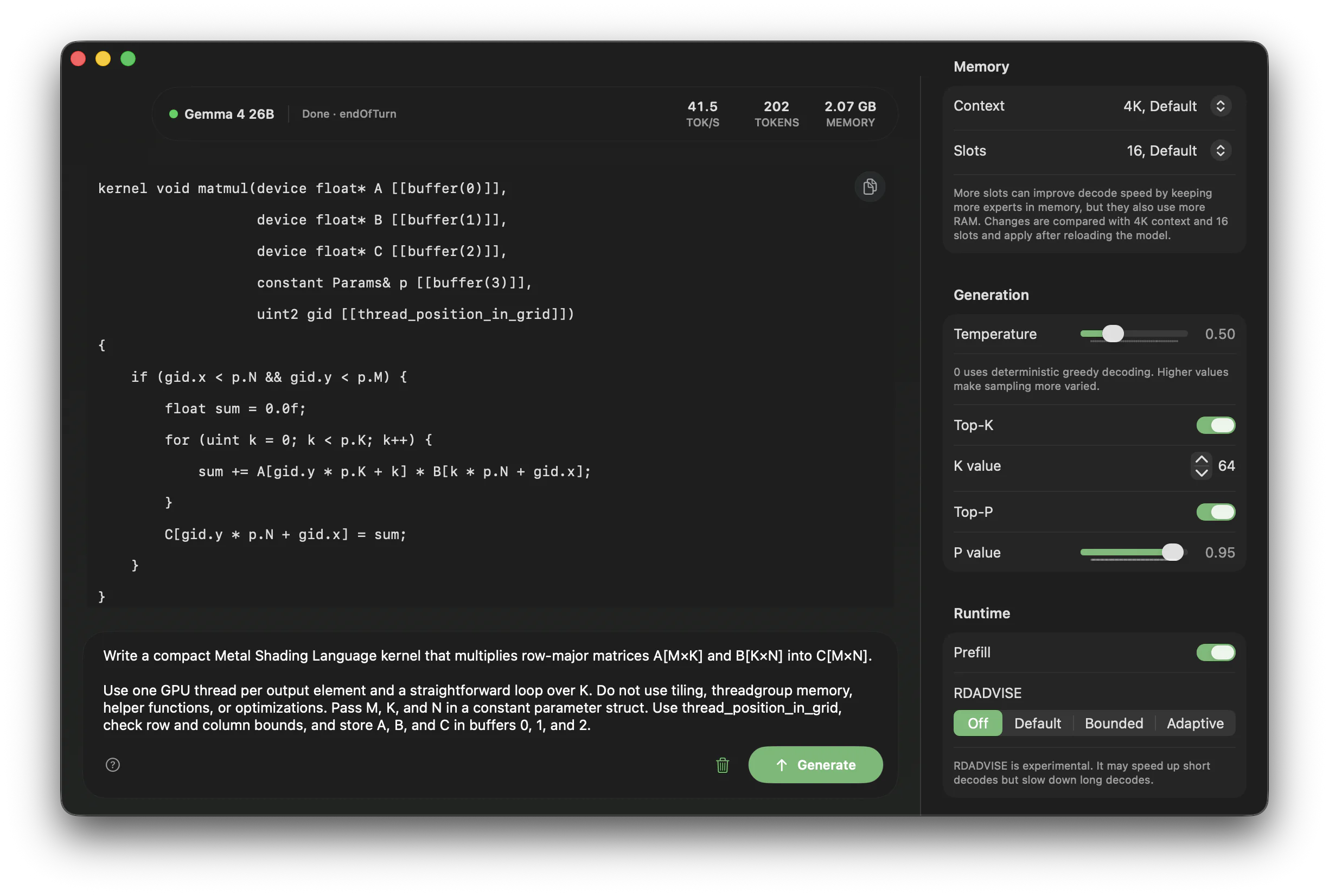
Engineer Andrey Mikhailov solved this problem with an unconventional engineering trick. He wrote from scratch a runtime called TurboFieldfare that runs Google's instruction model Gemma 4 26B-A4B in just 2 GB of RAM.

What's the main architecture trick
Gemma 4 26B-A4B is built on a Mixture of Experts (MoE) architecture. It has 26 billion parameters in total, but not all layers are activated for processing a specific token—only about 3.88 billion parameters.
Typically, runtimes like llama.cpp or MLX load the entire model's weights into memory before starting work. For 4-bit Gemma, that's about 14.3 GB. TurboFieldfare does things differently:
- The model's shared core weighing 1.35 GB and FP16 KV-cache for context are kept in persistent RAM.
- The model's router at each layer determines which 8 experts are needed for the current token.
- The program checks the local expert cache in memory (16 slots with an LFU algorithm).
- If the required expert isn't in RAM, the runtime quickly loads it directly from SSD via parallel system calls
preadinto buffers accessible to Metal.
While the GPU computes the shared expert branch, a parallel CPU thread manages to read the missing weights from storage. As a result, peak memory consumption fits within approximately 2 GB.
No dependencies on llama.cpp and MLX
The project is written purely in Swift 6.2 and Metal 4. The author didn't create another wrapper around existing C++ libraries—he wrote custom GPU kernels for quantization, matrix multiplication (GEMV), attention, MoE, RMSNorm normalization, and RoPE.
The repository includes four ready-to-use utilities:
TurboFieldfareMac— a native desktop application built with SwiftUI and AppKit featuring an integrated chat, memory monitoring, and generation settings.TurboFieldfareCLI— a command-line interface for batch generation and script-driven execution via JSON message files.TurboFieldfareServer— a local server with an API compatible with the OpenAI Chat Completions specification (http://127.0.0.1:8080/v1).TurboFieldfareRepack— a utility for streaming weight downloads from Hugging Face directly into the custom.gturboformat.
The installer downloads only the required byte ranges and packs them on the fly. You won't need to first download 15 GB of source weights and then keep another 15 GB of the converted file alongside it.
Real-world performance
Streaming reads from disk inevitably create I/O latency. There are no miracles: generation speed directly depends on SSD throughput and a fast cache.
The author conducted a series of benchmarks across different Apple Silicon generations:
- On a base MacBook Air M2 with 8 GB RAM, speed reaches 5.1–6.3 tokens per second. This is a comfortable pace for reading text in real time.
- On a MacBook Pro with M5 Pro and 24 GB of memory, generation speed reaches 31–35 tokens per second.
For the prefill phase (processing the incoming prompt), the author implemented chunking at 128 tokens. This helps invoke a single loaded expert for a group of rows at once, noticeably reducing time to first token.
How to build and run
Building requires an Apple Silicon Mac running a current version of macOS and Xcode with Swift 6.2 support.
Clone the repository and build the project in release mode:
git clone https://github.com/drumih/turbo-fieldfare.git
cd turbo-fieldfare
swift build -c release
After building, launch the native application:
.build/release/TurboFieldfareMac
On first launch, click the Download button. The app will download the model (about 15 GB of free disk space required) and prepare the scratch/gemma4.gturbo directory. After the download completes, click Load Model and enter your query in the input field.
If you prefer the console, you can download the model with a separate command:
swift run -c release TurboFieldfareRepack \
  --output scratch/gemma4.gturbo \
  --overwrite
Then pass a dialogue file to the CLI:
swift run -c release TurboFieldfareCLI \
  --model scratch/gemma4.gturbo \
  --messages-file messages.json
And to connect local clients like OpenCode or custom Python scripts, just spin up the server:
.build/release/TurboFieldfareServer --model scratch/gemma4.gturbo
The server listens on port 8080 and serves the familiar /v1/chat/completions endpoints with streaming and tool calling support.
Where the project will be useful in practice
This isn't a universal engine for any weights. TurboFieldfare is strictly tailored for one specific model—Gemma 4 26B-A4B. But within its niche, the project covers several concrete scenarios:
- Local developer assistant on low-end laptops. If you have 8 GB of RAM, running a 26B model any other way without freezing the entire system is practically impossible.
- Background server for tool calling and text parsing via the loopback interface without sending confidential data to the cloud.
- Learning resource for low-level Metal optimization. The repository includes a log of 103 detailed experiments with benchmarks for read speeds, caching, and GPU kernel performance.
If you want to run large MoE models locally on a base MacBook or are interested in writing custom Metal shaders for ML, the repository is definitely worth cloning and studying.
Related projects