How Magnitude Automates the Browser Through Vision Instead of Brittle Selectors

Anyone who has written end-to-end tests or parsers with Playwright and Selenium knows this pain. Frontend developers updated the build, Tailwind regenerated classes, the layout shifted ten pixels to the side, and half the scenarios crash with a ElementNotFound error. Even if you layer a standard language model on top, it quickly stumbles on the bloated DOM tree of modern SPA applications or a canvas that has no markup nodes at all.
The creators of the open-source project Magnitude decided to approach it from a different angle. Instead of feeding LLMs megabytes of raw HTML or drawing markers with numbers on top of buttons, they built the tool around direct computer vision.
Why Selectors and Overlaid Markers No Longer Work
Most modern AI agents for browsers work using the Set-of-Marks approach. The script finds all interactive elements on the page, draws bright colored boxes with numbers around them, takes a screenshot, and asks the model to pick the number of the desired button.
On simple landing pages, this trick works. But try opening a complex admin panel, an interactive map, or an editor like Figma. First, the markup script starts to lag. Second, elements often overlap each other, numbers creep onto text, and dropdown menus close the moment the auxiliary DOM is injected.
Magnitude uses visually grounded LLMs. The neural network looks at a clean page screenshot the same way a person does, and immediately outputs precise pixel coordinates for clicking. This eliminates the need to deal with page structure and delivers 94% success rate on the WebVoyager benchmark.
How the Agent Code Works
In code, Magnitude looks like a standard asynchronous TypeScript library. You can issue top-level commands in natural language, or explicitly specify low-level actions.
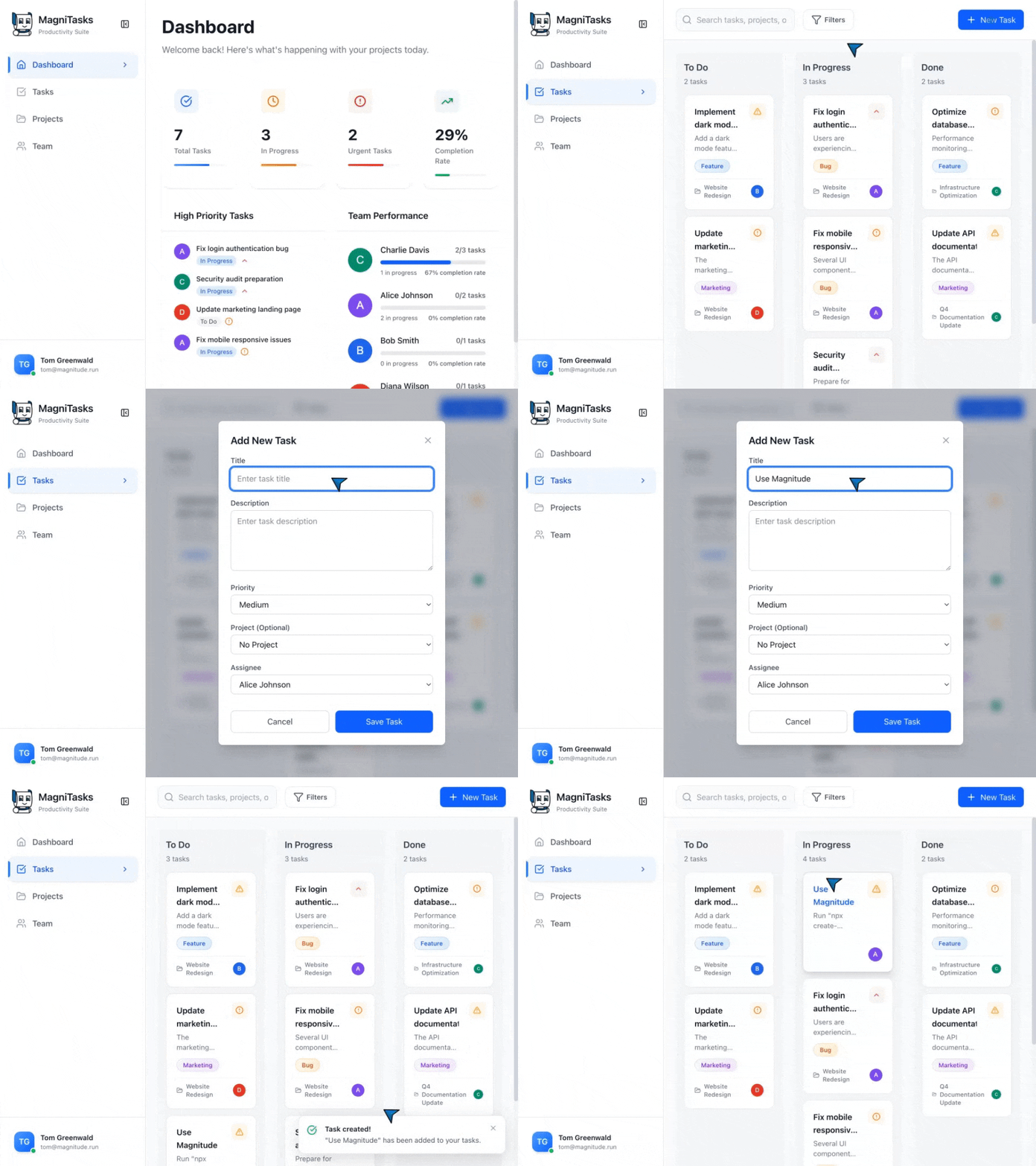
Here is a basic example of working with board tasks:
import { agent } from 'magnitude';
import { z } from 'zod';

// Агент сам найдет нужные поля и заполнит форму
await agent.act('Create a task', {
    data: {
        title: 'Use Magnitude',
        description: 'Run "npx create-magnitude-app" and follow the instructions',
    },
});

// Низкоуровневое действие с пониманием контекста интерфейса
await agent.act('Drag "Use Magnitude" to the top of the in progress column');
Separate praise goes to the data parsing functionality. Often you need not just to click a button, but to extract structured information from the page. Magnitude includes a extract method that accepts a Zod validation schema.
// Извлечение данных прямо по схеме с дополнительным анализом
const tasks = await agent.extract(
    'List in progress tasks',
    z.array(z.object({
        title: z.string(),
        description: z.string(),
        difficulty: z.number().describe('Rate the difficulty between 1-5')
    })),
);
Note the difficulty field. The agent doesn't just pull raw text from the markup, but can also evaluate task complexity on the fly using a scale, if you request this through the field description.
Built-in Test Runner
Besides flexible automation, the authors made a ready-made runner for web application testing. You can install it in an existing repository:
npm i --save-dev magnitude-test
npx magnitude init
The command creates a tests/magnitude folder with a config and a test example. Unlike standard tests, here assertions are built on visual checks. You write a scenario in plain language, the agent goes through the steps and verifies that the interface responds correctly.
If you need a clean project for automation from scratch, you can spin up the environment even faster:
npx create-magnitude-app
Model Requirements and Hidden Nuances
The main trade-off of this approach is computational resources and API costs. Small open models won't reliably hit the right coordinates.
The developers recommend using Claude Sonnet 4, which currently handles spatial orientation in images better than anything else. If you need an open-weight option for local deployment or a private environment, Qwen-2.5VL with 72 billion parameters is supported. But running such a model locally will require serious hardware with multiple high-end graphics cards.
The second thing to keep in mind: speed. Each agent step requires sending a screenshot to the model and waiting for a response. This takes a couple of seconds per action, so the tool won't work for load testing. Currently, the authors are working on a native action caching system so that repetitive scenarios execute deterministically without constant requests to the LLM.
What the Project Is Already Good For
- Automating services without an open API. If you need to export reports from a closed banking panel or a third-party CRM system where the API is either paid or nonexistent.
- End-to-End testing of complex UIs. When a project has a lot of drag-and-drop, nested iframes, or canvas components whose selector support turns into a nightmare.
- Smart data collection. Parsing catalogs with complex layouts, infinite scrolling, and dynamic content loading.
Magnitude wins points for not trying to be a universal "magic button," but instead giving developers a clean TypeScript API with type validation and control over every step. It's definitely worth trying if you're tired of fixing failing tests after every redesign.
Related projects