When Scrapy Feels Cramped and Python Is Slow: Collecting Data with Elixir Using Crawly
When it comes to website parsing and data collection at industrial scale, almost every developer immediately thinks of Python and Scrapy. This is an industry standard, proven over years. But Python has a peculiarity: when you need to download hundreds of pages in parallel, maintain thousands of open connections, and clean data on the fly, you end up hitting threads, async, and GIL limitations.
In the world of functional programming, the BEAM virtual machine is ideal for such tasks. Processes in Erlang and Elixir are isolated, weigh just a few kilobytes, and can be spawned in the millions. The Crawly framework takes the best architectural concepts from Scrapy (spiders, middlewares, processing pipelines) and brings them to Elixir. The result is a tool that's ready out of the box to handle massive network request loads without complex async runtime tuning.
What's inside and how it works
If you've ever written a parser in Scrapy, Crawly's architecture will feel native. All work is divided into three clear parts: Spiders, Middlewares, and Pipelines.
A spider describes the entry points and the logic for extracting data from pages.
Here's a typical example of a spider that browses a book catalog, collects titles with prices, and follows pagination pages:
defmodule BooksToScrape do
  use Crawly.Spider

  @impl Crawly.Spider
  def base_url(), do: "https://books.toscrape.com/"

  @impl Crawly.Spider
  def init() do
    [start_urls: ["https://books.toscrape.com/"]]
  end

  @impl Crawly.Spider
  def parse_item(response) do
    {:ok, document} = Floki.parse_document(response.body)

    items =
      document
      |> Floki.find(".product_pod")
      |> Enum.map(fn x ->
        %{
          title: Floki.find(x, "h3 a") |> Floki.attribute("title") |> Floki.text(),
          price: Floki.find(x, ".product_price .price_color") |> Floki.text(),
          url: response.request_url
        }
      end)

    next_requests =
      document
      |> Floki.find(".next a")
      |> Floki.attribute("href")
      |> Enum.map(fn url ->
        Crawly.Utils.build_absolute_url(url, response.request.url)
        |> Crawly.Utils.request_from_url()
      end)

    %Crawly.ParsedItem{items: items, requests: next_requests}
  end
end
The code is clean and declarative. HTML parsing is done through the Floki library with familiar CSS selectors. From the parse_item function, we return a structure containing ready-to-use data and a batch of new requests for the scheduler.
Configuring pipelines and protection against blocks
A parser rarely consists of just an HTTP client and HTML parser. You need to track URL uniqueness, limit the number of concurrent requests to a domain, modify headers, filter duplicates, and validate the schema before saving.
In Crawly, all of this is moved to configuration:
import Config

config :crawly,
  closespider_timeout: 10,
  concurrent_requests_per_domain: 8,
  closespider_itemcount: 100,
  middlewares: [
    Crawly.Middlewares.DomainFilter,
    Crawly.Middlewares.UniqueRequest,
    {Crawly.Middlewares.UserAgent, user_agents: ["Crawly Bot"]}
  ],
  pipelines: [
    {Crawly.Pipelines.Validate, fields: [:url, :title, :price]},
    {Crawly.Pipelines.DuplicatesFilter, item_id: :title},
    Crawly.Pipelines.JSONEncoder,
    {Crawly.Pipelines.WriteToFile, extension: "jl", folder: "/tmp"}
  ]
What's happening here? Requests first pass through a chain of middlewares: a foreign domain filter won't let the spider accidentally wander off to scan the entire internet, and UniqueRequest will cut off repeated visits to the same pages. When the spider has extracted the data, it goes into the pipeline. There, required fields are checked, duplicates are filtered out by title, and valid results are packed into JSON Lines and written to disk.
Generators save time on startup: the mix crawly.gen.spider command will create a spider template with all the necessary callbacks, and mix crawly.gen.config will prepare a default config.
Built-in management panel
An interesting detail: starting from version 0.15.0, the project added a web management interface right out of the box. It's available at localhost:4001.
Through this admin panel, you can:
- manually start and stop spiders,
- view the queue of scheduled requests,
- download collected items and view execution logs,
- track crawler status in real time.
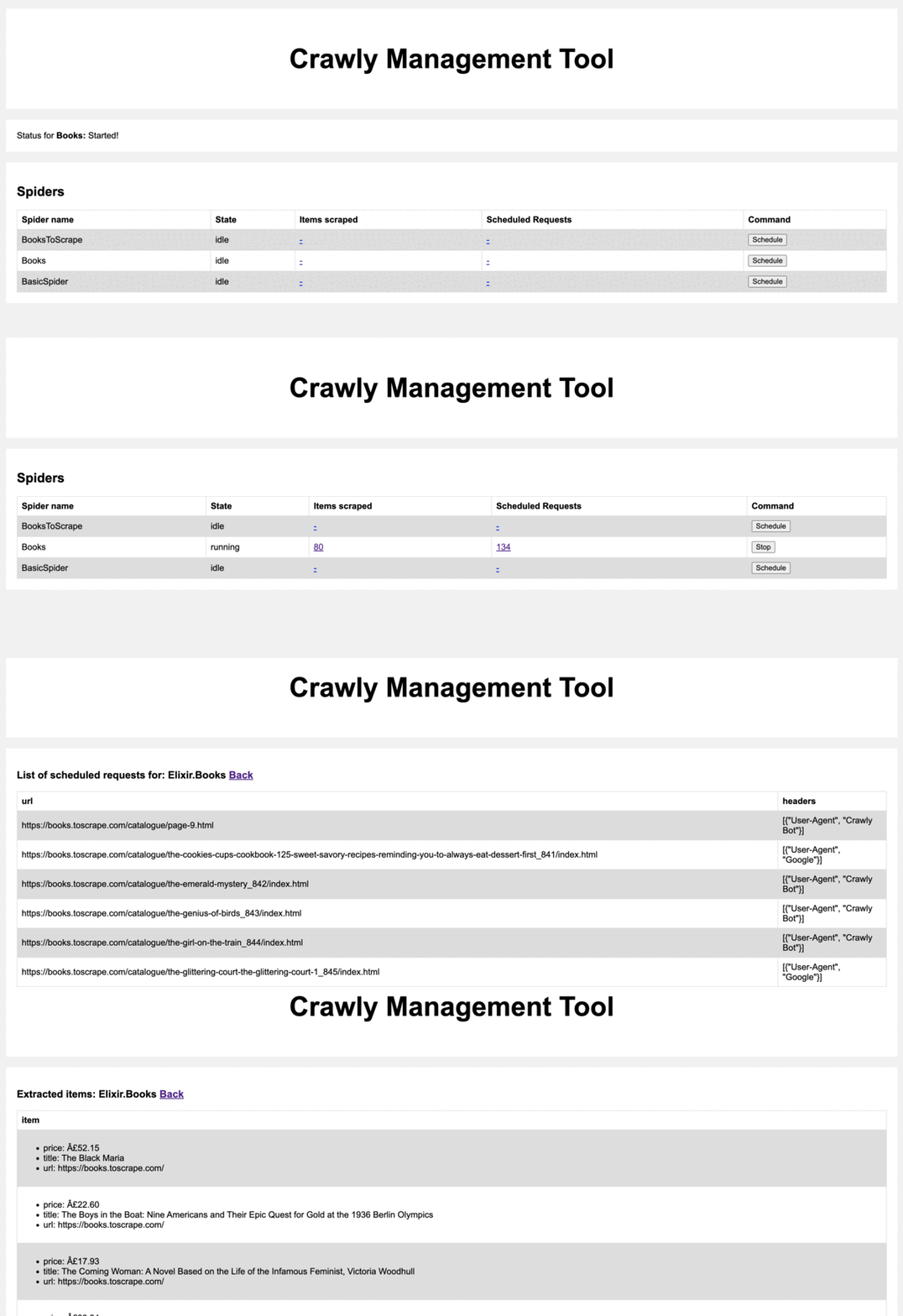
If you're embedding Crawly into an existing Phoenix or Plug web application, you don't have to keep the admin panel on a separate port. You can simply route it through the common router via forward "/admin", Crawly.API.Router.
Rendering dynamic pages and running without Elixir
The modern web is overloaded with JavaScript. If content loads asynchronously via AJAX or the application is built with React, a regular HTTP GET will return an empty page skeleton. Crawly can work with external renderers like Chrome or Splash. You configure a headless browser, and the framework fetches the already rendered DOM with all executed scripts.
Another non-obvious feature is the standalone mode. If nobody on your team writes in Elixir, you don't need to spin up a full codebase just for a crawler. Crawly can run in a minimalist Docker container where page scraping rules are described in simple YAML files. This is a rare example of an Elixir tool being open to developers from other stacks.
Practical scenarios
Where Crawly shines best:
- Price monitoring in online stores. When you need to regularly crawl thousands of product cards, check inventory changes and discounts.
- Collecting training datasets for ML. Parsing articles, reviews, and forums with saving to jsonl formats.
- Listing aggregators. Collecting real estate or automotive offers from dozens of regional boards.
- Historical content archiving. Fast downloading of blogs and documents with broken link filtering.
Who will benefit from this project
If your primary language is Elixir or Erlang, Crawly is unambiguously the best choice for web scraping. You won't have to build awkward workarounds in Python alongside your main service and set up inter-service communication through queues.
If you write in Python and are tired of fighting Scrapy's performance on large data volumes, Crawly is definitely worth a look. The entry barrier is low: concepts match almost one-to-one, and Elixir syntax reads very easily after Python. You can start with the official documentation on HexDocs and a quick tutorial on the test site books.toscrape.com.
Related projects