All Tools for Vector Search and LLM in One Python Library
When you need to build a service with vector search or a RAG pipeline, the standard stack turns into a construction kit. You grab a vector database like Qdrant, hook up LlamaIndex or LangChain, look for a solution for local SQLite with metadata, and wonder how to tie it all together. In the end, the project accumulates a dozen external services and dependencies that need to be hosted somewhere and constantly updated.
The txtai project solves exactly this problem. The library has been developing since 2020 and brings together in one place a vector database, hybrid search with SQL support, graph analytics, and language model orchestration.
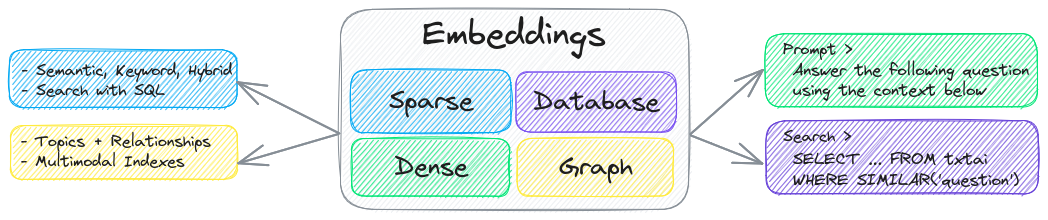
Why another AI framework
The main idea behind txtai is to provide an "all-in-one" tool without requiring a connection to cloud APIs. If you need to organize search through internal documentation or build an autonomous agent, you don't necessarily have to send all data to third-party services.
The core component of the library is an embeddings database. It combines a vector index, relational tables, and graph networks. This enables hybrid queries that combine semantic similarity with standard field-based filtering.
Here's an example of launching a vector index in just three lines of Python code:
import txtai

embeddings = txtai.Embeddings()
embeddings.index(["Correct", "Not what we hoped"])
embeddings.search("positive", 1)
# [(0, 0.29862046241760254)]
If Python is not your primary language in the stack, txtai has ready-made bindings for JavaScript, Java, Rust, and Go. This works through a built-in web server on FastAPI or the Model Context Protocol (MCP).
Main framework capabilities
Hybrid semantic search
Classical search engines look for exact keyword matches. Vector databases find similar phrases by meaning. txtai combines both approaches and adds the ability to write queries with SQL syntax.
You can not only search for semantically similar texts but also apply conditions by date, category, or text tags right within a single query. You can index not only text but also images, audio recordings, and video.
LLM and RAG orchestration
For generating responses with context grounding (Retrieval Augmented Generation), txtai combines vector search with language models. The database returns relevant text chunks, and the model forms the final answer, which reduces the likelihood of hallucinations.

As a generative engine, you can use local models via llama.cpp or third-party providers like OpenAI, Claude, and AWS Bedrock through LiteLLM.
Autonomous agents
The agent module in txtai is built on the smolagents framework from Hugging Face. Agents can independently break down complex tasks into subtasks, query databases, and use external tools.
Agent behavior configuration is supported through standard configuration files agents.md and specification skill.md. This is convenient when you need to quickly describe the logic without writing heavy boilerplate code.
Micromodel pipelines
Large language models are versatile but demanding on hardware resources and work slowly. txtai emphasizes building workflows from specialized compact models.
Instead of calling a hypothetical GPT-4 for speech recognition, translation, and text summarization, the framework suggests combining specialized neural networks:
- Whisper for converting audio to text
- OPUS for machine translation
- DistilBART for generating summaries
- DeBERTa v3 for classification and tagging
- ESPnet JETS for text-to-speech
This pipeline approach saves computational resources and reduces latency in data processing.
How it works internally
The project is written in Python 3.10+ and actively uses Hugging Face infrastructure (Transformers and Sentence Transformers). SQLite, DuckDB, and network libraries are used under the hood for metadata and graph connections storage.
In terms of deployment, txtai is minimalist. You can install the base package via pip or run a ready-made Docker container:
pip install txtai
If needed, additional modules are installed, for example for working with audio or graphics, which keeps the library lightweight in the base configuration.
# app.yml
embeddings:
    path: sentence-transformers/all-MiniLM-L6-v2
To run in microservice mode, simply pass the configuration file to uvicorn:
CONFIG=app.yml uvicorn "txtai.api:app"
curl -X GET "http://localhost:8000/search?query=positive"
Practical use cases
The txtai developers maintain a set of 70 interactive notebooks with examples. Among real-world scenarios, several most common ones stand out:
- Creating a knowledge base with document and argumentation file search
- Building knowledge graphs from texts with automatic entity extraction
- Media file processing: automatic podcast transcription or image search
- Creating personal assistants that work completely offline on local hardware
The bottom line
txtai is unlikely to completely replace specialized distributed databases like Milvus in high-load projects with billions of vectors. However, for local services, internal corporate utilities, and quick hybrid RAG systems, it's an extremely convenient framework. You get a working combination of search, models, and pipelines without needing to set up complex infrastructure.
Related projects