How Google Tries to Bring Order to AI App Development with Genkit
Developers from the Firebase team have open-sourced Genkit — a framework for building AI features. Let's find out if it helps combine Gemini, OpenAI, and Ollama in a single project without spaghetti code.
Why Do We Need Another AI Framework
If you've tried adding an LLM call to your backend, you've likely followed this path. First, you write a simple fetch call to the OpenAI API. Then you need to parse strictly valid JSON from the model's response, and you resort to workarounds with regular expressions. Next, the business side asks to switch to Gemini or connect a local Ollama for testing, but each has a different SDK. The result is a project cluttered with custom wrappers, prompt templating systems, and scattered logging.
The Python community tackles this with LangChain or LlamaIndex. But if your primary stack is TypeScript or Go, alternatives have been scarce until recently. Google engineers from the Firebase team encountered the same problem internally and built Genkit. Now the project is available as open source.

What the Framework Can Do
Genkit's concept is straightforward: provide a unified interface to different neural network providers and handle the routine work. Instead of learning specific SDKs for each service, you work with a universal API.
Several languages are currently supported:
- JavaScript and TypeScript are production-ready
- Go is production-ready
- Python is in Beta
- Dart is in Preview
Out of the box, supported providers include Google Gemini, OpenAI, Anthropic, and Ollama. Switching between models often requires just a single configuration line change.
Let's look at a minimal example of initializing and calling a model in TypeScript:
import { genkit } from 'genkit';
import { googleAI } from '@genkit-ai/google-genai';

const ai = genkit({ plugins: [googleAI()] });

const { text } = await ai.generate({
    model: googleAI.model('gemini-flash-latest'),
    prompt: 'What is the meaning of life?'
});
The code looks clean and doesn't tie the backend to low-level HTTP requests.
Typed Output and Tool Calling
One of the most common tasks in AI service development is getting the model to return not just text, but a data structure. Genkit works with Zod schemas in TypeScript and similar mechanisms in other languages. You describe the response schema, pass it to the model, and get a valid object back.
The second useful feature is calling external functions, or tool calling. If the model needs to check the current weather or query a database, you register a tool with a description of its input arguments. Genkit automatically passes the function description to the LLM, receives the call decision, and executes the necessary code.
The framework also includes:
- Prompt templating via the Dotprompt format
- Streaming responses
- Vector search and RAG for working with knowledge bases
- Call chains and agents via Flows mechanisms
Local Debugging via Developer UI
When developing complex AI features, the hardest part is understanding exactly where the call chain broke. Did the model return the wrong format? Did a tool crash with an error? Was the prompt too long?
The Genkit developers created a local CLI utility and GUI for debugging. You run the genkit start command, and a dashboard opens in your browser.
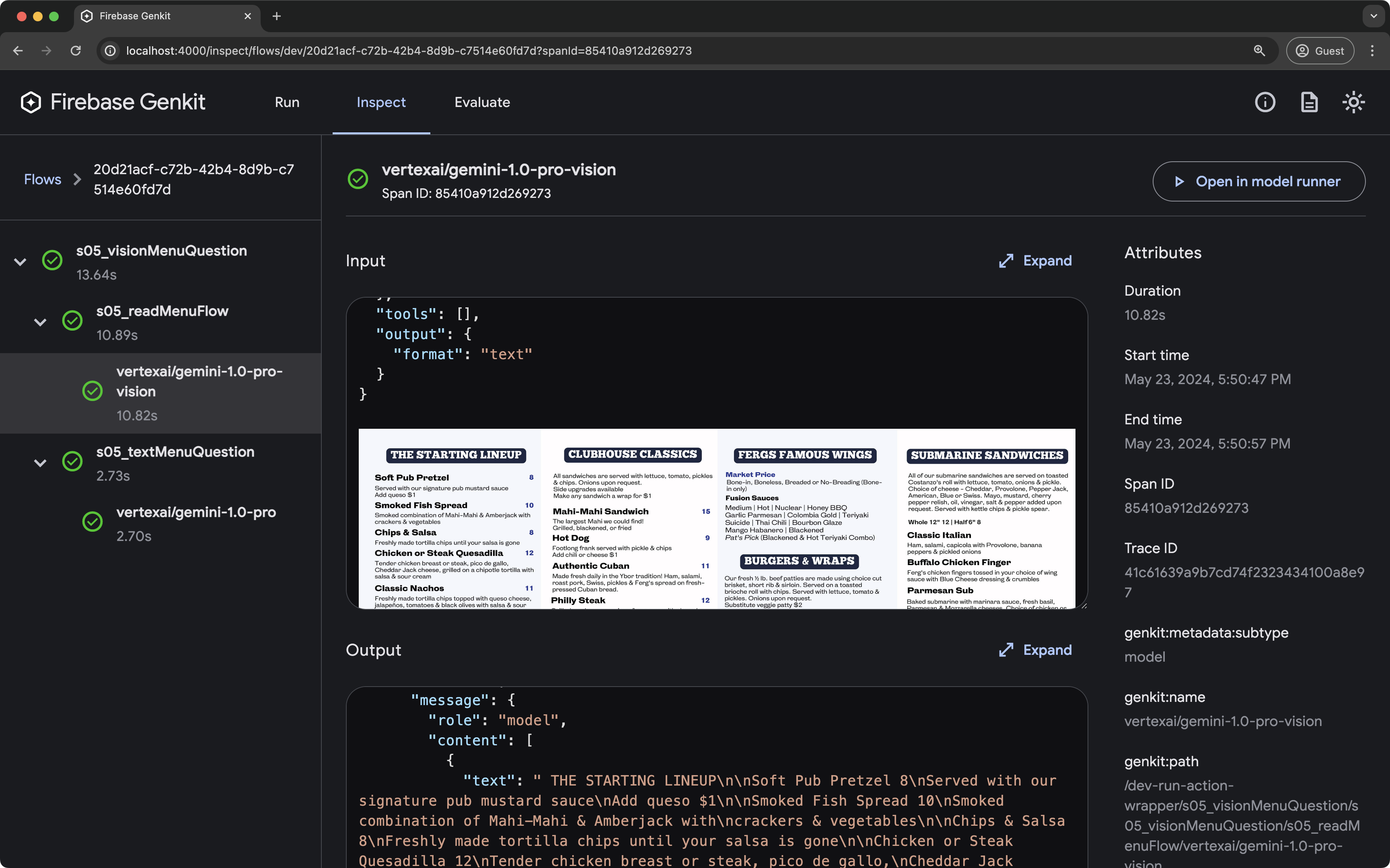
This UI allows you to do several things:
- Run prompts and chains manually in an interactive sandbox
- Compare results from different models on the same prompt
- View detailed traces with step-by-step breakdowns, timestamps, and precise inputs and outputs for each stage
Having a local UI significantly speeds up iterations. You don't need to deploy to a test environment or write logging scaffolding every time.
Where to Deploy and How to Monitor
Although Genkit was created within Google and integrates with Firebase Cloud Functions and Google Cloud Run, it doesn't lock you into Google Cloud infrastructure. You can deploy the application on Node.js or Go in any Docker container, on Vercel, AWS, or your own servers.
In production, the framework can send metrics and traces to monitoring systems. You'll see request counts, latencies, errors, and token costs directly in the Firebase console or through third-party solutions based on OpenTelemetry.
Who Should Try It
Genkit turned out to be a balanced tool. Unlike some open-source libraries trying to do everything, it shows a careful engineering approach.
The project is useful if:
- You write AI services in TypeScript or Go and don't want to switch to Python
- You need a unified abstraction layer over OpenAI, Gemini, and local models
- You're tired of debugging complex AI agents without clear traces
Python support is still in beta and Dart is still developing. But the Node.js version is already quite ready for production services. You can try out examples and read the documentation on the official genkit.dev website or in the genkit-ai/genkit GitHub repository.
Related projects