Stop Feeding Neural Networks Gigabytes of Code and Turn Your Repository into a Graph

Every time I open an unfamiliar repository with a couple of tens of thousands of lines and try to involve AI in refactoring, the same thing happens. The assistant starts greedily grepping through files, fills the context window with unrelated code snippets, gets confused about calls, and ends up producing a hallucination instead of a working patch. We spend tons of tokens, yet the model never understands how the parts of the system are connected to each other.
Recently I came across an interesting project called Ix. The authors decided to approach the problem differently: instead of feeding raw text to neural networks, they build a local dependency graph from the codebase.
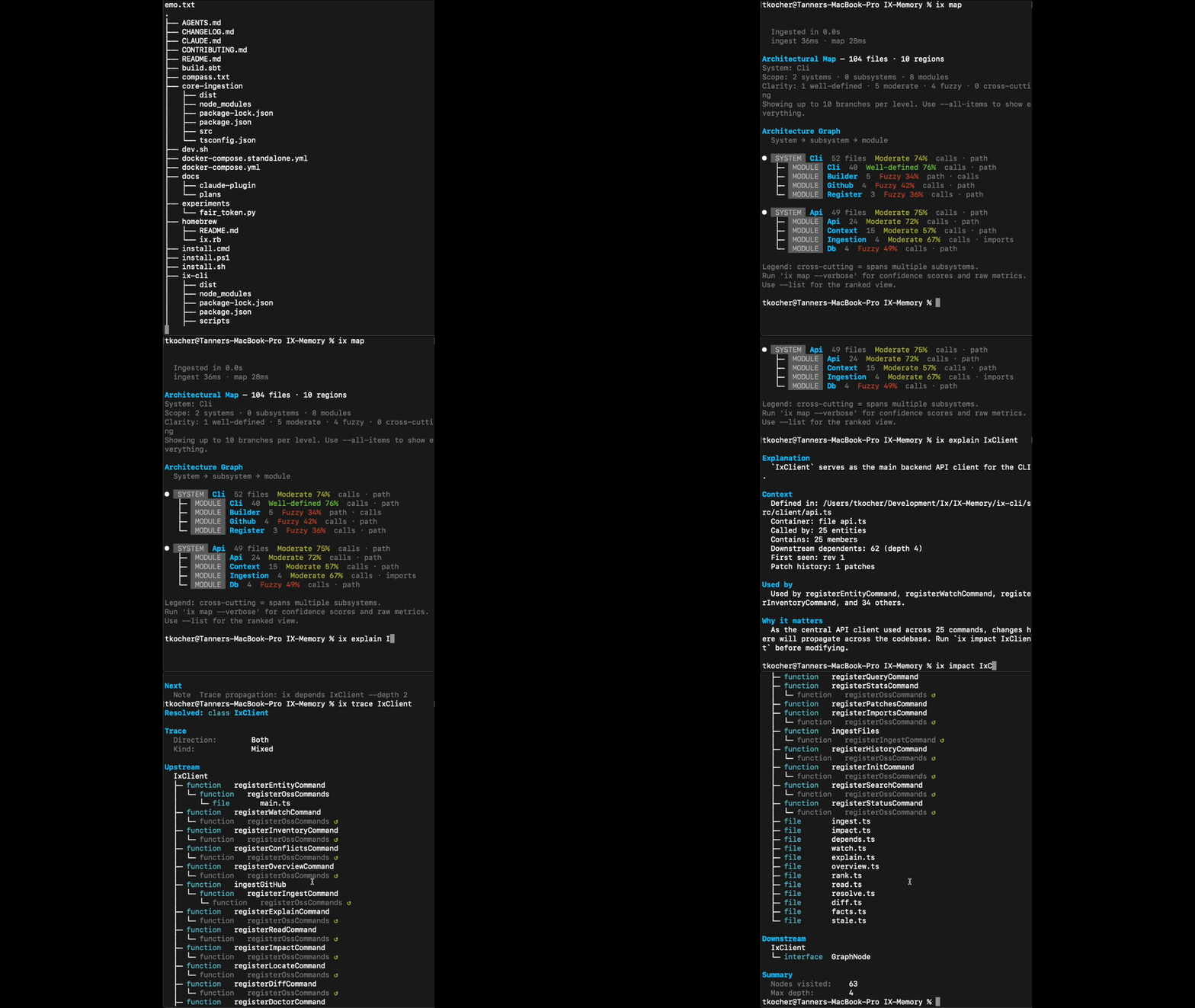
What Ix Does
Essentially, it's a CLI utility and local backend that parses the repository using a tree-sitter parser. The tool supports 26 programming languages, including TypeScript, Go, Rust, Python, Java, C++, Ruby, and Elixir, and also recognizes configuration files like YAML, SQL, and Dockerfile.
During scanning, the utility extracts the structure: functions, classes, import points, and call chains. All of this is saved to a local ArangoDB graph database running in Docker. The result is that instead of endless file reading and guesswork, the developer and LLM get an interactive map of the project that can be queried with targeted commands.
Context persists between sessions. If you close the terminal or restart the editor, the accumulated connections don't disappear.
Four Commands Instead of Endless Searching
All work with the utility revolves around four basic scenarios.
1. Building a Map
First, we scan the current codebase:
ix map .
The parser goes through files, parses syntax trees, and builds the initial dependency graph.
2. Explaining a Component
When you need to quickly understand what a specific module is responsible for and what it's connected to, call explain:
ix explain IngestionService
The command will output a brief summary for the symbol, along with a list of incoming and outgoing connections.
3. Tracing Flows
If you're tracing a data processing chain, the trace command comes in handy:
ix trace user_login_flow
It traverses the graph nodes and shows the call sequence from the entry point to the final handler.
4. Assessing the Impact of Changes
Before editing a shared function or data schema, it's worth checking what might break:
ix impact verify_token
The utility will find all places that directly or indirectly depend on the selected symbol. According to the authors, this targeted structure search saves between 30% and 99% of tokens in development tasks.
Connecting to Editors via MCP
The CLI already has a Model Context Protocol (MCP) server built in. This means the utility can be easily connected to any modern AI tool: Cursor, VS Code, Claude Code, Codex, Gemini CLI, or OpenClaw.
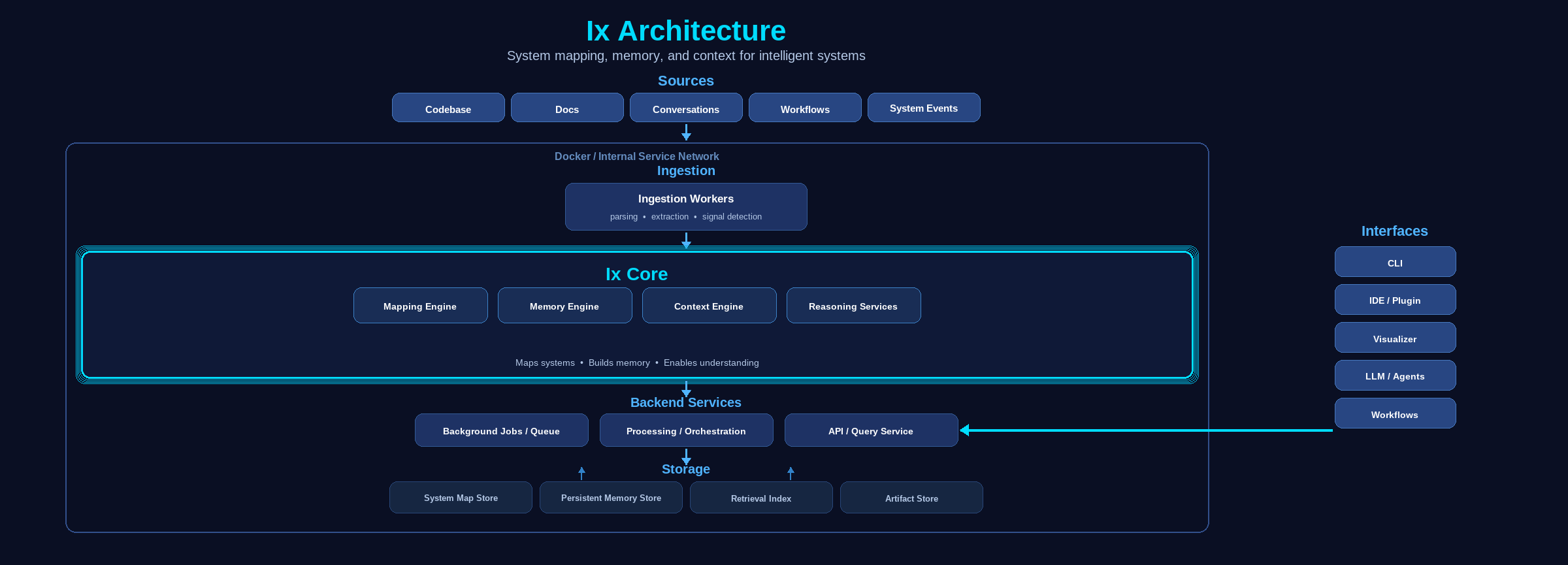
Automatic setup of all detected clients is launched with a single command:
ix mcp install
The script checks the configs on the machine and carefully adds the ix mcp server startup. It also creates backup copies of configs with the .bak extension and doesn't blindly overwrite existing settings.
If you need to manually register a client (for example, Codex), just run:
codex mcp add ix-memory -- ix mcp
When an agent completes a task, it accesses the local graph directly through MCP tools, instead of performing a blind grep across hundreds of files.
Installation and System Requirements
You'll need Node.js 22+, Git, ripgrep, and a working Docker with Docker Compose (it runs ArangoDB under the hood).
On macOS and Linux, installation is a single line:
curl -fsSL https://ix-infra.com/install.sh | sh
For Windows, there's a PowerShell script:
irm https://ix-infra.com/install.ps1 | iex
After installation, check the service status:
ix status
ix docker start
ix doctor
If the database isn't running yet, ix docker start will spin up the ArangoDB container in the background.
The Bottom Line
The project is currently in early alpha, so command behavior and API may still change. Documentation is currently minimal, and the dependency on a local Docker container adds some overhead on first launch.
Who should try the project:
- Developers who frequently navigate large unfamiliar repositories.
- Those who actively use Claude Code, Cursor, or Codex and are tired of context overflow.
- Teams that need a local knowledge base of connections within microservices without sending source code to third-party servers.
If you're looking for a way to bring order to how AI interacts with your codebase, take a look at the project's GitHub repository and test ix map on your own project.
Related projects